
1. Product Overview
The Bosch D203 Security Enclosure is designed to provide a secure and protective housing for various Bosch modules. This enclosure ensures that sensitive electronic components are shielded from environmental elements and unauthorized access, whether installed in close proximity to the main control panel or at a remote location.
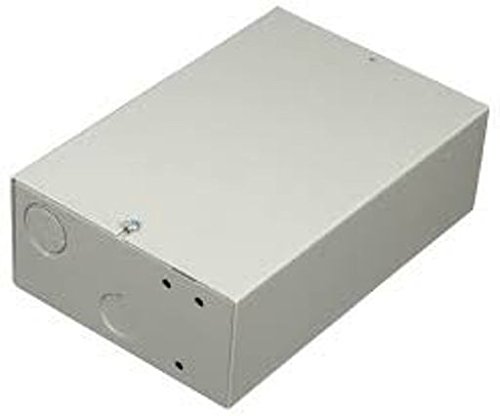
Figure 1: Bosch D203 Security Enclosure. This image displays the Bosch D203 Security Enclosure. It is a robust, gray rectangular housing unit, typically used to protect sensitive electronic modules from environmental factors and tampering. The enclosure features a clean design, suitable for various installation environments.
2. Safety Information
Please read all safety instructions before installing or operating the Bosch D203 Security Enclosure. Failure to follow these instructions may result in damage to the product, property, or personal injury.
- Ensure all power is disconnected from modules before installation or maintenance.
- Only qualified personnel should perform installation and servicing.
- Mount the enclosure securely to a stable surface to prevent accidental dislodgement.
- Do not expose the enclosure to extreme temperatures, moisture, or corrosive environments beyond its specified operating conditions.
- Use appropriate tools and personal protective equipment during installation.
3. Package Contents
Verify that all items are present in the package before proceeding with installation:
- Bosch D203 Security Enclosure
- Mounting Hardware (screws, anchors - quantity may vary)
- Instruction Manual (this document)
4. Setup and Installation
4.1 Mounting the Enclosure
- Select a suitable location: Choose a flat, stable surface, such as a wall, that can support the weight of the enclosure and its contents. Ensure adequate space for ventilation and access.
- Mark drilling points: Use the enclosure as a template to mark the desired drilling points for the mounting hardware.
- Drill pilot holes: Drill pilot holes appropriate for the mounting screws and anchors.
- Secure the enclosure: Attach the enclosure to the mounting surface using the provided hardware. Ensure it is firmly secured and level.
4.2 Installing Modules
- Open the enclosure: Carefully open the enclosure door or cover.
- Mount modules: Follow the specific instructions for each Bosch module to securely mount them within the enclosure. The D203 is designed to accommodate various module types.
- Connect wiring: Route all necessary wiring through the designated knockouts or cable entry points. Ensure proper strain relief and secure all connections according to module specifications.
- Close the enclosure: Once all modules are installed and wired, securely close the enclosure door or cover.
5. Operating Considerations
The Bosch D203 is a passive enclosure designed to protect internal modules. Proper operation primarily involves ensuring the enclosure remains sealed and its environment is suitable for the housed electronics.
- Environmental Protection: Ensure the enclosure remains closed to protect modules from dust, debris, and splashes.
- Access Control: Keep the enclosure secured to prevent unauthorized access to the internal modules.
- Ventilation: While the enclosure provides protection, ensure that the overall installation environment allows for adequate heat dissipation from the housed modules.
6. Maintenance
Regular maintenance helps ensure the longevity and continued protection provided by the D203 enclosure.
- Periodic Inspection: Annually inspect the enclosure for any signs of damage, corrosion, or loose mounting hardware.
- Cleaning: Clean the exterior of the enclosure with a soft, damp cloth. Avoid abrasive cleaners or solvents that could damage the finish.
- Seal Integrity: Check the integrity of any seals or gaskets to ensure continued environmental protection.
7. Troubleshooting
This section addresses common issues related to the enclosure itself. For issues with internal modules, refer to their respective manuals.
| Problem | Possible Cause | Solution |
|---|---|---|
| Enclosure door does not close securely. | Obstruction, damaged hinge/latch, or improper module placement. | Check for obstructions. Inspect hinges and latches for damage. Ensure modules are correctly seated and not protruding. |
| Enclosure feels loose on mounting surface. | Loose mounting hardware or damaged mounting points. | Tighten mounting screws. If mounting points are damaged, relocate or reinforce the mounting surface. |
| Visible damage to the enclosure. | Impact or environmental stress. | Assess the extent of damage. If structural integrity or environmental protection is compromised, replace the enclosure. |
8. Specifications
| Feature | Detail |
|---|---|
| Model Number | D203 |
| Manufacturer | Bosch |
| Package Dimensions | 10 x 7 x 3 inches |
| Item Weight | 1 pound |
| ASIN | B014BWD2N4 |
| UPC | 782695022016 |
| Date First Available | August 23, 2015 |
9. Warranty and Support
For warranty information and technical support regarding your Bosch D203 Security Enclosure, please refer to the official Bosch website or contact Bosch customer service directly. Keep your purchase receipt as proof of purchase for warranty claims.
Online Resources: Visit the official Bosch website for product documentation, FAQs, and support contact information.
Customer Service: Contact details for customer support can typically be found on the Bosch website or within the packaging materials.


