
1. Product Overview
The Pana-Vue 2 Illuminated Slide Viewer is a compact, tabletop device designed for convenient viewing of 35mm slides. It features a bright, 2x magnification lens and a clear 2 x 2 inch viewing screen, allowing for detailed inspection of your slides. The viewer is portable and operates on two AA batteries, making it suitable for use in various locations. An optional Pana-Vue transformer (not included) can be used for household current operation.
2. Package Contents
Verify that all items are present in your package:
- Pana-Vue 2 Illuminated Slide Viewer
- 4-Pack AA Batteries
- The Imaging World Microfiber Cleaning Cloth
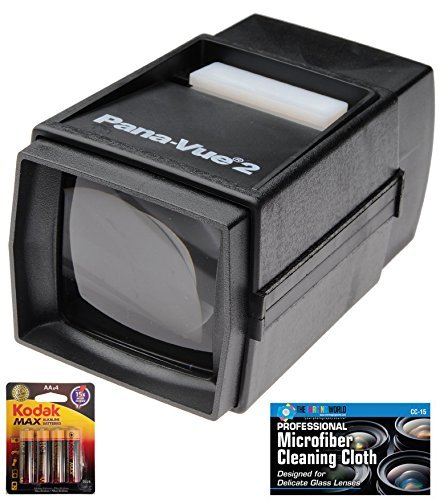
Image: Pana-Vue 2 Illuminated Slide Viewer. This shows the compact black viewer with its viewing screen and slide slot.

Image: Kodak MAX AA Alkaline Batteries 4-pack. This image displays the retail packaging for the included AA batteries.

Image: The Imaging World Microfiber Cleaning Cloth. This image shows the branded microfiber cloth designed for delicate lenses.
3. Setup
3.1 Battery Installation
- Locate the battery compartment on the underside of the Pana-Vue 2 Slide Viewer.
- Gently slide open the battery compartment cover.
- Insert two (2) AA batteries, ensuring correct polarity (+ and -) as indicated inside the compartment.
- Close the battery compartment cover securely.
Note: For continuous use without batteries, an optional Pana-Vue AC transformer (not included) can be connected to the designated port on the viewer.
4. Operating Instructions
4.1 Viewing Slides
- Ensure batteries are installed or the optional AC adapter is connected.
- Hold the slide viewer with the viewing screen facing you.
- Insert a 35mm slide into the slot located at the top of the viewer. The slide should fit snugly.
- Press down on the light bar, typically located near the slide slot, to illuminate the slide.
- Look through the viewing screen to observe the magnified image of your slide.
- Release the light bar to turn off the illumination.
- Remove the slide by gently pulling it out of the slot.
Tip: Some users find it convenient to use the same finger that inserted the slide to activate and hold down the light bar.
5. Maintenance
5.1 Cleaning the Viewer
- Use the included microfiber cleaning cloth to gently wipe the viewing screen and the exterior of the viewer.
- Avoid using abrasive cleaners or solvents, as these can damage the plastic and lens.
- For stubborn smudges on the viewing screen, a small amount of lens cleaning solution applied to the microfiber cloth can be used.
5.2 Battery Replacement
When the light dims or fails to illuminate, it is time to replace the AA batteries. Follow the battery installation steps in Section 3.1.
6. Troubleshooting
| Issue | Possible Cause | Solution |
|---|---|---|
| Light does not turn on. | Batteries are dead or incorrectly installed. | Check battery polarity and replace batteries if necessary. Ensure the light bar is fully depressed. |
| Image is blurry or unclear. | Viewing screen or slide is dirty. | Clean the viewing screen and the slide using the microfiber cloth. |
| Slides are difficult to insert or remove. | Slide is not aligned correctly. | Ensure the slide is inserted straight into the slot. Do not force slides. |
7. Specifications
- Model: PV2 K1
- Magnification: 2x
- Viewing Screen Size: 2 x 2 inches
- Compatible Slide Type: 35mm slides
- Power Source: 2 x AA batteries (included) or optional Pana-Vue AC transformer (not included)
- Approximate Dimensions (Viewer): 7.24 x 5.31 x 3.62 inches
- Approximate Item Weight: 7 ounces
- Manufacturer: The Imaging World
8. Warranty and Support
For warranty information or technical support regarding your Pana-Vue 2 Illuminated Slide Viewer, please contact The Imaging World directly. Refer to the product packaging or the manufacturer's official website for current contact details and warranty terms.