
1. Introduction
This manual provides essential information for the safe and efficient operation of your NuWave Oven Pro Plus. Please read all instructions carefully before first use and retain this manual for future reference.
The NuWave Oven Pro Plus utilizes a combination of infrared, conduction, and convection cooking technologies to prepare a variety of meals. It is designed for energy-efficient performance and versatile cooking options.
2. Important Safety Instructions
When using electrical appliances, basic safety precautions should always be followed to reduce the risk of fire, electric shock, and injury to persons, including the following:
- Read all instructions before operating the appliance.
- Do not touch hot surfaces. Use handles or knobs.
- To protect against electrical shock, do not immerse cord, plugs, or the main power head in water or other liquid.
- Close supervision is necessary when any appliance is used by or near children.
- Unplug from outlet when not in use and before cleaning. Allow to cool before putting on or taking off parts.
- Do not operate any appliance with a damaged cord or plug, or after the appliance malfunctions or has been damaged in any manner.
- The use of accessory attachments not recommended by the appliance manufacturer may cause injuries.
- Do not use outdoors.
- Do not let cord hang over edge of table or counter, or touch hot surfaces.
- Do not place on or near a hot gas or electric burner, or in a heated oven.
- Extreme caution must be used when moving an appliance containing hot oil or other hot liquids.
- Always attach plug to appliance first, then plug cord into the wall outlet. To disconnect, turn any control to "off", then remove plug from wall outlet.
- Do not use appliance for other than intended use.
3. Package Contents
Verify that all components are present in your package:
- NuWave Oven Pro Plus Power Head
- Dome
- Base
- Cooking Rack
- Stainless Steel Extender Ring
- Black Carrying Case
- Strap
- Recipe Chart
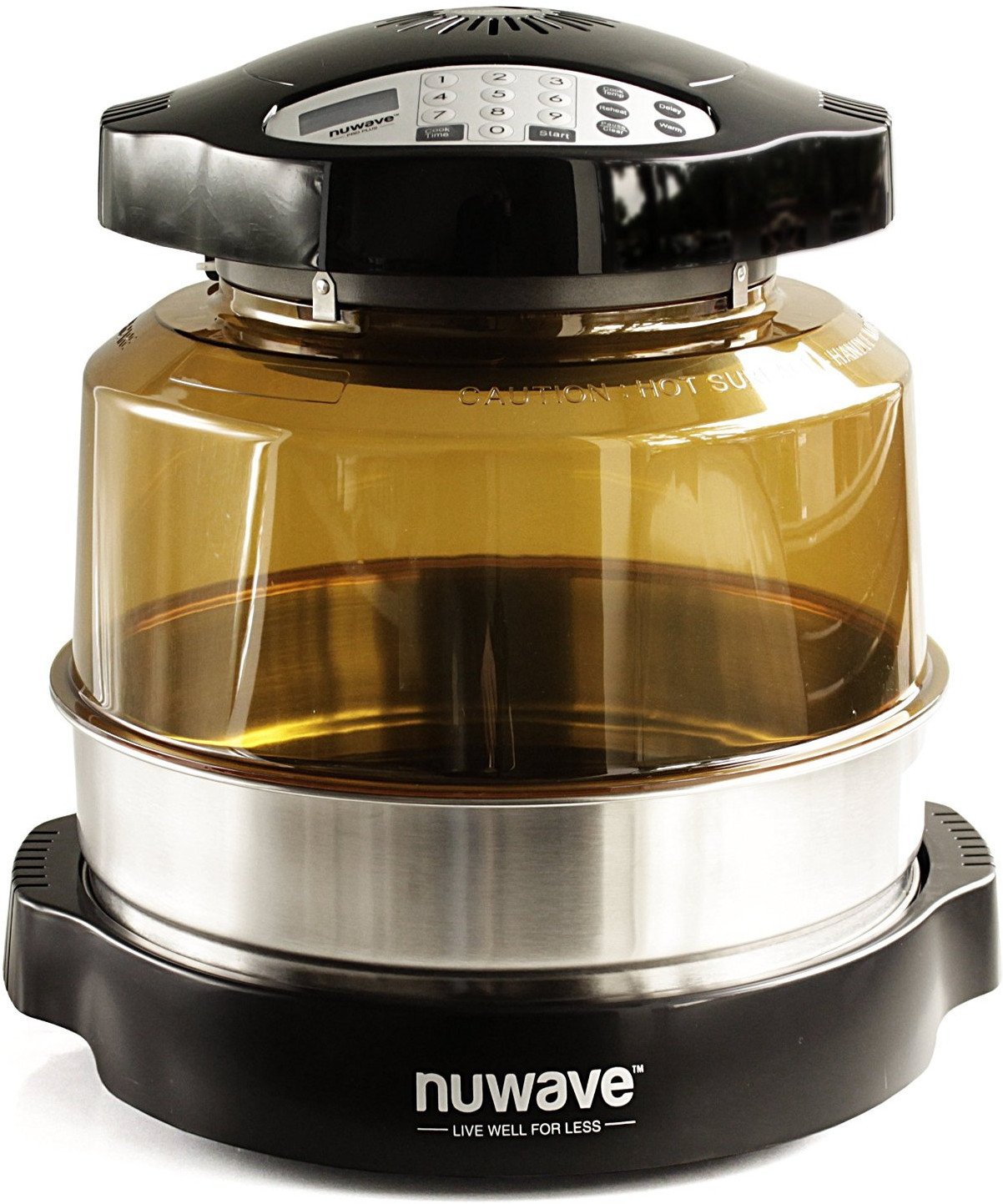
Image: The NuWave Oven Pro Plus assembled, showing the power head, transparent dome, and base unit.
4. Setup
- Unpacking: Carefully remove all components from the packaging. Remove any protective films or packing materials.
- Initial Cleaning: Before first use, wash the dome, base, cooking rack, and extender ring with warm, soapy water. Rinse thoroughly and dry completely. The power head should be wiped clean with a damp cloth. Do not immerse the power head in water.
- Assembly:
- Place the base on a stable, heat-resistant surface.
- Insert the cooking rack into the base. You can use the low or high rack position depending on your cooking needs.
- If using the extender ring for larger items, place it on top of the base before placing the dome.
- Place the dome securely onto the base or extender ring.
- Position the power head on top of the dome, ensuring it sits flush and is stable.
- Power Connection: Plug the power cord into a standard electrical outlet. The display on the power head should illuminate.

Image: The NuWave Oven Pro Plus with the cooking rack positioned inside the dome.

Image: The NuWave Oven Pro Plus assembled with the stainless steel extender ring in place, increasing cooking capacity.
5. Operating Instructions
5.1 Control Panel Overview
The power head features a digital control panel for setting cooking time and temperature.

Image: A hand interacting with the digital control panel of the NuWave Oven Pro Plus, showing buttons for time, temperature, and start/pause.
5.2 Basic Cooking
- Place food on the cooking rack inside the oven.
- Ensure the dome and power head are properly seated.
- Press the 'Cook Time' button, then use the number pad to enter the desired cooking duration.
- Press the 'Cook Temp' button, then use the number pad to enter the desired temperature.
- Press 'Start' to begin cooking.
5.3 Special Features
- Triple Cooking Technology: The oven combines infrared, conduction, and convection heating for thorough and even cooking.
- Energy Efficient: Designed to use less energy and cook faster compared to conventional ovens.
- Versatile Temperature Settings: Includes 'Warm', 'Reheat', and 'Delay' settings. The default temperature for these settings is 155°F for 2 hours.
- Programmable Delay Timer: Set the oven to begin cooking at a later time for convenient meal preparation.
- Large Cooking Capacity: With the included stainless steel extender ring, the oven can accommodate large items such as a 16 lb. turkey or a 14 lb. ham.
5.4 Cooking Examples

Image: The NuWave Oven Pro Plus cooking a steak and vegetables, demonstrating its use in a typical kitchen environment.

Image: A large ham and vegetables being cooked inside the NuWave Oven Pro Plus, utilizing the extender ring for increased capacity.

Image: Cookies baking inside the NuWave Oven Pro Plus, showcasing its versatility for different types of food preparation.

Image: A whole turkey being cooked in the NuWave Oven Pro Plus in an outdoor setting, highlighting its portability.
5.5 Official Product Video
Video: An official product video demonstrating the NuWave Oven Pro Plus, including its use with the stainless steel extender ring for cooking larger items like a turkey. This video highlights the oven's capacity and cooking capabilities.
6. Cleaning and Maintenance
- Before Cleaning: Always unplug the oven from the electrical outlet and allow all parts to cool completely before cleaning.
- Dome, Base, Extender Ring, and Racks: These components are generally dishwasher safe or can be washed by hand with warm, soapy water. Rinse thoroughly and dry completely before storage or next use.
- Power Head: The power head contains electrical components and should never be immersed in water or any other liquid. Wipe the exterior with a damp cloth. For stubborn stains, use a mild, non-abrasive cleaner on the cloth. Ensure the power head is completely dry before plugging it back in.
- Storage: Store the NuWave Oven Pro Plus in a clean, dry place. The included carrying case and strap can be used for convenient storage and transport.
7. Troubleshooting
If you encounter issues with your NuWave Oven Pro Plus, refer to the following common solutions:
| Problem | Possible Cause | Solution |
|---|---|---|
| Oven does not turn on. | Not plugged in; power outage; faulty outlet. | Ensure the power cord is securely plugged into a working electrical outlet. Check your home's circuit breaker. |
| Food is not cooking evenly. | Improper food placement; too much food; incorrect temperature/time settings. | Ensure food is placed centrally on the rack. Avoid overcrowding. Adjust cooking time and temperature as per recipe or food type. |
| Smoke or unusual odor during cooking. | Food residue; excessive fat/grease; new appliance odor. | Ensure all parts are clean before use. Trim excess fat from food. A slight odor is normal during initial uses. If smoke is excessive, unplug immediately and contact support. |
| Control panel not responding. | Temporary electronic glitch; power interruption. | Unplug the oven for a few minutes, then plug it back in. If the issue persists, contact customer support. |
8. Specifications
| Feature | Detail |
|---|---|
| Brand | NuWave |
| Model Name | NUWAVE Oven Pro Plus |
| Model Number | 20632 |
| Color | Stainless Steel |
| Product Dimensions (D x W x H) | 12"D x 12"W x 10"H |
| Capacity | 16 pounds (with extender ring) |
| Special Feature | Infrared, Conduction & Convection cooking |
| Wattage | 1500 Watts |
| Control Type | Push Button |
| Power Source | AC adapter |
| Temperature Range | Up to 155°F (for Warm/Reheat/Delay) |
| Number of Shelves | 1 (adjustable positions) |
| Item Weight | 10.5 pounds |
| Material | Porcelain, Stainless Steel |
| UPC | 616043651750, 789185601751 |
9. Warranty and Support
For warranty information, product registration, or technical support, please refer to the documentation included with your NuWave Oven Pro Plus or visit the official NuWave website. Keep your purchase receipt as proof of purchase for warranty claims.


