
DR. INFRARED HEATER DR-968H
Dr. Infrared Heater DR-968H Portable Space Heater with Humidifier User Manual
Model: DR-968H | Brand: DR. INFRARED HEATER
1. Introduction
This manual provides essential instructions for the safe and efficient operation, maintenance, and troubleshooting of your Dr. Infrared Heater DR-968H Portable Space Heater with Humidifier. This unit features an advanced dual heating system combining PTC and Quartz Infrared elements, along with a built-in ultrasonic humidifier to add moisture to dry air. Designed for indoor use, it offers 1500 watts of heating power and includes multiple safety features.

Image 1.1: Main view of the Dr. Infrared Heater DR-968H unit.
2. Important Safety Instructions
READ ALL INSTRUCTIONS BEFORE USING THIS HEATER.
- This heater is hot when in use. To avoid burns, do not let bare skin touch hot surfaces.
- Keep combustible materials, such as furniture, pillows, bedding, papers, clothes, and curtains at least 3 feet (0.9 m) from the front of the heater and keep them away from the sides and rear.
- Extreme caution is necessary when any heater is used by or near children or invalids and whenever the heater is left operating and unattended.
- Always unplug heater when not in use.
- Do not operate any heater with a damaged cord or plug or after the heater malfunctions, has been dropped or damaged in any manner.
- Do not use outdoors.
- To disconnect heater, turn controls to off, then remove plug from outlet.
- Do not insert or allow foreign objects to enter any ventilation or exhaust opening as this may cause an electric shock or fire, or damage the heater.
- To prevent a possible fire, do not block air intakes or exhaust in any manner. Do not use on soft surfaces, like a bed, where openings may become blocked.
- A heater has hot and arcing or sparking parts inside. Do not use it in areas where gasoline, paint, or flammable vapors or liquids are used or stored.
- This heater is designed for indoor use only.
- The heater is equipped with overheat and tip-over protection for enhanced safety.
3. Package Contents
Verify that all items are present upon unpacking:
- Dr. Infrared Heater DR-968H Unit
- Remote Controller (requires 2 AAA batteries, included)
- User Manual
4. Setup
- Unpacking: Carefully remove the heater from its packaging. Retain packaging for future storage.
- Placement: Place the heater on a firm, level surface. Ensure there is at least 3 feet (0.9 m) of clear space around the heater to allow for proper airflow and prevent fire hazards. The power cord is 72 inches long.
- Humidifier Setup (Optional):
- Locate the humidifier attachment on the back of the unit.
- Fill a standard water bottle (not included) with distilled water and attach it securely to the humidifier base.
- Ensure the humidifier is properly seated before operation.
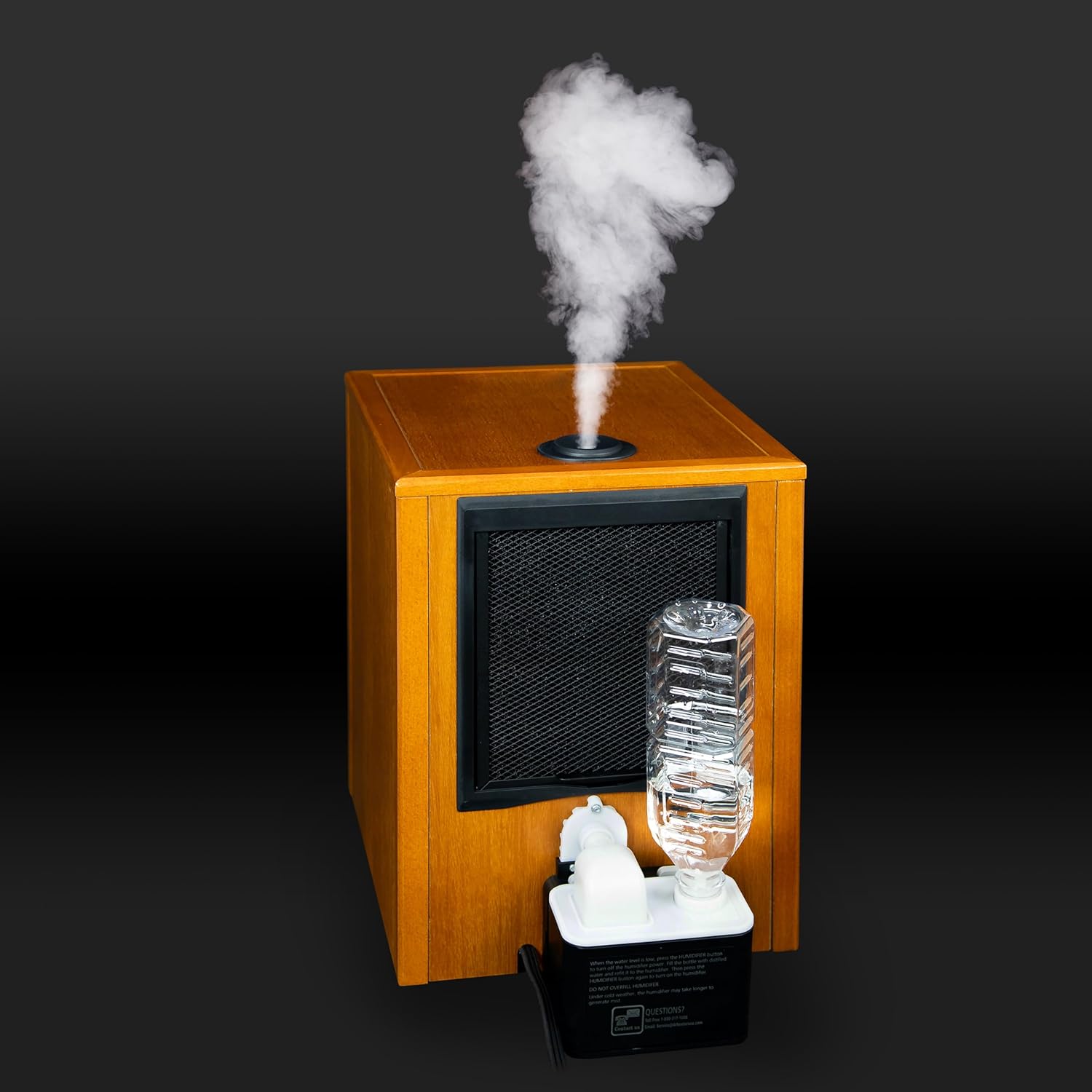
Image 4.1: Humidifier water bottle attachment.
- Power Connection: Plug the heater directly into a 120V, 12.5 Amp grounded wall outlet. Do not use extension cords or power strips.
5. Operating Instructions
5.1 Control Panel Overview

Image 5.1: Front control panel of the heater.
- POWER: Turns the unit on or off.
- SET TEMP / ROOM TEMP: Displays the set temperature or current room temperature.
- HUMIDIFIER: Activates or deactivates the humidifier function.
- TIMER: Sets the automatic shut-off timer.
- MODE/OFF: Cycles through heating modes (ECO, High, Low) or turns the unit off.
- UP/DOWN Arrows: Adjusts temperature settings or timer duration.
- ECO Mode: Energy-saving mode that cycles between high and low settings to maintain desired temperature.
5.2 Basic Operation
- Turning On/Off: Press the POWER button on the control panel or remote.
- Setting Temperature: Use the UP and DOWN arrows to set your desired temperature between 50°F and 85°F. The unit will work to maintain this temperature.
- Selecting Mode: Press the MODE button to cycle through ECO, High, and Low heating settings.
- Humidifier Function: Press the HUMIDIFIER button to activate or deactivate the ultrasonic humidifier. Ensure the water bottle is filled.
- Timer Function: Press the TIMER button to set the automatic shut-off time, up to 12 hours.
5.3 Remote Control
The included remote control allows for convenient adjustment of settings from a distance.

Image 5.2: Remote control for the heater.
- Ensure 2 AAA batteries are correctly installed.
- Functions on the remote mirror those on the control panel.
5.4 Humidifier Featured Functions Video
Video 5.3: This video demonstrates the humidifier's operational features, including how it produces mist to add moisture to the air.
6. Maintenance
6.1 Cleaning the Filter
The heater features a detachable filter for easy cleaning. Regular cleaning of the filter is recommended to maintain optimal performance and airflow.
- Turn off the heater and unplug it from the power outlet.
- Locate the filter cover, typically on the rear of the unit.
- Remove the filter cover and gently pull out the filter.
- Clean the filter using a vacuum cleaner or by rinsing it with warm water. Ensure the filter is completely dry before reinserting.
- Replace the filter and secure the cover.
6.2 General Cleaning
- Always unplug the heater before cleaning.
- Use a soft, damp cloth to wipe the exterior surfaces. Do not use abrasive cleaners or solvents.
- Do not immerse the heater in water.
6.3 Storage
When storing the heater, keep it in a cool, dry place, preferably in its original packaging, to protect it from dust and damage.
7. Troubleshooting
| Problem | Possible Cause | Solution |
|---|---|---|
| Heater does not turn on. | Not plugged in, power outage, main power switch off, overheat protection activated. | Check power cord, check circuit breaker, ensure main power switch is on, unplug and allow to cool for 30 minutes. |
| No heat output. | Temperature setting too low, ECO mode active, heating elements malfunction. | Increase temperature setting, change mode, contact customer support. |
| Humidifier not producing mist. | Water bottle empty, humidifier not activated, clogged nozzle. | Refill water bottle, activate humidifier, clean humidifier nozzle. |
| Unit makes unusual noise. | Fan obstruction, loose internal component. | Turn off and unplug, check for obstructions, contact customer support. |
8. Specifications
| Feature | Detail |
|---|---|
| Model Number | DR-968H |
| Brand | DR. INFRARED HEATER |
| Power Output | 1500 Watts |
| Voltage | 120V |
| Amperage | 12.5 Amps |
| Heating Coverage | Up to 400 sq ft |
| Temperature Range | 50°F - 85°F |
| Dimensions (D x W x H) | 13" x 12" x 15" |
| Item Weight | 23 pounds |
| Special Features | Detachable Filter, Energy Efficient, Portable, Noiseless, Tip-Over Protection, Overheat Protection, On/Off Timer, Built-in Humidifier |
| Certifications | UL Certified |

Image 8.1: Dimensions of the Dr. Infrared Heater DR-968H.
9. Warranty and Support
Your Dr. Infrared Heater DR-968H comes with a 3-Year parts & components limited warranty. For warranty claims, technical support, or any questions regarding your product, please refer to the contact information provided in the included user manual or visit the official DR. INFRARED HEATER website.
Related documentsDR-968H


Ask a question about this manual
Ask about setup, troubleshooting, compatibility, parts, safety, or missing instructions. Manuals+ will review the question and use this page’s manual context to help answer it.