
FLYCAM FLCM-CMFT-KIT
Flycam 5000 Handheld Camera Stabilizer with Comfort Arm Vest Instruction Manual
Model: FLCM-CMFT-KIT | Brand: FLYCAM
Introduction
The Flycam 5000 Handheld Camera Stabilizer with Comfort Arm Vest is a professional stabilization system designed to provide smooth, stable, and fatigue-free video capture. This comprehensive kit allows filmmakers and videographers to achieve cinematic shots with ease, accommodating a variety of cameras up to 11 lbs (5 kg). This manual provides detailed instructions for assembly, operation, maintenance, and troubleshooting to ensure optimal performance and longevity of your equipment.
Safety Information
Please read and understand all safety instructions before operating the Flycam 5000. Improper use can result in injury or damage to the equipment.
- Always ensure all components are securely fastened before use.
- Do not exceed the maximum weight capacity of 11 lbs (5 kg).
- Exercise caution when adjusting the telescopic post to avoid pinching fingers.
- Keep the stabilizer away from water and extreme temperatures.
- Store the equipment in its protective case when not in use.
Package Contents
Verify that all items listed below are included in your package:
- Flycam 5000 Handheld Camera Stabilizer (FLCM-5000-Q)
- Unico Quick Release (FLCM-UQR)
- Comfort arm & vest (CMFT-AV)
- Arm Brace (FLCM-AB) - Complimentary!
- Table Clamp (TC-030-00) - Complimentary!
- Storage Case

Image: Complete Flycam 5000 kit including stabilizer, comfort arm, and vest.
Setup
1. Assembling the Stabilizer
Begin by assembling the main stabilizer unit. Ensure all locking mechanisms are secure.

Image: The Flycam 5000 stabilizer unit with counterweights.
2. Attaching the Comfort Arm and Vest
Wear the comfort vest and adjust the straps for a snug, comfortable fit. Attach the comfort arm to the vest's mounting point. The arm is designed to absorb shocks and distribute the weight of the camera system, reducing operator fatigue.

Image: The Comfort Vest with adjustable straps and padding.

Image: The Comfort Arm with spring tension adjustment knob.
3. Mounting the Camera
Attach your camera to the Unico Quick Release plate. Secure the quick release plate onto the stabilizer's camera platform. Ensure the camera is firmly seated and locked in place.
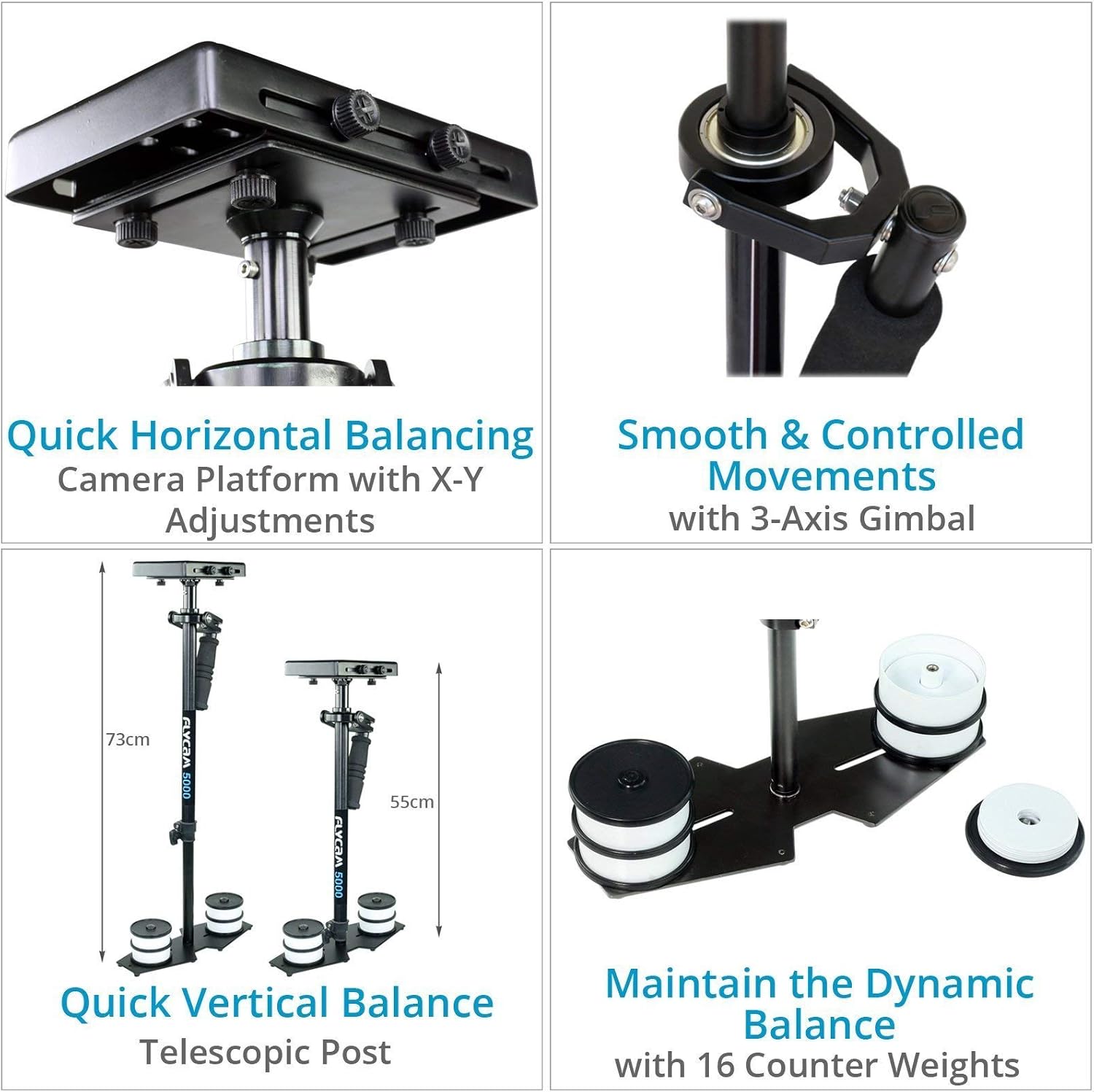
Image: Close-up of the Unico Quick Release plate for camera mounting.
4. Initial Balancing
Achieving proper balance is crucial for smooth operation. The Flycam 5000 features micro-balancing mechanisms for precise adjustments.
- Horizontal Balancing: Use the camera platform's X-Y adjustments to center the camera's weight.
- Vertical Balancing: Adjust the telescopic central post to achieve vertical balance. The stabilizer should remain upright and level when held freely. Add or remove counterweight discs on the base platform as needed to fine-tune the dynamic balance.

Image: Camera platform with X-Y adjustments for quick horizontal balancing.

Image: Telescopic post for quick vertical balance adjustment.

Image: Base platform with 16 counterweight discs to achieve perfect dynamic balance.
Setup and Operation Overview Video
Video: An official overview of the Flycam 5000 Camera Stabilizer with Comfort Arm and Vest, demonstrating its features and basic setup.
Operating Instructions
1. Basic Operation
Once balanced, hold the stabilizer by the gimbal handle. The comfort arm will support the weight, allowing you to move freely while keeping the camera stable. Practice walking and moving in different directions to get a feel for the system.

Image: Operator using the Flycam 5000 system for stable footage.
2. Advanced Techniques
The shock-absorbing arm allows for smooth high and low angle shots. By adjusting your body position and the arm's spring tension, you can achieve dynamic movements without introducing shake or blur.

Image: Operator demonstrating the versatility of the Flycam 5000 for various shot angles.
Operation Demonstration Video
Video: A detailed demonstration of the Flycam 5000 Handheld Camera Stabilizer with Comfort Arm Vest in action, showcasing its smooth movement capabilities.
Maintenance
Regular maintenance ensures the longevity and optimal performance of your Flycam 5000 system.
- Cleaning: Wipe down all components with a soft, dry cloth after each use. For stubborn dirt, use a slightly damp cloth and dry thoroughly.
- Lubrication: Periodically apply a small amount of silicone-based lubricant to the gimbal bearings and arm joints to maintain smooth movement.
- Storage: Store the stabilizer and accessories in the provided storage case in a cool, dry place to protect them from dust and damage.
- Inspection: Regularly check all screws, bolts, and connections to ensure they are tight. Replace any worn or damaged parts immediately.
Troubleshooting
If you encounter issues with your Flycam 5000, refer to the common problems and solutions below:
| Problem | Possible Cause | Solution |
|---|---|---|
| Unstable or shaky footage | Improper balancing (horizontal or vertical) | Re-balance the stabilizer carefully, ensuring the camera is perfectly centered and the drop time is correct. |
| Difficulty moving the arm smoothly | Arm joints or springs need lubrication; incorrect spring tension | Lubricate the arm joints. Adjust the spring tension knob on the comfort arm to match the weight of your camera setup. |
| Vest discomfort | Improper vest adjustment | Adjust the shoulder straps and waist belt for a snug but comfortable fit. Ensure weight is evenly distributed. |
| Quick release plate sticking | Dirt or debris in the mechanism | Clean the quick release mechanism thoroughly. |
Specifications
| Feature | Detail |
|---|---|
| Construction | High-grade CNC Aluminum |
| Weight Capacity | Up to 5 kg / 11 lb |
| Head Dimension | 17.9 x 12.0 x 2.6 cm / 7.0 x 4.7 x 1.0" |
| Base Platform | 4 x 10" / 10.16 x 25.4 cm |
| Height (Adjustable) | 55 to 73 cm / 22 to 29" |
| Counterweight Discs | 16 x 95 gram / 3.35 oz |
| Stabilizer Weight (without discs) | 1.4 kg / 3.09 lb |
| Comfort Arm Construction | High-Grade Aluminum |
| Comfort Arm Weight | 1.4 kg / 3.5 lb |
| Comfort Vest Waist Size | 28 to 60" |
| Comfort Vest Weight | 1.7 kg / 3.6 lb |
| Compatible Devices | DSLR, Video Camera, Camcorder, Mirrorless Camera |
Warranty and Support
FLYCAM products are designed for durability and performance. For specific warranty details and terms, please refer to the warranty information provided at the time of purchase or contact FLYCAM customer support directly.
For further assistance, detailed guides, or to contact support, please visit the official FLYCAM website or refer to the user guide PDF:
Related documentsFLCM-CMFT-KIT


Ask a question about this manual
Ask about setup, troubleshooting, compatibility, parts, safety, or missing instructions. Manuals+ will review the question and use this page’s manual context to help answer it.