Introduction
The Health o meter BFM144DQ3-99 Stainless Steel Body Fat Scale is designed to assist users in monitoring various health metrics. This device accurately measures weight and calculates important body composition data including Body Mass Index (BMI), body fat percentage, bone mass, and hydration level. It features 4-load-cell technology for precise measurements and can store information for up to four individual users, tracking their last 10 weigh-ins.

Figure 1: Health o meter BFM144DQ3-99 Stainless Steel Body Fat Scale.
Setup
1. Unpacking
- Carefully remove the scale from its packaging.
- Inspect the scale for any signs of damage.
- Retain packaging materials for future storage or transport.
2. Battery Installation
- Locate the battery compartment on the underside of the scale.
- Open the battery compartment cover.
- Insert the required batteries (typically AAA or AA, check compartment for specific type) ensuring correct polarity (+/-).
- Close the battery compartment cover securely.
3. Initial Placement
- Place the scale on a hard, flat, and stable surface. Avoid carpets or uneven flooring, as this can affect accuracy.
- Ensure the scale is not exposed to direct sunlight or extreme temperatures.
Operating Instructions
1. Powering On
- Gently tap the center of the scale with your foot to activate it. The display will illuminate.
- Wait for the display to show "0.0" or "0.00" before stepping on.
2. Taking a Weight Measurement
- Once "0.0" is displayed, step onto the scale with bare feet, ensuring your feet are positioned on the stainless steel electrodes.
- Stand still until your weight is displayed and locks.
- The scale will automatically turn off after a few seconds of inactivity.
3. Setting Up User Profiles (for Body Composition Analysis)
The scale can store data for up to 4 users. To utilize the body composition analysis features (body fat, hydration, bone mass, BMI), you must set up a user profile.
- With the scale off, tap it to turn it on.
- Press the "SELECT" button (or similar button as indicated on your scale's display area).
- Use the arrow buttons (up/down) to select a user number (P1, P2, P3, P4).
- Press "SELECT" to confirm the user number.
- The display will prompt you to enter personal data such as age, height, and gender. Use the arrow buttons to adjust values and "SELECT" to confirm each entry.
- Once all personal data is entered, the profile is saved.
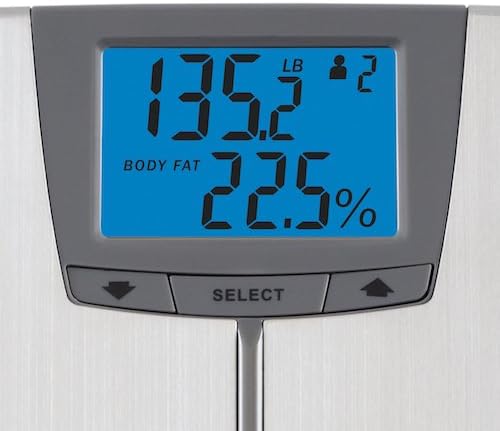
Figure 2: Close-up view of the scale's digital display, showing weight and body fat percentage.
4. Taking Body Composition Measurements
- Activate the scale and select your user profile using the "SELECT" and arrow buttons.
- Once your profile is selected and "0.0" is displayed, step onto the scale with bare feet, ensuring good contact with the electrodes.
- The scale will first display your weight, then cycle through your body fat percentage, hydration level, bone mass, and BMI.
- Remain still until all measurements are displayed.
Maintenance
1. Cleaning
- Wipe the scale surface with a soft, damp cloth.
- Do not use abrasive cleaners or immerse the scale in water.
- Ensure the scale is dry before storage or next use.
2. Storage
- Store the scale in a cool, dry place.
- Avoid storing objects on top of the scale, as this can affect calibration.
3. Battery Replacement
- If the display shows "Lo" or becomes dim, replace the batteries.
- Follow the battery installation steps outlined in the Setup section.
Troubleshooting
| Problem | Possible Cause | Solution |
|---|---|---|
| Scale does not turn on. | Dead or incorrectly installed batteries. | Check battery polarity or replace batteries. |
| Inaccurate readings. | Scale on uneven surface; scale not calibrated; user not standing still. | Place scale on a hard, flat surface. Tap to activate and wait for "0.0" before stepping on. Stand still during measurement. |
| Body composition readings (fat, hydration, bone) not displayed. | User profile not set up; user not barefoot; poor contact with electrodes. | Ensure a user profile is set up. Step on with clean, bare feet. Ensure full contact with the stainless steel electrodes. |
| "Lo" or "Err" displayed. | Low battery; measurement error (e.g., weight exceeds capacity). | Replace batteries. Ensure weight is within the 400 lbs capacity. |
Specifications
- Model Number: BFM144DQ3-99
- Capacity: 400 Pounds (181 kg)
- Measurement Increments: 0.2 lb
- Display Type: Digital, 1.5 inch easy-to-read
- Measurements: Weight, Body Fat, Hydration, Bone Mass, BMI
- User Profiles: Stores information for up to 4 users, tracks last 10 weigh-ins
- Platform Material: Stainless Steel
- Product Dimensions: 2.8 x 16.3 x 15.1 inches
- Item Weight: 4 Pounds
- Manufacturer: Sunbeam Corporation
- ASIN: B01410ZEBO
Important Information & Support
This product is intended for personal use to monitor health metrics. It is not a medical device and should not be used for diagnosis or treatment of any medical condition. Consult with a healthcare professional for any health concerns.
For technical support or warranty inquiries, please refer to the contact information provided with your product packaging or visit the official Health o meter website. Statements regarding dietary supplements have not been evaluated by the FDA and are not intended to diagnose, treat, cure, or prevent any disease or health condition.
For more information, you may visit the Health o meter Store on Amazon.