
1. Introduction
The BAOFENG BL-5L 3800mAh Extended Battery is designed to provide extended power and reliable performance for compatible BAOFENG two-way radios. This manual provides essential information for safe and effective use, including installation, charging, maintenance, and specifications.
2. Compatible Models
This extended battery is compatible with the following BAOFENG 5R Series two-way radios:
- BAOFENG UV-5R
- BAOFENG UV-5R Plus
- BAOFENG UV-5RTP
- BAOFENG UV-5R 8W
- BAOFENG UV-5RA
- BAOFENG UV-5G
- BAOFENG UV-5G Pro
- BAOFENG GT-5R
- BAOFENG GT-5R Pro
- BAOFENG UV-5X
- BAOFENG UV-5X3
- BAOFENG UV-5RL
- BAOFENG UV-5R V2+
- BAOFENG BF-F8
- BAOFENG BF-F8+
- BAOFENG BF-F8V2+
- BAOFENG BF-F9
- BAOFENG BF-F9V2+
- BAOFENG BF-F8HP

Image: Various compatible BAOFENG radios equipped with the extended BL-5L battery.
3. Key Features
- Extended Capacity: 3800mAh capacity for longer operating times.
- Reliable Performance: Built-in protection against overcharging, over-discharging, and overheating.
- Compact & Travel-Ready: Designed for outdoor enthusiasts and ham radio operators on the go.
- DC-USB Charging: Includes a DC-USB charging cable for versatile charging options.
- Clear LED Indicator: Provides charging status at a glance.
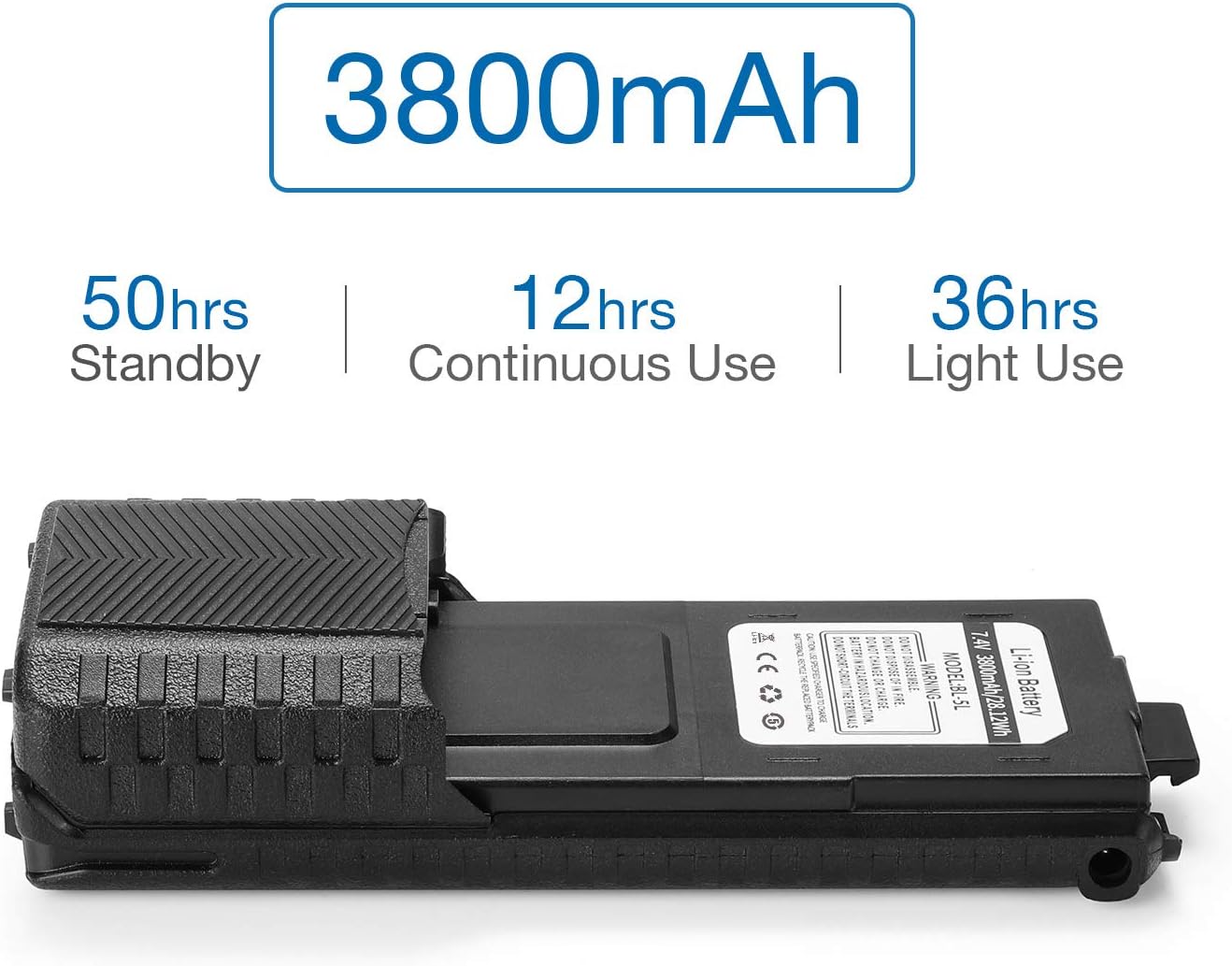
Image: Estimated battery life performance for the 3800mAh extended battery.

Image: Safety features ensuring effective protection against various electrical issues.
4. Setup and Installation
To attach the BL-5L extended battery to your compatible BAOFENG radio:
- Ensure the radio is powered off.
- Locate the battery release latch on the top rear of your radio. Press the latch to release the existing battery (if any).
- Align the extended battery with the battery compartment on the back of the radio.
- Slide the battery upwards into the compartment until it clicks securely into place. Ensure there is no gap and the battery is firmly attached.

Image: A BAOFENG radio with the extended BL-5L battery properly installed.

Image: Demonstrating the ergonomic fit of the extended battery on a BAOFENG radio.
Video: A seller's preview demonstrating the installation of the extended battery onto a BAOFENG radio.
5. Charging the Battery
The BL-5L extended battery offers multiple convenient charging methods:
- Desktop Charger (CH-5): The battery can be charged by placing the radio (with battery attached) into a compatible desktop charging cradle (e.g., CH-5).
- Wired DC-USB Charging: Connect the provided DC-USB charging cable directly to the DC port on the battery. This allows charging via USB power sources such as power banks, car chargers, or PC USB ports.
A clear LED indicator on the battery will show the charging status. Typically, red indicates charging, and green indicates a full charge.

Image: Demonstrates both desktop cradle charging and direct wired DC-USB charging methods.
Video: A seller's video showcasing the Baofeng 5RM GM-5RH UV-5G Plus 3800mAh Extended Battery, including its charging capabilities.
6. Maintenance and Safety
To ensure the longevity and safe operation of your BL-5L battery, please observe the following:
- Do Not Disassemble: Never attempt to open or disassemble the battery pack.
- Do Not Dispose of in Fire: Lithium-ion batteries can explode or catch fire if exposed to high temperatures.
- Proper Charging: Only use specified chargers for the battery pack.
- Avoid Short-Circuiting: Do not short-circuit the terminals.
- Hazardous Location: Do not change or charge the battery in hazardous locations.
- Recycle Properly: Dispose of used batteries according to local regulations.
- Storage: Store the battery in a cool, dry place away from direct sunlight and extreme temperatures.

Image: Detailed view of the battery label, including important safety warnings and specifications.
7. Troubleshooting
If you encounter issues with your BL-5L extended battery, consider the following:
- Battery Not Charging: Ensure the charging cable or desktop cradle is properly connected and receiving power. Check the LED indicator for status.
- Short Battery Life: Verify that the battery is fully charged. Operating the radio at high power or in transmit mode for extended periods will consume battery faster.
- Battery Not Fitting: Ensure you have a compatible radio model. Refer to the compatibility list in Section 2.
- Radio Not Powering On: Confirm the battery is securely attached and fully charged.
For further assistance, please refer to the user manual of your specific BAOFENG radio model or contact customer support.
8. Specifications
| Feature | Detail |
|---|---|
| Model Number | BL-5L |
| Battery Type | Lithium Ion |
| Battery Capacity | 3800 mAh |
| Voltage | 7.4V |
| Watt-hours | 28.12 Wh |
| Product Dimensions | 3.94 x 1.57 x 1.18 inches |
| Item Weight | 5.3 ounces |
| Manufacturer | Baofeng |
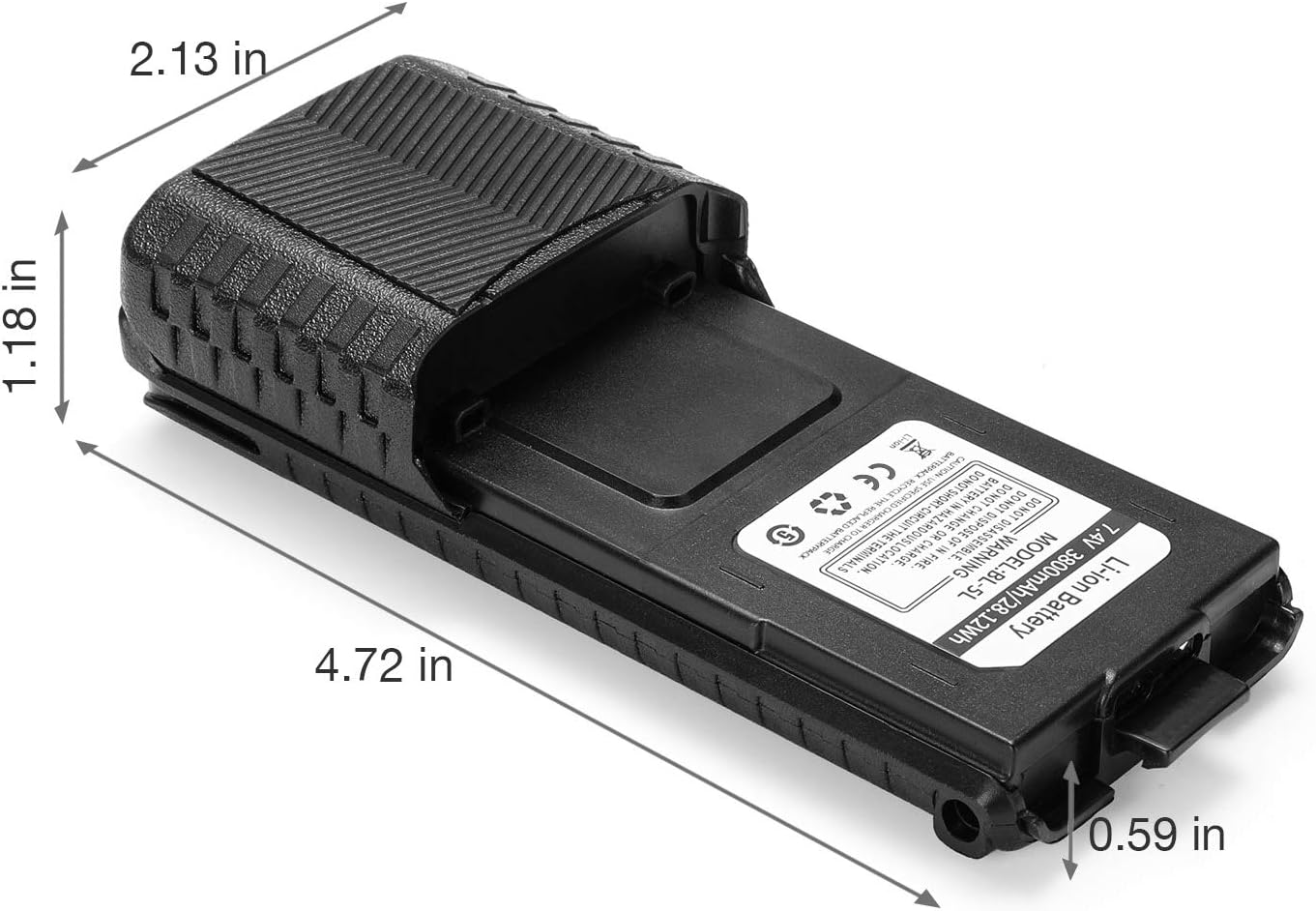
Image: Physical dimensions of the BAOFENG BL-5L extended battery.
9. Warranty and Support
BAOFENG is committed to providing world-class products and stands behind its products. If you have any questions, concerns, or require support regarding your BL-5L extended battery, please do not hesitate to contact BAOFENG customer service. Refer to your product packaging or the official BAOFENG website for contact details.