
Introduction
This manual provides essential information for the proper use and maintenance of the Hakko T18 Series Chisel Soldering Tip Pack. This pack includes five distinct chisel tips: T18-D08, T18-D12, T18-D24, T18-D32, and T18-S3. These tips are designed for use with Hakko FX-8801, FX-888, 900M, 907, and 913 soldering irons, offering versatility for various soldering applications.

Image: The complete Hakko T18 Series Chisel Soldering Tip Pack, featuring all five tips.
Product Features and Tip Descriptions
The Hakko T18 series tips are constructed from alloy steel and copper, designed for efficient heat transfer and durability. Each tip in this pack serves a specific purpose:
T18-D08 Chisel Tip (0.8 x 14.5mm)

Image: Close-up view of the T18-D08 chisel tip.
This fine chisel tip is suitable for precision soldering tasks, such as working with small pins or components under magnification. Its narrow profile allows access to confined spaces on circuit boards.
T18-D12 Chisel Tip (1.2 x 14.5mm)
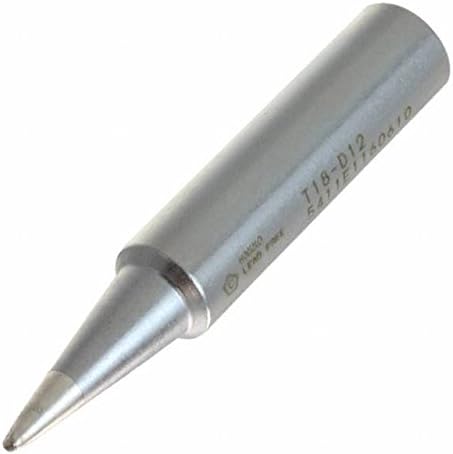
Image: Close-up view of the T18-D12 chisel tip.
A versatile tip for delicate pins and general electronics. It offers a balance between fine control and sufficient contact area for common components like resistors and integrated circuit chips.
T18-D24 Chisel Tip (2.4 x 14.5mm)

Image: Close-up view of the T18-D24 chisel tip.
This medium-sized chisel tip is well-suited for general electrical work, including soldering medium-gauge wires or attaching larger modules to circuit boards. It provides a good thermal mass for consistent heat delivery.
T18-D32 Chisel Tip (3.2 x 14.5mm)

Image: Close-up view of the T18-D32 chisel tip.
A larger chisel tip designed for components with higher thermal capacity or for soldering medium to heavy-gauge wires. It ensures efficient heat transfer to larger solder joints.
T18-S3 Chisel Tip (5.2 x 18mm)

Image: Close-up view of the T18-S3 chisel tip.
This is the largest chisel tip in the pack, intended for applications requiring significant thermal mass, such as soldering large components, heat sinks, or heavy-gauge wires. It is also suitable for tasks like spot welding with solder or large glass soldering projects.
Setup and Installation
Proper installation of soldering tips is crucial for optimal performance and safety. Follow these general guidelines:
- Power Off: Always ensure your soldering station is powered off and unplugged before changing tips.
- Cool Down: Allow the existing tip to cool completely to prevent burns.
- Remove Old Tip: Carefully remove the retaining nut or sleeve, then slide out the old tip.
- Insert New Tip: Insert the desired Hakko T18 series tip into the heating element. Ensure it is fully seated.
- Secure Tip: Re-attach and tighten the retaining nut or sleeve. Do not overtighten.
- Initial Tinning: After installation and powering on the soldering station, allow the tip to reach operating temperature. Immediately tin the new tip with a small amount of solder to prevent oxidation and ensure proper heat transfer.
Refer to your specific Hakko soldering iron or station manual for detailed instructions on tip replacement.
Operating Instructions
Effective soldering requires proper technique and tip selection. Consider the following:
- Tip Selection: Choose the appropriate T18 tip size for the component and pad/wire size. Smaller tips (T18-D08, T18-D12) are for fine pitch components, while larger tips (T18-D24, T18-D32, T18-S3) are for larger components or those with high thermal mass.
- Temperature Setting: Set your soldering station to the recommended temperature for your solder type and application. Avoid excessively high temperatures, which can degrade tips faster.
- Tinning: Always keep the tip tinned with a thin layer of solder. This improves heat transfer and protects the tip from oxidation.
- Contact and Heat Transfer: Apply the tip to both the component lead and the pad simultaneously to heat them evenly. Once both are hot, apply solder to the joint, not directly to the tip.
- Cleanliness: Regularly clean the tip using a damp sponge or brass wool during operation to remove excess solder and flux residue.
- Storage: When not in use, ensure the tip is tinned before returning the iron to its stand.
Maintenance
Proper maintenance extends the life of your Hakko T18 soldering tips:
- Regular Cleaning: Use a damp cellulose sponge or brass wire cleaner to wipe the tip frequently during soldering. This removes oxidized solder and flux.
- Re-tinning: If a tip becomes oxidized and solder does not adhere well, clean it thoroughly and re-tin it immediately. Specialized tip activators can be used for heavily oxidized tips, but sparingly.
- Avoid Abrasives: Do not use abrasive materials like sandpaper or files to clean tips, as this removes the protective plating and significantly shortens tip life.
- Proper Storage: Always tin the tip with fresh solder before storing the iron or turning off the station. This protective layer prevents oxidation when the tip cools.
- Inspect for Damage: Periodically inspect tips for pitting, excessive wear, or damage to the plating. Replace worn tips to maintain soldering quality.
Troubleshooting
Common issues encountered with soldering tips and their potential solutions:
- Solder Not Sticking to Tip:
- Cause: Tip oxidation or insufficient tinning.
- Solution: Clean the tip thoroughly with brass wool or a damp sponge, then immediately re-tin with fresh solder. If heavily oxidized, use a tip tinner/activator.
- Poor Heat Transfer:
- Cause: Oxidized tip, incorrect temperature, or loose tip installation.
- Solution: Ensure the tip is clean and well-tinned. Verify the soldering station temperature setting. Check that the tip is securely seated in the iron.
- Tip Pitting or Erosion:
- Cause: Excessive temperature, aggressive flux, or prolonged contact with components.
- Solution: Lower the soldering temperature if possible. Use appropriate flux for your application. Avoid leaving the tip in contact with components for extended periods. Replace severely pitted tips.
Specifications
| Brand | Hakko |
| Model Number | 43211-16103 |
| UPC | 818497013058 |
| Tip Types Included | T18-D08, T18-D12, T18-D24, T18-D32, T18-S3 |
| Tip Dimensions | 0.8mm x 14.5mm (D08) to 5.2mm x 18mm (S3) |
| Blade Edge | Flat (Chisel) |
| Blade Material | Alloy Steel |
| Body Material | Copper |
| Item Weight | 1.44 ounces (total pack) |
| Compatibility | Hakko FX-8801, FX-888, 900M, 907, 913 Soldering Irons |
Warranty and Support
For specific warranty information and technical support regarding your Hakko T18 Series Soldering Tips, please refer to the documentation provided with your Hakko soldering station or visit the official Hakko website. Hakko products are known for their quality and durability, and proper care ensures long-lasting performance.
For further assistance, you may contact Hakko customer service directly through their official channels.


