1. Introduction
The NSi Industries TES-131 is a compact and reliable GFCI electrical wiring analyzer designed to quickly and accurately test the wiring condition of standard 110-125VAC electrical outlets. It identifies common wiring errors and includes a push-button GFCI integrity test. This manual provides essential information for the safe and effective use of your TES-131 analyzer.
2. Important Safety Information
Please read and understand all safety instructions before operating the TES-131 analyzer. Failure to follow these instructions may result in electric shock, fire, or personal injury.
- Always ensure the outlet being tested is de-energized before plugging in or unplugging the analyzer if you suspect any severe wiring issues.
- Do not use the analyzer if it appears damaged or if the casing is cracked.
- This device is designed for standard 110-125VAC outlets only. Do not use it on higher voltage circuits.
- Keep hands and other objects away from the metal prongs when the device is plugged into a live outlet.
- Do not attempt to open or repair the analyzer. Refer all servicing to qualified personnel.
- Always wear appropriate personal protective equipment (PPE) when working with electrical systems.
3. Product Overview
The NSi Industries TES-131 is a plug-in device featuring indicator lights and a GFCI test button. Its compact design allows for easy portability and use in various electrical testing scenarios.

Figure 1: Front view of the NSi Industries TES-131 GFCI Electrical Wiring Analyzer, showing the indicator lights and GFCI test button.
The analyzer is housed in a durable plastic casing, typically yellow and black, and features three prongs for insertion into a standard electrical outlet. The front panel includes a series of neon indicator lights and a red push-button for GFCI testing.
4. Setup
The TES-131 requires no complex setup. Simply remove the device from its packaging and it is ready for use.

Figure 2: The NSi Industries TES-131 GFCI Electrical Wiring Analyzer as packaged, ready for unboxing.
5. Operating Instructions
Follow these steps to test an electrical outlet:
- Plug In: Insert the TES-131 analyzer firmly into the 110-125VAC electrical outlet you wish to test.
- Observe Indicators: Once plugged in, observe the pattern of the three neon indicator lights on the front of the analyzer. These lights will illuminate in specific patterns to indicate the wiring condition of the outlet. Refer to the "Wiring Indication Chart" section for interpretation.
- GFCI Test (if applicable): If the outlet is a GFCI (Ground Fault Circuit Interrupter) type, proceed to the "GFCI Integrity Test" section.
- Unplug: After testing, carefully remove the analyzer from the outlet.

Figure 3: The TES-131 analyzer plugged into a standard electrical outlet, with indicator lights illuminated.
6. Wiring Indication Chart
The TES-131 uses a combination of three neon lights to indicate the wiring status. The lights are typically labeled L1 (left), L2 (middle), and L3 (right) or similar. Refer to the diagram on the device itself for exact light positions.

Figure 4: Close-up view of the TES-131's indicator light panel and corresponding wiring legend.
| Indicator Lights (L1 L2 L3) | Wiring Condition |
|---|---|
| ● ● ● (All On) | Correct Wiring |
| ○ ● ● (L1 Off, L2 On, L3 On) | Open Ground |
| ● ○ ● (L1 On, L2 Off, L3 On) | Open Neutral |
| ● ● ○ (L1 On, L2 On, L3 Off) | Open Hot |
| ○ ○ ● (L1 Off, L2 Off, L3 On) | Hot/Ground Reverse |
| ● ○ ○ (L1 On, L2 Off, L3 Off) | Hot/Neutral Reverse |
Note: '●' indicates a light is ON, '○' indicates a light is OFF. The exact light positions may vary slightly; always refer to the legend printed on the device.
7. GFCI Integrity Test
The TES-131 includes a feature to test the functionality of a Ground Fault Circuit Interrupter (GFCI) outlet. This test simulates a ground fault to ensure the GFCI trips correctly, providing protection against electric shock.
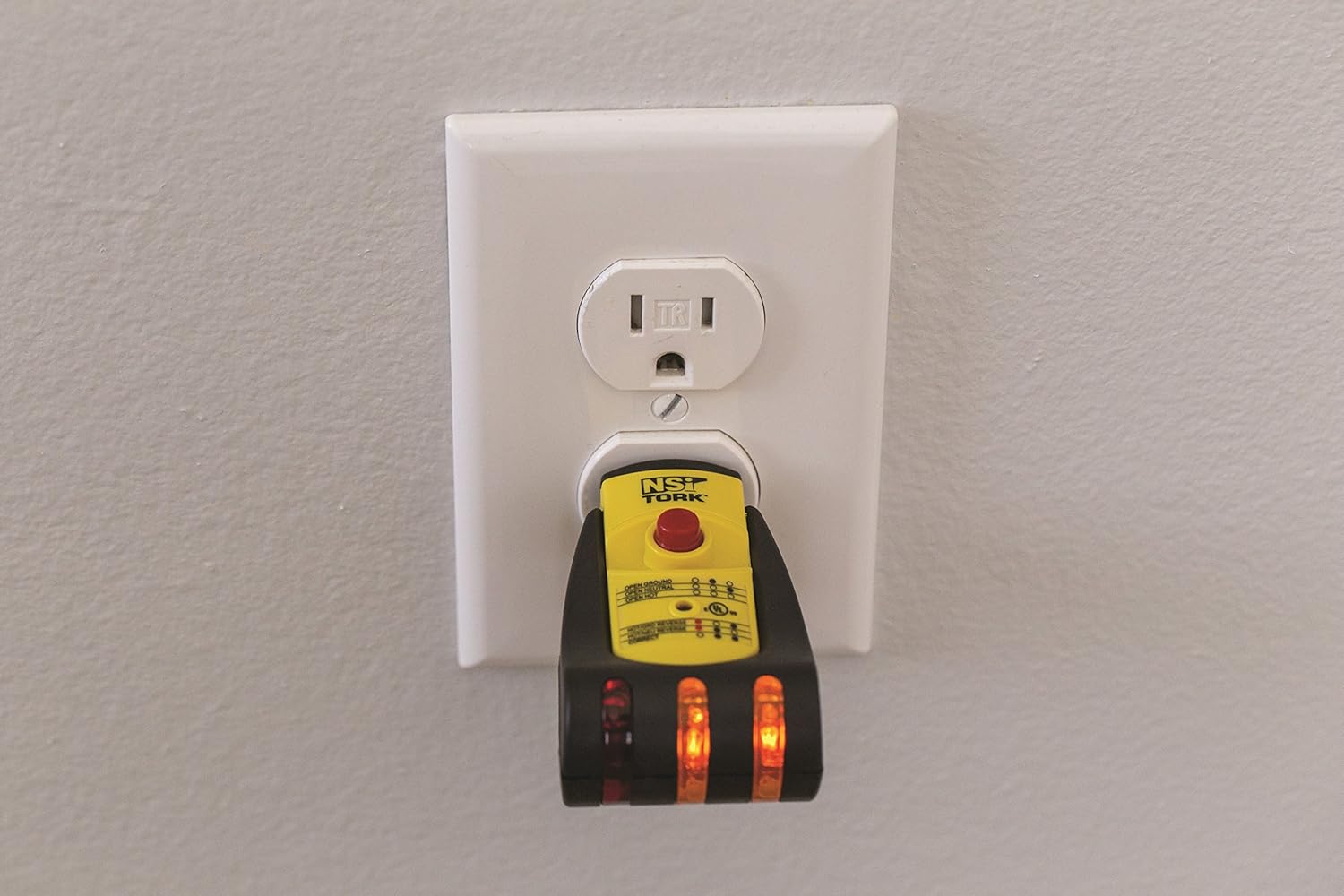
Figure 5: Close-up view of the TES-131's red push-button for initiating the GFCI integrity test.
- Plug In: Insert the TES-131 into the GFCI outlet. Ensure the indicator lights show a "Correct Wiring" condition.
- Press GFCI Button: Firmly press the red GFCI test button located on the front of the analyzer.
- Observe Trip: A functional GFCI outlet should immediately trip, cutting power to the outlet. The indicator lights on the TES-131 will turn off.
- Reset GFCI: Press the "RESET" button on the GFCI outlet to restore power. The TES-131 indicator lights should illuminate again, showing "Correct Wiring."
If the GFCI does not trip when the button is pressed, the GFCI outlet is faulty and should be replaced by a qualified electrician. If the GFCI trips but does not reset, there may be a wiring issue or a faulty GFCI. Consult a qualified electrician.
8. Troubleshooting
If you encounter issues while using your TES-131 analyzer, refer to the following common problems and solutions:
- No Lights Illuminate:
- Check if the outlet has power. Use a known working device to confirm.
- Ensure the TES-131 is fully inserted into the outlet.
- The outlet may have an "Open Hot" condition (refer to wiring chart).
- The TES-131 itself may be faulty.
- GFCI Does Not Trip:
- The GFCI outlet is faulty and needs replacement.
- The outlet is not a GFCI type.
- GFCI Trips but Won't Reset:
- There may be a persistent ground fault or other wiring issue in the circuit.
- The GFCI outlet itself may be faulty.
For persistent issues or if you are unsure about any wiring condition, always consult a qualified electrician.
9. Specifications
- Model: TES-131
- Brand: NSI
- Operating Voltage: 110-125VAC
- Material: Plastic
- Color: Yellow/Black
- Dimensions: Approximately 6.42 x 3.46 x 1.38 inches
- Weight: Approximately 2.47 ounces
- Manufacturer: NSi Industries
10. Maintenance
The TES-131 analyzer requires minimal maintenance.
- Cleaning: Wipe the device with a dry, soft cloth to remove dust or dirt. Do not use abrasive cleaners or immerse the device in liquids.
- Storage: Store the analyzer in a cool, dry place away from direct sunlight and extreme temperatures when not in use.
11. Warranty and Support
The NSi Industries TES-131 GFCI Electrical Wiring Analyzer typically comes with a 1-year warranty from the date of purchase, covering defects in materials and workmanship. Please retain your proof of purchase for warranty claims.
For technical support, warranty inquiries, or further assistance, please contact NSi Industries customer service. Refer to the official NSi Industries website or product packaging for current contact information.