
1. Introduction
This manual provides detailed instructions for the safe and effective use of your VONYX MEG045 40W Megaphone. Please read this manual thoroughly before operating the device and retain it for future reference. The VONYX MEG045 is a powerful, portable megaphone designed for outdoor activities, events, and public address, featuring 40W output, recording function, siren, and multimedia playback capabilities.
2. Safety Instructions
- Do not expose the megaphone to rain or moisture to prevent electric shock or fire.
- Do not open the casing. There are no user-serviceable parts inside. Refer all servicing to qualified personnel.
- Use only the specified battery type (6 x D-cell batteries). Ensure correct polarity when inserting batteries.
- Remove batteries if the megaphone will not be used for an extended period to prevent leakage.
- Keep the megaphone away from direct sunlight and heat sources.
- Avoid pointing the megaphone directly at people's ears at close range, as the high volume can cause hearing damage.
- Dispose of batteries according to local regulations.
3. Package Contents
Please check that all items are present and in good condition upon opening the package:
- VONYX MEG045 40W Megaphone
- Adjustable Shoulder Strap
- User Manual (this document)
4. Product Overview
Familiarize yourself with the components of your VONYX MEG045 Megaphone.
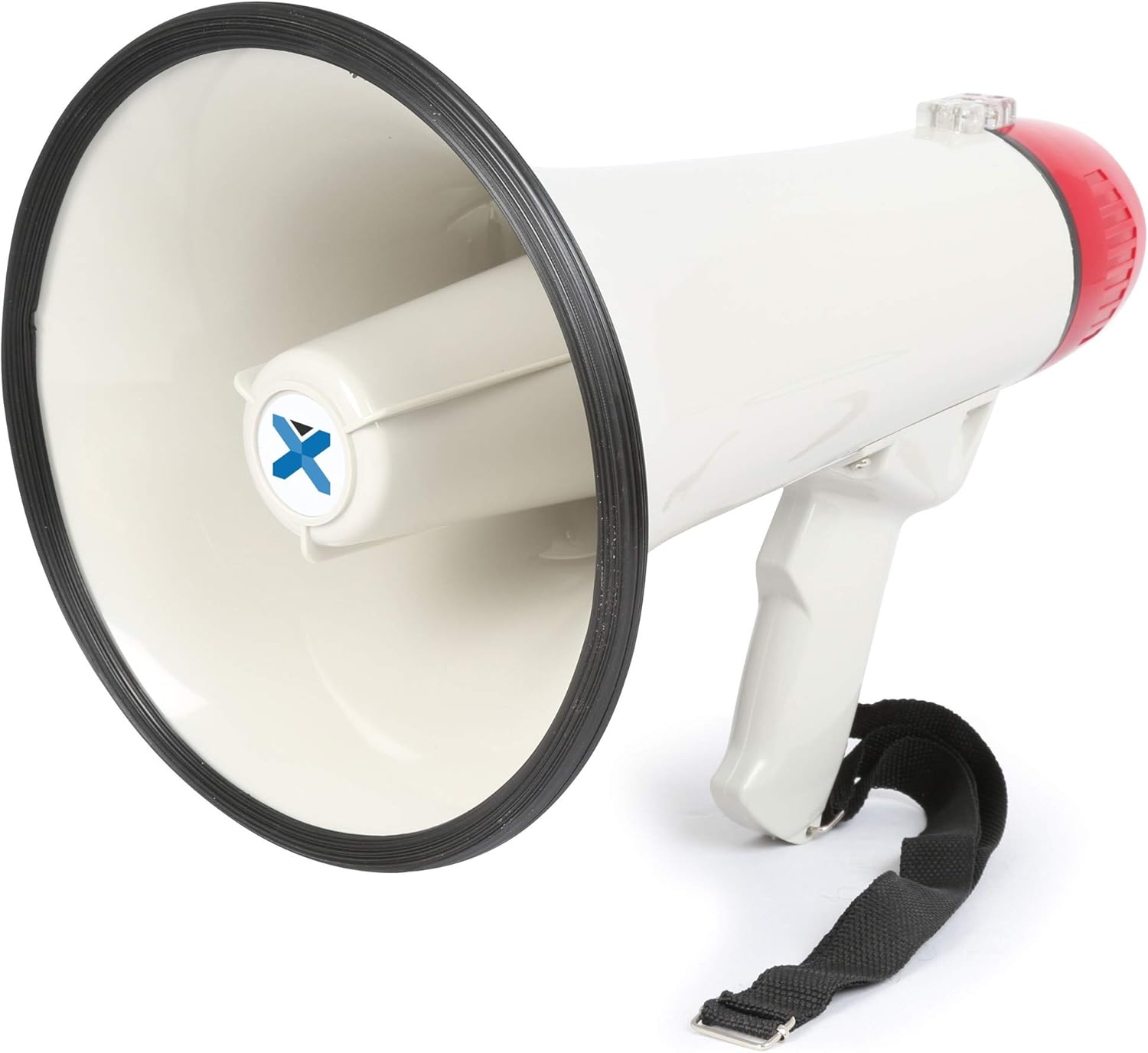
Figure 4.1: Overall view of the VONYX MEG045 Megaphone, showing the horn, handle, and attached shoulder strap.
- Horn: The sound output area.
- Microphone: Integrated into the rear of the megaphone for voice amplification.
- Handle: Ergonomic grip for comfortable holding.
- Control Panel: Located near the handle, containing various buttons and ports.
- Battery Compartment: Located at the rear, under the red cap.
- Shoulder Strap: For easy carrying and portability.
5. Setup
5.1 Battery Installation
The MEG045 megaphone requires 6 x D-cell batteries (not included).
- Twist the red rear cap counter-clockwise to open the battery compartment.
- Insert 6 D-cell batteries, ensuring correct polarity (+ and -) as indicated inside the compartment.
- Replace the red rear cap by twisting it clockwise until securely closed.

Figure 5.1: Open battery compartment showing where D-cell batteries are inserted.
5.2 Attaching the Shoulder Strap
Attach the provided shoulder strap to the designated loops on the megaphone for convenient carrying.
6. Operating Instructions
The control panel features various buttons and input ports for different functions.

Figure 6.1: Close-up of the control panel showing USB, AUX, and SD/MMC card slots.
6.1 Basic Operation (Voice Amplification)
- Ensure batteries are correctly installed.
- Locate the power switch (usually a trigger on the handle or a button on the control panel) and turn the megaphone ON.
- Adjust the volume control knob to a suitable level.
- Speak clearly into the integrated microphone.
6.2 Siren Function
Press the Siren button on the control panel to activate the built-in siren sound. Press it again to turn off the siren.
6.3 Recording and Playback
- To record: Press and hold the Record button. Speak into the microphone. Release the button to stop recording.
- To play back: Press the Playback button to listen to your last recording.
6.4 Multimedia Playback (USB/SD/AUX)
The megaphone supports playback from USB drives, SD/MMC cards, and external devices via the AUX input.
- USB/SD Playback: Insert a USB drive or SD/MMC card into the corresponding slot on the control panel. The megaphone will automatically detect and play compatible audio files (e.g., MP3). Use the track navigation buttons (if available) to skip tracks.
- AUX Input: Connect an external audio device (smartphone, laptop, tablet) to the AUX input using a 3.5mm audio cable. The megaphone will play audio from the connected device. Control playback and volume from your external device.
7. Maintenance
- Cleaning: Wipe the megaphone with a soft, dry cloth. Do not use abrasive cleaners or solvents.
- Battery Care: Always remove batteries if the megaphone is not used for extended periods to prevent corrosion.
- Storage: Store the megaphone in a cool, dry place, away from direct sunlight and extreme temperatures.
8. Troubleshooting
| Problem | Possible Cause | Solution |
|---|---|---|
| No sound/Low volume |
|
|
| Siren/Recording not working |
|
|
| USB/SD/AUX playback issues |
|
|
9. Specifications
| Feature | Detail |
|---|---|
| Brand | VONYX |
| Model Number | MEG045 (8715693276435) |
| Power Output | 40W |
| Range | Up to 1 km (0.6 miles) |
| Weight | 1.3 kg (approx.) |
| Power Supply | 6 x D-cell batteries (not included) |
| Inputs | USB, SD/MMC card slot, AUX (3.5mm) |
| Functions | Voice amplification, Siren, Recording, Multimedia Playback |
10. Warranty and Support
Specific warranty information and customer support details are not available in the provided product data. For warranty claims, technical support, or service inquiries, please refer to the documentation included with your purchase or visit the official VONYX website for the most up-to-date information.
You may also contact your retailer for assistance.


