
1. Introduction
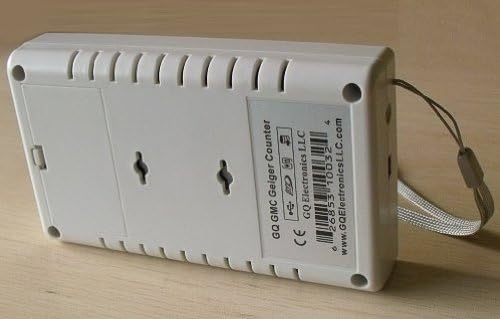
The GQ GMC-320 Plus is a portable nuclear radiation detector designed to accurately measure Beta, Gamma, and X-ray radiation. This device is an essential tool for monitoring environmental radiation levels, detecting radioactive sources, and ensuring safety in various settings. It features a user-friendly interface with multiple display modes and data logging capabilities, making it suitable for both professional and personal use.


2. Key Features
- Portable Design: Compact and lightweight, making it easy to carry and use on the go.
- Radiation Detection: Capable of detecting Beta, Gamma, and X-ray radiation.
- Audio/Video Indication: Provides audible clicks and visual alerts for detected radiation.
- Dot Matrix LCD Screen: Clear display for readings and settings.
- Real-Time Data Logging: Records radiation data every second for detailed analysis.
- USB Connectivity: Allows for data transfer to a PC and device charging.
- PC Software Compatibility: Works with GQ Geiger Counter PC software for advanced data management and visualization.
- Large Character Display Mode: Offers an easy-to-read display option for key data.
- Real-Time Graphical Display: Visualizes radiation fluctuations over time for immediate trend assessment.
- Built-in Rechargeable Battery: Equipped with a 3.7V Li-ion battery for extended operation.
3. Setup
3.1. Charging the Device
The GMC-320 Plus comes with a built-in rechargeable Lithium-ion battery. Before first use, or when the battery indicator shows low power, connect the device to a USB power source (e.g., computer USB port, USB wall adapter) using the provided USB cable. The device will indicate charging status on the display.
3.2. Powering On/Off
To power on the device, press and hold the power button (usually marked with a power symbol) until the screen illuminates. To power off, press and hold the power button again until the device shuts down.
3.3. Initial Configuration
Upon first power-on or after a factory reset, you may need to set the date and time. Navigate through the menu using the arrow buttons and confirm selections with the appropriate button (refer to the device's on-screen prompts for specific navigation).
4. Operating Instructions
4.1. Understanding Display Modes
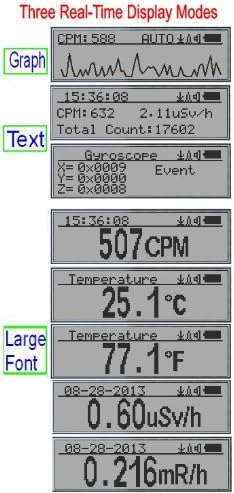
The GMC-320 Plus offers several real-time display modes to present radiation data:
- Graph Mode: Displays a real-time graph of radiation fluctuations (Counts Per Minute - CPM) over a short period, providing a visual trend.
- Text Mode: Shows numerical values for CPM, equivalent dose rate (µSv/h or mR/h), and total accumulated count. This mode may also display gyroscope data if enabled.
- Large Font Mode: Presents the primary radiation reading (e.g., CPM, µSv/h) in a larger font for enhanced readability, along with date and time.
You can switch between these modes using the designated navigation buttons on the device.
4.2. Data Logging and PC Software
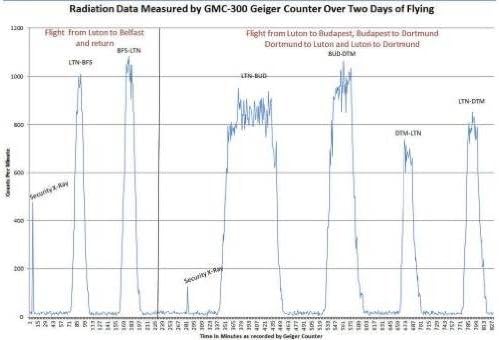
The GMC-320 Plus automatically logs radiation data. To access and analyze this data, connect the device to your computer via the USB cable. Download and install the GQ Geiger Counter PC software (available from the manufacturer's website). The software allows you to:
- Download historical data from the device.
- View data in various formats, including graphs and tables.
- Export data for further analysis.
- Configure device settings.

5. Maintenance
5.1. Battery Care
The device uses a 3.7V Li-ion battery. For optimal battery life, avoid fully discharging the battery frequently. Recharge the device when the battery indicator is low. If the battery needs replacement, ensure you use a compatible 3.7V Li-ion battery (AA(14500) type).
5.2. Cleaning and Storage
Clean the device with a soft, dry cloth. Do not use abrasive cleaners or solvents. Store the device in a cool, dry place away from direct sunlight and extreme temperatures when not in use for extended periods.
6. Troubleshooting
- Device does not power on: Ensure the battery is sufficiently charged. Connect the device to a USB power source and try again.
- Inconsistent or fluctuating readings: Radiation levels in the environment naturally fluctuate. Ensure the device is placed in a stable location away from potential interference. For accurate measurements, allow the device to average readings over a longer period.
- Cannot connect to PC software: Verify that the USB cable is securely connected to both the device and the computer. Ensure the correct drivers are installed. Try a different USB port or cable.
- No Alpha particle detection: Please note that the GMC-320 Plus is designed to detect Beta, Gamma, and X-ray radiation. It does not detect Alpha particles, nor is it designed for EMF (Electromagnetic Field) or Radon gas detection.
7. Specifications
| Attribute | Detail |
|---|---|
| Manufacturer | GQ Electronics LLC |
| Model Number | 320 Plus |
| Product Dimensions | 12.7 x 7.11 x 7.54 cm |
| Item Weight | 220 grams |
| Battery Type | 1 Lithium-ion battery (included) |
| Voltage | 3.7 Volts |
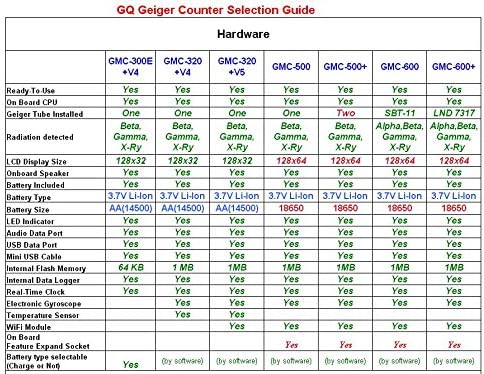
| Radiation Detected | Beta, Gamma, X-Ray |
| Internal Flash Memory | 1 MB (for data logging) |

8. Warranty and Support
For warranty information, technical support, and the latest software downloads, please refer to the official GQ Electronics website. GQ Electronics is committed to providing quality products and customer support.
Manufacturer: GQ Electronics LLC
For further assistance, please visit the manufacturer's official support channels.


