Product Overview
The Electrolux EOGA24M4RMS is a 60cm built-in gas oven designed for modern kitchens. It features a spacious interior and a durable stainless steel finish, offering reliable performance for various cooking needs. This manual provides essential information for installation, operation, maintenance, and troubleshooting to ensure optimal use of your appliance.
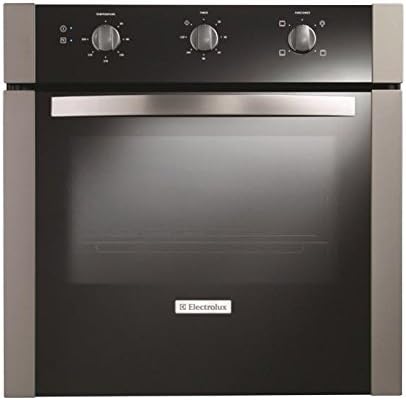
Figure 1: Front view of the Electrolux EOGA24M4RMS Built-in Gas Oven. The oven features a black glass door, a stainless steel handle, and three control knobs on the top panel. The Electrolux logo is visible on the lower part of the oven door.
Setup and Installation
This Electrolux gas oven is designed for built-in installation. Proper installation is crucial for safety and performance. It is highly recommended that installation be performed by a qualified technician.
Safety Precautions:
- Ensure the gas supply is turned off before beginning installation.
- Verify that the electrical supply matches the oven's requirements.
- Provide adequate ventilation around the oven as specified in local building codes.
- Do not obstruct ventilation openings.
Installation Steps (Summary):
- Prepare the cabinet opening according to the oven's dimensions (approximately 61 x 59 x 59 cm).
- Connect the gas line safely and securely, checking for leaks.
- Connect the electrical power supply.
- Slide the oven into the prepared opening and secure it using the provided mounting screws.
- Test the oven for proper operation before first use.
Operating Instructions
Familiarize yourself with the control panel before operating the oven.
Control Panel Overview:
- Left Knob: Function Selector (e.g., Bake, Broil, Grill).
- Middle Knob: Temperature Control (adjusts oven temperature in degrees Celsius/Fahrenheit).
- Right Knob: Timer/Clock (sets cooking duration or current time).
Basic Operation:
- Preheating: Turn the Function Selector knob to the desired cooking mode. Turn the Temperature Control knob to the desired temperature. Allow the oven to preheat until the indicator light turns off, signaling it has reached the set temperature.
- Cooking: Place food inside the preheated oven. Close the oven door. Monitor cooking progress through the oven light or by briefly opening the door.
- Using the Timer: Refer to the specific instructions for the Timer/Clock knob to set cooking duration or an alarm.
- Turning Off: Once cooking is complete, turn both the Function Selector and Temperature Control knobs to the "OFF" position.
Safety Tips During Operation:
- Always use oven mitts when handling hot dishes or racks.
- Keep children and pets away from the hot oven.
- Do not line the oven bottom with aluminum foil as it can trap heat and damage the oven.
- Ensure proper ventilation in the kitchen during oven use.
Maintenance and Cleaning
Regular cleaning and maintenance will prolong the life of your oven and ensure hygienic operation.
General Cleaning:
- Exterior: Clean the stainless steel exterior with a soft cloth and a mild, non-abrasive cleaner specifically designed for stainless steel. Wipe in the direction of the grain to avoid streaks.
- Interior: For light spills, wipe with a damp cloth and mild detergent after the oven has cooled. For stubborn stains, use an oven cleaner according to the product's instructions. Ensure adequate ventilation when using oven cleaners.
- Oven Racks: Remove racks and wash them in warm, soapy water. For baked-on residue, soak them before scrubbing.
- Glass Door: Clean the glass door with a glass cleaner or a mixture of vinegar and water. Avoid abrasive pads or cleaners that could scratch the glass.
Maintenance Tips:
- Regularly check the oven door seal for any damage or wear. A damaged seal can lead to heat loss.
- Ensure the oven light bulb is working. Replace it if necessary, following the instructions in the full manual.
- Avoid using harsh chemicals or sharp objects inside the oven that could damage the enamel finish.
Troubleshooting
Before contacting service, please refer to the following common issues and their potential solutions.
| Problem | Possible Cause | Solution |
|---|---|---|
| Oven not heating. | No gas supply; power outage; control knob not set correctly. | Check gas valve; verify power supply; ensure knobs are set to desired function and temperature. |
| Uneven cooking. | Food placed too close to heating element; oven not preheated; door seal damaged. | Adjust rack position; allow full preheat; inspect and replace door seal if necessary. |
| Oven light not working. | Bulb is burnt out. | Replace the oven light bulb (ensure oven is cool and power is off). |
| Excessive smoke during cooking. | Food spills or grease buildup inside the oven. | Clean the oven interior thoroughly. |
If the problem persists after attempting these solutions, please contact Electrolux customer service or a qualified service technician.
Specifications
| Feature | Detail |
|---|---|
| Brand | Electrolux |
| Model | EOGA24M4RMS |
| Product Dimensions (W x D x H) | 61 x 59 x 59 cm (approximately 24 x 23.2 x 23.2 inches) |
| Weight | 34.8 kg (approximately 76.7 lbs) |
| Color | Stainless Steel |
| Heating Method | Gas |
| Finish Type | Stainless Steel |
| Installation Type | Built-in |
| ASIN | B013KV2JLS |
Warranty and Support
Electrolux stands behind the quality of its products. For detailed warranty information, including terms and conditions, please refer to the warranty card included with your appliance or visit the official Electrolux website for your region.
For technical assistance, spare parts, or to schedule a service appointment, please contact Electrolux Customer Service. Have your model number (EOGA24M4RMS) and serial number ready when you call.
You can typically find contact information on the Electrolux website or in the documentation provided with your oven.


