
Introduction
The DEGEN DE28 is a versatile and compact device that combines an AM/FM/Shortwave radio, a fully featured MP3 player, and a voice recorder. Designed for both indoor and outdoor use, it offers excellent sensitivity, selectivity, and sound quality. This manual provides instructions for setup, operation, and maintenance of your DE28 unit.
Package Contents
Please check the package for the following items:
- DEGEN DE28 Unit
- Rechargeable Li-ion Battery
- USB Charging Cable
- Lanyard
- User Manual
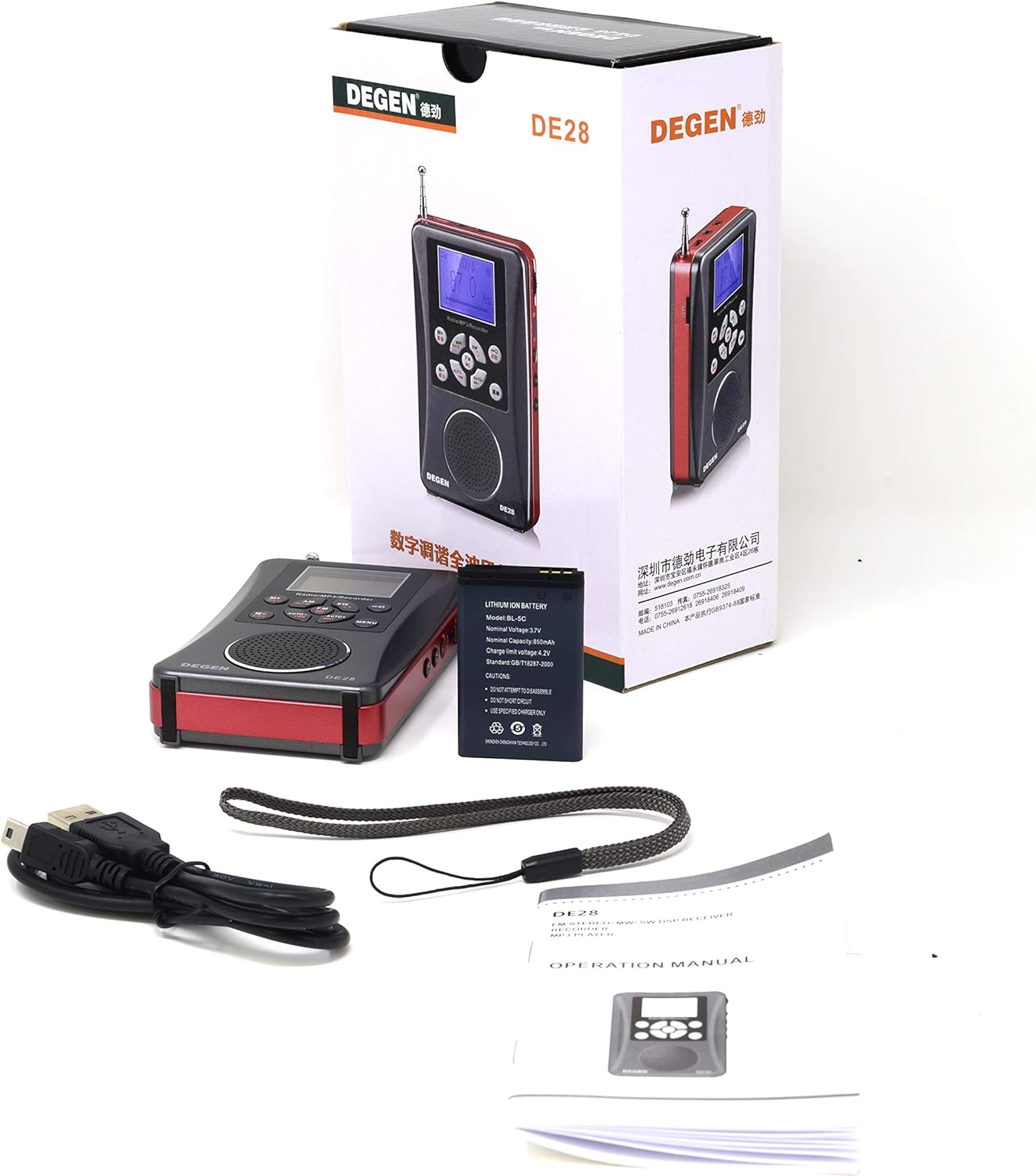
Image: Contents of the DEGEN DE28 package, including the radio, battery, USB cable, lanyard, and manual.
Product Layout and Controls
Familiarize yourself with the buttons, ports, and features of your DEGEN DE28 unit.
Front View

Image: Front view of the DEGEN DE28 radio, showing the LCD display, speaker, and control buttons for AM, FM, SW, M+, M-, AUTO+, AUTO-, MENU, and power.
- LCD Display: Shows frequency, mode, time, and battery status.
- Speaker: For audio output.
- AM/FM/SW Buttons: Select radio bands.
- M+/REC, M-/DEL Buttons: Save/recall presets, initiate/delete recordings.
- AUTO+/AUTO- Buttons: Automatic station scanning.
- MENU Button: Access settings and options.
Side View and Ports

Image: Side view of the DEGEN DE28 radio, highlighting the volume control wheel, power button, and various input/output ports.
- Power Switch: Slide to turn the unit on or off.
- Volume Wheel (V+/V-): Adjusts audio volume.
- 3.5mm Earphone Jack: For private listening.
- Micro USB Port: For charging the battery.
- Micro SD/TF Card Slot: Insert memory card for MP3 playback and recording.
Antenna

Image: The DEGEN DE28 radio shown with its telescopic antenna fully extended for improved radio reception.
The telescopic antenna is used for FM and Shortwave reception. Extend it fully for best signal quality.
Micro SD/TF Card Slot Detail

Image: An angled view of the DEGEN DE28 radio, providing a clear look at the Micro SD/TF card slot on its side.
Setup
1. Battery Installation and Charging
- Locate the battery compartment on the back of the unit.
- Insert the provided Li-ion battery, ensuring correct polarity.
- Close the battery compartment cover.
- Connect the supplied USB charging cable to the Micro USB port on the DE28 and to a standard USB power source (e.g., computer USB port, USB wall adapter).
- The charging indicator on the display will show charging status. A full charge typically takes a few hours.
2. Micro SD/TF Card Installation
- Locate the Micro SD/TF card slot on the side of the unit.
- Gently insert a Micro SD/TF card (up to 8GB, not included) into the slot until it clicks into place. Ensure the card is inserted in the correct orientation.
- To remove, gently push the card inward until it clicks, then release, and it will eject.
Operating Instructions
Power On/Off
- Slide the power switch on the side of the unit to the 'ON' position to power on.
- Slide the power switch to the 'OFF' position to power off.
Mode Selection
- Press the 'MENU' button repeatedly to cycle through available modes: Radio, MP3 Player, Recorder.
Radio Operation (AM/FM/SW)
- Ensure the unit is in Radio mode.
- Press the 'AM', 'FM', or 'SW' button to select the desired radio band.
- Automatic Tuning: Press 'AUTO+' or 'AUTO-' to automatically scan for and stop at the next available station.
- Manual Tuning: Use the 'M+' or 'M-' buttons for fine-tuning the frequency.
- Saving Presets: Tune to a desired station. Press and hold 'M+' or 'M-' to save it to a memory slot. Follow on-screen prompts if any.
- Recalling Presets: Briefly press 'M+' or 'M-' to cycle through saved stations.
- Extend the telescopic antenna for optimal FM and SW reception.
MP3 Player Operation
- Ensure a Micro SD/TF card with MP3, WAV, or WMA audio files is inserted.
- Switch the unit to MP3 Player mode.
- The unit will automatically start playing music from the card.
- Use 'M+' to skip to the next track and 'M-' to go to the previous track.
- Adjust volume using the volume wheel on the side.
Voice Recorder Operation
- Ensure a Micro SD/TF card is inserted.
- Switch the unit to Recorder mode.
- Press and hold the 'M+/REC' button to start recording. The display will indicate recording status.
- Press 'M+/REC' again briefly to stop and save the recording.
- To play back recordings, navigate to the recording list in Recorder mode using 'M+' or 'M-'.
- To delete a recording, select it and press and hold the 'M-/DEL' button.
Clock and Sleep Timer
- The DE28 features a back-lit LCD display with a clock. Refer to the on-screen menu for setting the time.
- A sleep timer function is available to automatically turn off the radio after a set period. Access this feature through the 'MENU' options.
Earphone Use
- Plug any standard 3.5mm stereo earphones into the earphone jack for private listening. The speaker will automatically mute.
Specifications
| Feature | Specification |
|---|---|
| Brand | DEGEN |
| Model Number | DE28 |
| FM Frequency Range | 64.0 MHz - 108.0 MHz |
| AM Frequency Range | 522 KHz - 1710 KHz |
| Speaker | D40mm |
| Earphone Jack | 3.5 mm Stereo |
| Power Source | Li-ion battery, 5V DC USB |
| Dimensions (L x W x H) | 4.5” x 2.5” x 0.75” (approx.) |
| Weight (without battery) | 4.5 Oz (approx. 127g) |
| Supported Audio Formats | MP3, WAV, WMA |
| Micro SD/TF Card Support | Up to 8GB |
| Display Type | Back-lit LCD |
| Connectivity Technology | USB |
| Enclosure Material | Plastic |
Troubleshooting
If you encounter issues with your DEGEN DE28, refer to the following common problems and solutions:
- No Power:
- Ensure the battery is correctly installed and charged.
- Verify the power switch is in the 'ON' position.
- No Sound:
- Check the volume level using the volume wheel.
- If earphones are plugged in, unplug them to enable the speaker.
- Poor Radio Reception:
- Fully extend the telescopic antenna for FM and SW bands.
- Reposition the radio to a different location, away from electronic interference.
- For AM, try rotating the unit for better signal.
- Micro SD/TF Card Not Recognized:
- Ensure the card is inserted correctly and fully into the slot.
- Check if the card is formatted correctly (FAT32 is generally recommended).
- Try a different Micro SD/TF card (up to 8GB).
- MP3 Files Not Playing:
- Verify that the audio files are in supported formats (MP3, WAV, WMA).
- Ensure the unit is in MP3 Player mode.
Maintenance
- Cleaning: Use a soft, dry cloth to clean the exterior of the unit. Do not use liquid cleaners or abrasive materials.
- Battery Care: For optimal battery life, avoid fully discharging the battery frequently. If storing the unit for an extended period, charge the battery partially (around 50%) and store in a cool, dry place.
- Storage: Store the DE28 in a dry environment, away from direct sunlight, extreme temperatures, and high humidity.
- Water Exposure: This unit is not waterproof. Avoid exposure to water or moisture.
Warranty and Support
For warranty information, please refer to the documentation provided at the time of purchase or contact your retailer. For technical support or further assistance, please reach out to the manufacturer or the point of purchase.


