
Pyle PMXAKB2000
Pyle PMXAKB2000 User Manual
Dual Channel Bluetooth Mixing Amplifier
Model: PMXAKB2000 | Brand: Pyle
1. Introduction
The Pyle PMXAKB2000 is a versatile dual-channel Bluetooth mixing amplifier designed for karaoke, PA, home theater, and studio applications. It delivers a powerful 2000 watts (1000W + 1000W at 4 Ohms) and features comprehensive mixing capabilities, including multiple microphone inputs, line inputs, and video I/O connections. This unit supports Bluetooth wireless streaming, USB/SD card playback, and offers extensive EQ controls for precise audio adjustment.
2. Safety Information
WARNING:
- To reduce the risk of electric shock, do not open the unit. No user-serviceable parts inside. Refer servicing to qualified service personnel.
- Do not expose this unit to rain or moisture.
- Ensure proper ventilation to prevent overheating.
- Always disconnect the power cord before cleaning or servicing.
- Keep out of reach of children.
3. Package Contents
Verify that all items are present in the package:
- Pyle PMXAKB2000 Dual Channel Bluetooth Mixing Amplifier
- Remote Control
- Power Cable
- Rack Mount Brackets (2)
- Mounting Screws
- Owner's Manual

Figure 3.1: Included accessories: remote control, power cable, and rack mount brackets with screws.
4. Product Overview
4.1 Front Panel
The front panel provides access to all primary controls for microphones, music, echo effects, and master volume. It also features the digital LCD display and USB/SD card readers.
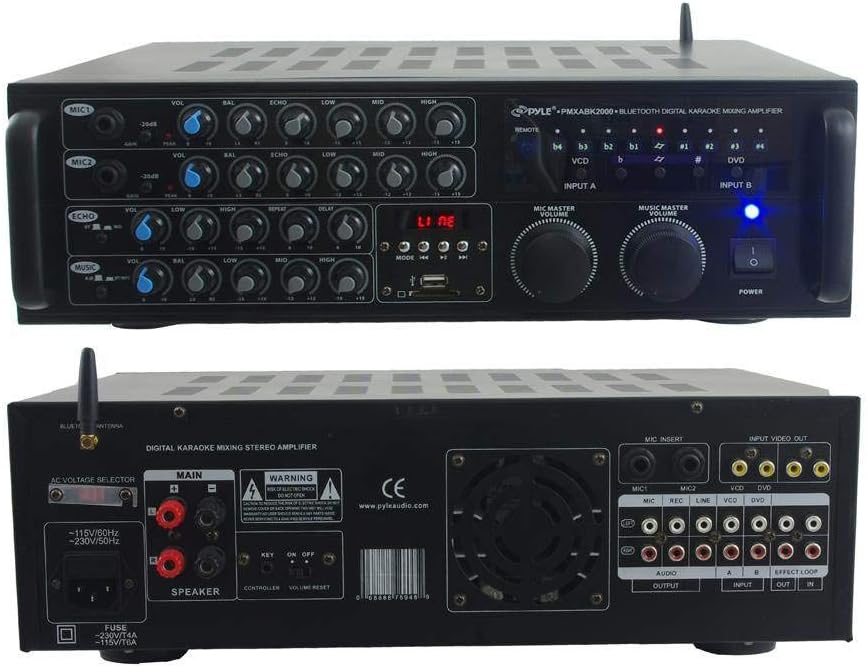
Figure 4.1: Front view of the amplifier, detailing microphone inputs, echo controls, music controls, and master volume knobs.
4.2 Rear Panel
The rear panel houses various input and output connections for speakers, audio sources, and video. It also includes the AC voltage selector and fuse compartment.
Figure 4.2: Rear view of the amplifier, highlighting speaker outputs, audio inputs/outputs, video inputs/outputs, and microphone insert jacks.
5. Setup
5.1 Connecting Speakers
The PMXAKB2000 supports speaker connections via banana clips or traditional bare wire. Ensure speakers have an impedance of 4-8 ohms.
- Identify the "MAIN" speaker output terminals on the rear panel.
- For banana clip connections: Insert the banana plugs into the corresponding red (+) and black (-) terminals.
- For bare wire connections: Unscrew the terminal caps, insert the bare wire ends into the holes, and tighten the caps to secure the connection. Ensure no stray wire strands touch each other or the amplifier chassis.
- Connect the other end of the speaker cables to your PA speakers. The amplifier is compatible with SpeakON connections on speakers, requiring appropriate cables.
Figure 5.1: Speaker output terminals on the rear panel, compatible with banana clips and bare wire.
5.2 Connecting Audio Sources
Connect your audio sources (e.g., CD player, DVD player, mixer, computer) to the appropriate RCA input jacks on the rear panel (Input A or Input B).
- RCA Audio Inputs: Use the "LINE" or "VCD/DVD" inputs for standard audio devices.
- Microphone Inputs: Connect microphones to the 1/4" MIC1 or MIC2 inputs on the front panel. Additional MIC INSERT jacks are available on the rear.
- Bluetooth: The amplifier features built-in Bluetooth for wireless audio streaming.

Figure 5.2: Front panel with two 1/4" microphone inputs.
5.3 Powering On
- Ensure all connections are secure.
- Connect the power cable to the amplifier's AC input and then to a suitable power outlet.
- Press the "POWER" button on the front panel to turn on the amplifier. The power indicator light will illuminate.
6. Operating Instructions
6.1 Basic Operation
- Input Selection: Use the "INPUT A" and "INPUT B" selectors on the front panel to choose your desired audio source.
- Music Master Volume: Adjust the large "MUSIC MASTER VOLUME" knob to control the overall music playback level.
- Microphone Master Volume: Adjust the "MIC MASTER VOLUME" knob to control the overall microphone level.
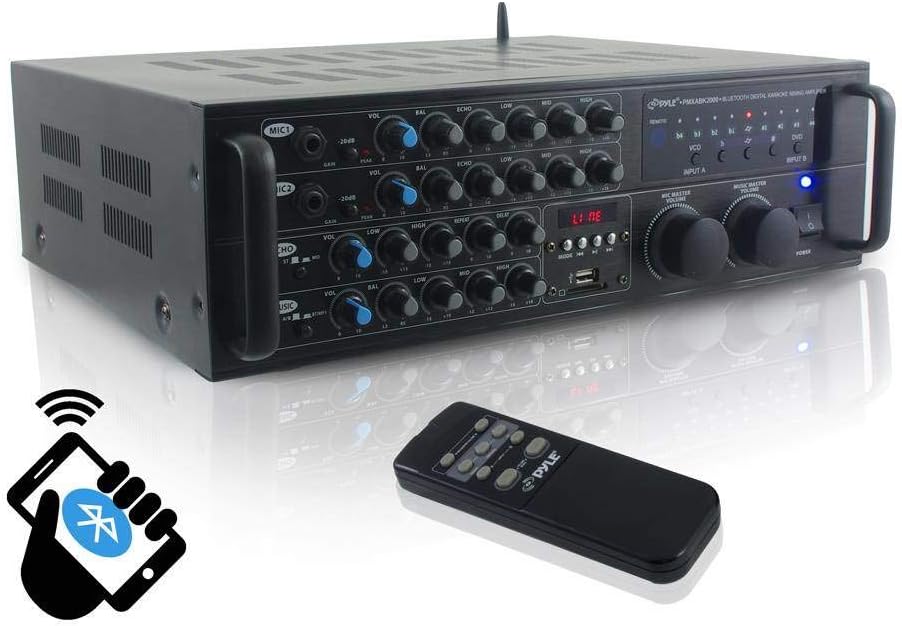
Figure 6.1: Front panel controls and included remote for convenient operation.
6.2 Microphone Controls
Each microphone input (MIC1, MIC2) has independent controls:
- VOL: Adjusts the volume of the individual microphone.
- BAL: Adjusts the balance (left/right) of the microphone signal.
- ECHO: Controls the amount of echo effect applied to the microphone.
- LOW/MID/HIGH: Equalizer controls for adjusting the bass, midrange, and treble frequencies of the microphone.
- GAIN: Adjusts the input sensitivity for the microphone.
6.3 Echo Controls
The echo section provides global control over the echo effect:
- VOL: Overall echo volume.
- LOW/HIGH: Echo tone controls.
- REPEAT: Adjusts the number of echo repetitions.
- DELAY: Adjusts the time between echo repetitions.
6.4 Music Controls
The music section allows for fine-tuning of the background music:
- VOL: Overall music volume.
- BAL: Music balance (left/right).
- LOW/MID/HIGH: Equalizer controls for adjusting the bass, midrange, and treble frequencies of the music.

Figure 6.2: Detailed view of the rotary knob controls for microphone, echo, and music adjustments.
6.5 Bluetooth Streaming
- Select the Bluetooth input mode on the amplifier.
- Enable Bluetooth on your device (smartphone, tablet, PC).
- Search for "Pyle PMXAKB2000" or similar in your device's Bluetooth settings.
- Pair with the amplifier. Once connected, you can stream audio wirelessly.

Figure 6.3: The amplifier features advanced Bluetooth technology for stable wireless streaming.
6.6 USB/SD Card Playback
Insert a USB flash drive or SD card containing MP3 audio files into the respective slot on the front panel. The amplifier will automatically detect and begin playback. Use the front panel controls or remote to navigate tracks and adjust playback.
6.7 Talk-Over Function
The MIC talk-over function automatically lowers the background music volume when a signal is detected from MIC1. This feature is useful for announcements or vocal performances where the microphone signal needs to be prioritized.
7. Maintenance
- Cleaning: Use a soft, dry cloth to clean the exterior of the amplifier. Do not use liquid cleaners or aerosols.
- Ventilation: Ensure the amplifier has adequate ventilation. Do not block the ventilation openings on the top or rear panels.
- Storage: If storing the unit for an extended period, disconnect it from power and store in a cool, dry place.
8. Troubleshooting
| Problem | Possible Cause | Solution |
|---|---|---|
| No power | Power cable disconnected; Power switch off; Blown fuse | Check power cable connection; Turn on power switch; Replace fuse (refer to specifications for fuse type). |
| No sound output | Incorrect input selected; Volume too low; Speaker connections loose; Source device issues | Select correct input; Increase master volume; Check speaker wiring; Verify source device is playing audio. |
| Humming or buzzing sound | Ground loop; Loose connections; Interference from other electronics | Check all cable connections; Try plugging into a different outlet; Move amplifier away from other electronic devices. |
| Bluetooth not connecting | Amplifier not in Bluetooth mode; Device not discoverable; Too far from amplifier | Ensure amplifier is in Bluetooth mode; Make sure device's Bluetooth is on and discoverable; Move device closer to amplifier. |
9. Specifications
- Power Output: 2000 Watts (1000W + 1000W at 4 Ohms)
- Inputs: 4 x 1/4" Mic IN (2 front/2 back), 3/2 pairs RCA audio input/output, RCA video connector input/output, USB/SD card slot, Effects Loop RCA connector
- Outputs: 2 pair speaker terminals
- Connectivity: Bluetooth Wireless Streaming
- Features: MIC Talk-Over Function, Digital LCD Display, Front Panel Rotary Controls, Independent Audio Controls for Mic & Audio Master Volumes, Built-in Cooling Fan, 9-step Digital Key Control, Digital Echo
- Product Dimensions: 13.5 x 16.5 x 5.5 inches
- Item Weight: 1 pounds
- Manufacturer: Sound Around
- Model Number: PMXAKB2000
- Date First Available: July 30, 2015
10. Warranty and Support
Pyle products are designed for reliability and performance. For warranty information, technical support, or service inquiries, please refer to the official Pyle Audio website or contact their customer service department. Keep your purchase receipt as proof of purchase for warranty claims.
For additional resources, you may visit the Pyle Store on Amazon or consult the official User Guide (PDF).
Related documentsPMXAKB2000


Ask a question about this manual
Ask about setup, troubleshooting, compatibility, parts, safety, or missing instructions. Manuals+ will review the question and use this page’s manual context to help answer it.