
Introduction
This manual provides comprehensive instructions for the VIZIO XRT112 Replacement Remote Control. Designed to function seamlessly with a wide range of VIZIO televisions, this remote offers a direct replacement solution without the need for complex programming. Please read this manual carefully to ensure proper setup and operation of your new remote control.
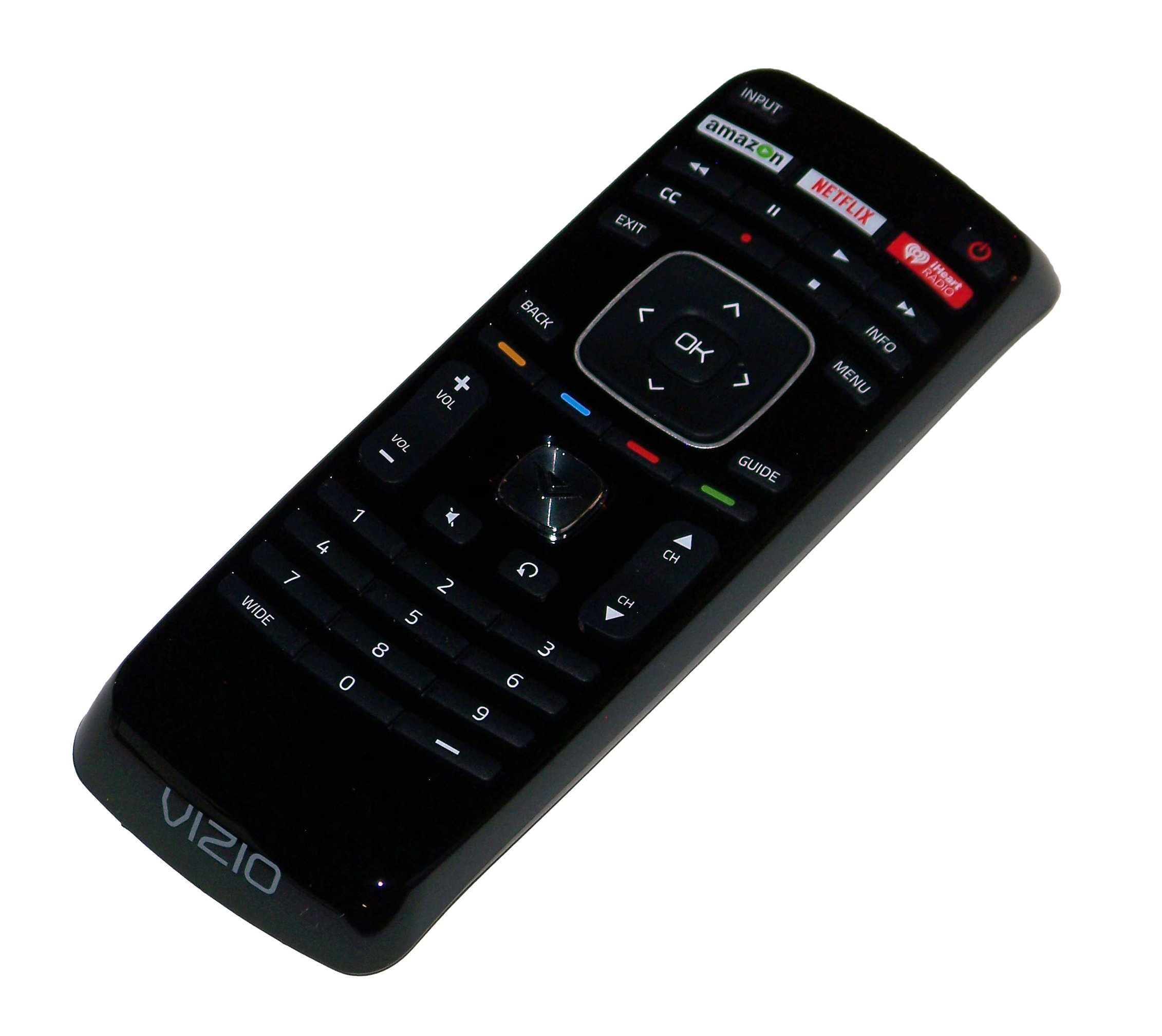
An image showing the VIZIO XRT112 Replacement Remote Control, featuring its ergonomic design and dedicated app buttons for Amazon, Netflix, and iHeart Radio.
Compatibility
The VIZIO XRT112 Replacement Remote Control is compatible with a broad range of VIZIO brand Television sets manufactured after 2012. It is designed to replace original remotes for many VIZIO LCD and LED TV models.
Key Compatible Models Include:
- E502AR, E550IA0, E550I-A0, E550IB2, E550I-B2, E600IB3, E600I-B3
- E370VP, E320VT, E370VT, E420VT, E422VLE, M370SL
- E322AR, E422AR, E472VLE, E552VLE
- E472VL, E552VL, E460ME
- M420SR, M420SV, M470SV, M550SV, M320SR, M370SR
- E3D320VX, E3D420VX, E3DB420VX, E3D470VX
- M3D421SR, M3D550SR, M3D460SR, M3D420SR
- XVT3D474SV, XVT3D650SV, XVT3D554SV
- E390i-A1, E500i-A1, M501-A2R
- E241IA1, E241I-A1W, E280IA1, E291IA1, E320IA2, E390IA1, E390IB1, E401IA2, E420A1, E420IA0, E500DA0, E500IB1E, E551IA2
This list is not exhaustive. The remote is generally compatible with most VIZIO LCD and LED TVs from 2012 onwards that originally used a similar XRT-series remote.
Features
- Direct Replacement: Functions immediately without programming for compatible VIZIO TVs.
- Dedicated App Buttons: Quick access to popular streaming services including Amazon, Netflix, and iHeart Radio.
- Ergonomic Design: Comfortable to hold and easy to use.
- Infrared Technology: Reliable communication with your television.
- Comprehensive Control: Full functionality for power, volume, channel, input selection, menu navigation, and more.
Setup
1. Battery Installation
- Locate the battery compartment on the back of the remote control.
- Slide the battery cover downwards or outwards to open it.
- Insert two (2) new AAA Alkaline batteries, ensuring the positive (+) and negative (-) terminals match the diagrams inside the compartment.
- Replace the battery cover by sliding it back into position until it clicks securely.
The remote control is now ready for use. No additional programming is typically required for compatible VIZIO televisions.
Operating Instructions
Point the remote control directly towards the infrared sensor on your VIZIO television. Ensure there are no obstructions between the remote and the TV.
- Power Button (POWER): Press to turn the TV on or off.
- Volume Up/Down (VOL +/-): Adjusts the sound level.
- Channel Up/Down (CH +/-): Changes the television channel.
- Input (INPUT): Cycles through available input sources (HDMI, AV, etc.).
- Menu (MENU): Accesses the TV's main menu for settings and options.
- Navigation Buttons (ARROWS): Use the directional arrows (Up, Down, Left, Right) to navigate through menus and options.
- OK/Select (OK): Confirms selections within menus.
- Back/Exit (BACK/EXIT): Returns to the previous screen or exits the current menu.
- Dedicated App Buttons (AMAZON, NETFLIX, IHEART RADIO): Press these buttons for direct access to the respective streaming applications.
- Mute (MUTE): Silences the TV audio.
Maintenance
Battery Replacement
Replace batteries when the remote's response becomes inconsistent or stops working. Always replace both batteries at the same time with new AAA Alkaline batteries. Do not mix old and new batteries, or different types of batteries.
Cleaning
To clean the remote control, gently wipe its surface with a soft, dry cloth. For stubborn dirt, slightly dampen the cloth with water. Avoid using harsh chemicals, abrasive cleaners, or excessive moisture, as these can damage the remote.
Troubleshooting
- Remote not responding:
- Ensure fresh batteries are correctly installed.
- Check for any obstructions between the remote and the TV's infrared sensor.
- Confirm the remote is pointed directly at the TV.
- Specific buttons not working:
- This may indicate a faulty button or low battery power. Try replacing batteries.
- Remote does not control TV:
- Verify your VIZIO TV model is listed in the compatibility section or is a VIZIO LCD/LED TV manufactured after 2012.
- Ensure the TV's infrared sensor is not blocked or damaged.
Specifications
| Brand | VIZIO |
| Model Name | XRT112 (Replacement for XRT100 and others) |
| Model Number (Mfr Part Number) | 4330251959 |
| Connectivity Technology | Infrared |
| Battery Type | 2 x AAA Alkaline Batteries |
| Maximum Range | 10 Meters (approx. 33 feet) |
| Button Quantity | 45 |
| Special Feature | Ergonomic Design, Dedicated App Buttons (Amazon, Netflix, iHeart Radio) |
| Compatible Devices | VIZIO Televisions (LCD and LED models manufactured after 2012) |
| UPC | 741271833972 |
Warranty and Support
This product is typically covered by a limited warranty provided by the seller or manufacturer. For specific warranty details, please refer to the product packaging or contact your point of purchase. For technical support or further assistance, please reach out to the seller or VIZIO customer service.
For more information, you may visit the official VIZIO support website: www.vizio.com/en/support