
Talentcell YB1208300-USB
Talentcell YB1208300-USB 12V Lithium Ion Battery Pack User Manual
Model: YB1208300-USB
Introduction
This manual provides essential instructions for the safe and efficient use of your Talentcell YB1208300-USB 12V Lithium Ion Battery Pack. Please read this manual thoroughly before operating the device and retain it for future reference.
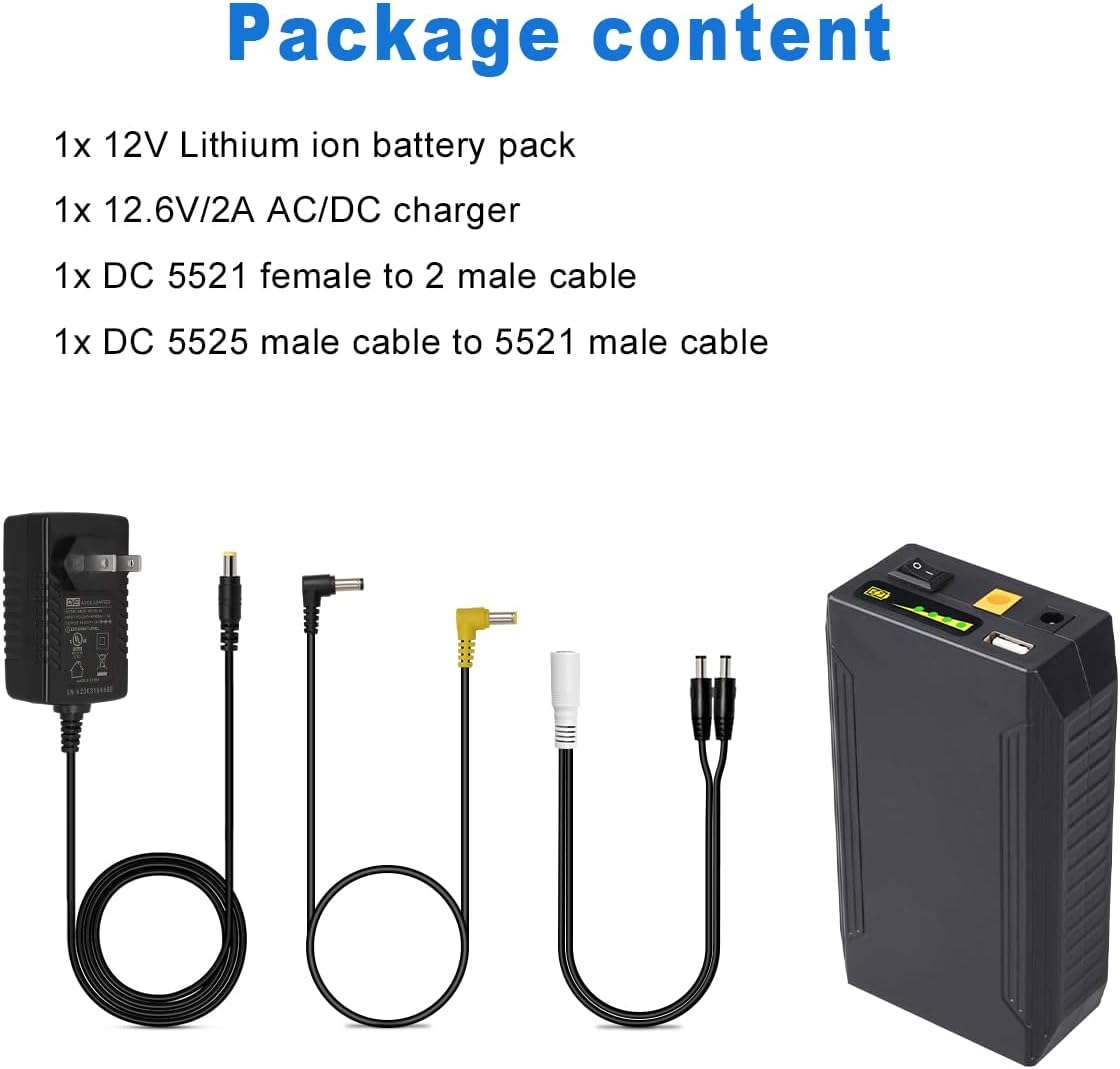
Package Contents
Verify that all items listed below are included in your package:
- 1x DC 12V Rechargeable Li-ion Battery Pack
- 1x 12.6V/1.5A AC/DC Charger for Battery
- 1x DC5525 Male to DC5521 Male Power Cable
- 1x DC5521 1 Female to 2 Male Power Splitter Cable
- 1x User Manual

Product Features and Overview
The Talentcell YB1208300-USB battery pack features multiple output ports for versatile power delivery to various electronic devices.

- 12V Output (DC5521): Provides 12V (voltage range 12.6V-9.0V) up to 6A maximum. This port also serves as the input for charging.
- 9V Output (DC5525): Provides 9V up to 1A.
- 5V USB Output: Provides 5V up to 2A maximum for USB-powered devices.
- Capacity LED Indicator: Displays the remaining battery charge level.
- Power Switch: Controls the power to the battery pack. Must be in the 'I' (ON) position for charging and discharging.

Setup
Initial Charging
- Ensure the power switch on the battery pack is in the 'I' (ON) position.
- Connect the provided 12.6V/1.5A AC/DC charger to a power outlet.
- Connect the charger's output plug to the 12V input/output port (DC5521) on the battery pack.
- The LED indicator on the AC/DC charger will be red during charging and turn green when the battery pack is fully charged.
- Charging typically takes approximately 6 hours for a full charge.
Note: The battery pack is designed for a slow charge process to help extend its service life.
Operating Instructions
Connecting Devices
To power your devices:
- Ensure the battery pack is sufficiently charged.
- Turn on the battery pack by setting the power switch to the 'I' (ON) position.
- Connect your device to the appropriate output port (12V, 9V, or 5V USB) using the correct cable.
- The battery pack can power multiple devices simultaneously, provided the total current draw does not exceed the maximum output for each port.
Special Note for Guitar Multi-Effects Pedals
The 9V DC output port (DC5525) on this battery pack has an inner positive (+) and outer negative (-) polarity. Most guitar pedals, however, typically require an inner negative (-) and outer positive (+) polarity. If you intend to power a guitar pedal, you must use a reversed polarity cable to connect the pedal to the battery pack. Failure to do so may damage your guitar pedal. This reversed polarity cable is not included in the package.
Important Safety Information
To ensure safe operation and prolong the life of your battery pack, please observe the following precautions:
- Do not use the power bank in areas with high humidity or where it may be exposed to water or other liquids.
- Do not attempt to modify or disassemble the power bank.
- Do not dispose of the power bank in fire or water.
- During charging, do not place the power bank on flammable materials such as beds or carpets. Ensure adequate ventilation.
- Avoid long-term storage in a low voltage state. For optimal battery life, store the battery with more than 50% charge. It is recommended to charge the battery every three months if stored for extended periods.
- Always confirm the polarity requirements of your devices before connecting them to the battery pack.
Specifications
| Feature | Detail |
|---|---|
| Model | YB1208300-USB |
| Capacity | 11.1V 8300mAh (99.9Wh) |
| Input | 12.6V/2A |
| Output 1 (DC5521) | 12V (voltage range 12.6-9V) / 6A Max |
| Output 2 (DC5525) | 9V / 1A |
| Output 3 (USB) | 5V / 2A Max |
| Weight | Approximately 500g (1.1 lbs) |
| Dimensions (L x W x H) | 5.39 x 3.11 x 1.54 inches (137 x 79 x 39 mm) |
| Battery Type | Lithium Ion |
Troubleshooting
- Battery not charging: Ensure the power switch on the battery pack is in the 'I' (ON) position when connecting the charger. Verify the charger is properly connected and plugged into a working power outlet.
- Device not powering on: Check if the battery pack has sufficient charge. Ensure the power switch is 'ON'. Verify that the correct output port is used and the cable is securely connected. Confirm the device's power requirements match the battery pack's output.
- Unusual heat or smell: Immediately disconnect the battery pack from all devices and the charger. Do not use the battery pack and contact customer support.
Warranty and Support
Talentcell products typically come with a 1-year warranty from the date of purchase. For warranty claims, technical assistance, or any questions regarding your Talentcell YB1208300-USB battery pack, please contact Talentcell customer support. Refer to your purchase documentation or the official Talentcell website for contact information.
Related documentsYB1208300-USB


Ask a question about this manual
Ask about setup, troubleshooting, compatibility, parts, safety, or missing instructions. Manuals+ will review the question and use this page’s manual context to help answer it.