
1. Introduction
The GoWISE Power 2000W Pure Sine Wave Power Inverter converts 12V DC power from a battery source into 120V AC household power. This inverter is designed for use in various applications, including vehicles, boats, camping, and during power outages. It provides a stable and clean power source suitable for sensitive electronic equipment, offering 2000W of continuous power and a 4000W surge capacity.
1.1. What's in the Box
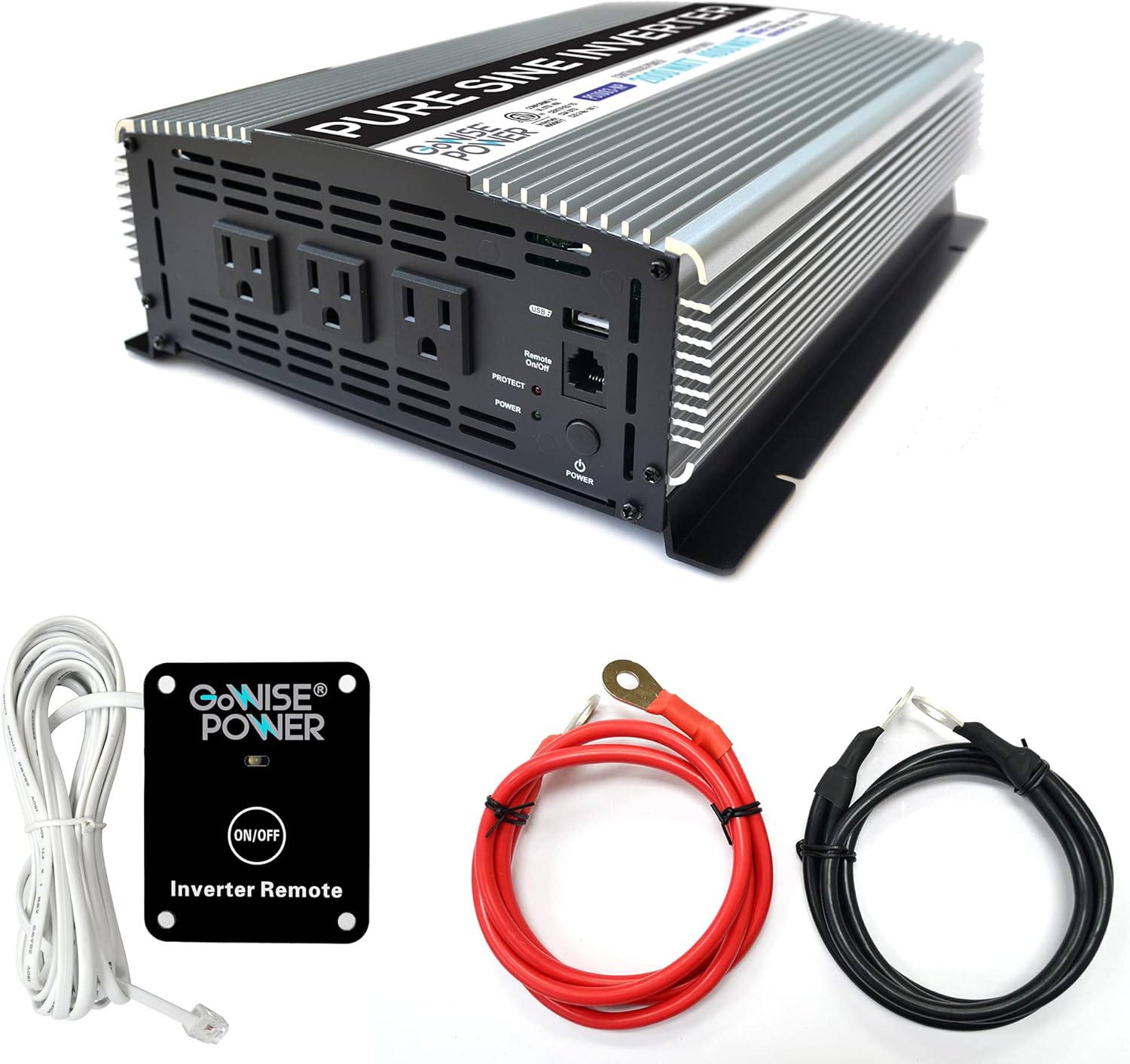
Image 1.1: GoWISE Power 2000W Pure Sine Wave Power Inverter with included accessories.
- GoWISE Power 2000W Pure Sine Wave Power Inverter (Model PS1003)
- Remote Switch with connecting cable
- One pair of Black and Red Battery Cables with ring terminals
- Instruction Manual (this document)
2. Safety Information
Read all safety warnings and instructions carefully before installing or operating the inverter. Failure to follow these instructions may result in electric shock, fire, serious injury, or property damage.
2.1. General Safety Precautions
- Keep the inverter away from moisture, water, rain, and snow.
- Do not operate the inverter if it has been dropped or damaged.
- Do not disassemble the inverter. Incorrect reassembly may result in electric shock or fire.
- To reduce the risk of electric shock, unplug the inverter from the outlet before attempting any maintenance or cleaning.
- Avoid placing the inverter in direct sunlight or near heating vents.
- Ensure adequate ventilation around the inverter. Do not block ventilation openings.
- This device is not intended for use by persons (including children) with reduced physical, sensory, or mental capabilities, or lack of experience and knowledge, unless they have been given supervision or instruction concerning use of the appliance by a person responsible for their safety.
2.2. Electrical Safety
- Connect the inverter only to a 12V DC power source.
- Ensure the battery cables are connected with correct polarity (red to positive, black to negative). Incorrect connection will damage the inverter.
- Do not connect the inverter to AC distribution wiring.
- Always connect the inverter to a properly grounded electrical system.
- Before connecting or disconnecting any cables, ensure the inverter is turned off.
- Verify that the total wattage of all connected appliances does not exceed the inverter's continuous power rating (2000W).
3. Setup and Installation
3.1. Choosing a Location
Select a location for the inverter that is:
- Dry and protected from water.
- Well-ventilated to allow for heat dissipation.
- Away from direct sunlight and heat sources.
- Securely mounted to prevent movement.
- As close as possible to the 12V DC power source to minimize cable length and voltage drop.
3.2. Wiring Instructions
Follow these steps to connect the inverter to your 12V DC power source:
- Prepare the Inverter: Ensure the inverter's power switch is in the OFF position.
- Connect Ground Wire: Connect one end of a suitable ground wire (not supplied) to the inverter's ground terminal (marked with a ground symbol) and the other end to a proper earth ground point (e.g., vehicle chassis, ground rod).
- Connect DC Cables to Inverter:Connect the ring terminal of the red battery cable to the positive (+) DC input terminal on the inverter. Connect the ring terminal of the black battery cable to the negative (-) DC input terminal on the inverter. Tighten the terminal nuts securely.

Image 3.1: Rear panel of the inverter with DC input terminals.
- Connect DC Cables to Battery: Connect the other end of the red battery cable to the positive (+) terminal of your 12V DC battery. Connect the other end of the black battery cable to the negative (-) terminal of your 12V DC battery. Ensure these connections are tight and secure.
- Remote Switch Connection (Optional): If using the remote switch, plug its cable into the RJ45 port labeled 'Remote On/Off' on the front panel of the inverter.

Image 3.2: Remote switch and battery cables.
Important: Always ensure proper cable gauge for your application. Inadequate cable size can lead to voltage drop and reduced performance or damage.
4. Operating Instructions
4.1. Powering On/Off

Image 4.1: Front panel of the inverter.
- To Turn On: Press and hold the main POWER button on the inverter's front panel for a few seconds until the green POWER indicator light illuminates. If using the remote switch, ensure the main power button on the inverter is in the ON position, then press the ON/OFF button on the remote.
- To Turn Off: Press and hold the main POWER button on the inverter's front panel until the green POWER indicator light turns off. If using the remote switch, press the ON/OFF button on the remote.
4.2. Using AC Outlets and USB Port
- Once the inverter is powered on, you can plug your 120V AC appliances into the three standard AC outlets.
- For charging USB devices, connect them to the 5V USB port.
- Ensure the total power consumption of all connected devices does not exceed 2000W.
4.3. Remote Control Operation
The included remote switch allows you to turn the inverter on and off from a distance. Simply plug the remote cable into the designated RJ45 port on the inverter's front panel. The remote has an ON/OFF button and an indicator light.
5. Protection Features
The GoWISE Power Inverter is equipped with multiple protection systems to ensure safe operation and protect both the inverter and your connected devices.

Image 5.1: Inverter protection systems.
- Thermal Protection: Automatically shuts down the inverter if its internal temperature exceeds a safe limit. This prevents damage from overheating.
- Overload Protection: Activates if the total power draw from connected devices exceeds the inverter's rated capacity. The inverter will shut down to prevent damage.
- Over Voltage Protection: Protects the inverter from damage if the input DC voltage from the battery exceeds a safe operating level.
- Under Voltage Protection: Shuts down the inverter if the input DC voltage drops below a critical level, protecting the battery from deep discharge.
- Low Voltage Protection Alarm: An audible alarm will sound when the battery voltage is getting low, providing a warning before the inverter shuts down due to under voltage.
When a protection system is triggered, the inverter will typically shut down, and the PROTECT indicator light on the front panel may illuminate. Disconnect the load, resolve the issue, and then restart the inverter.
6. Maintenance
Regular maintenance ensures optimal performance and longevity of your inverter.
- Cleaning: Periodically clean the exterior of the inverter with a soft, dry cloth. Do not use abrasive cleaners or solvents. Ensure ventilation openings are free from dust and debris.
- Cable Inspection: Regularly inspect battery cables and connections for any signs of wear, corrosion, or looseness. Tighten connections as needed.
- Ventilation: Ensure the area around the inverter remains clear to allow for proper airflow and cooling.
- Storage: If storing the inverter for an extended period, disconnect it from the battery and store it in a cool, dry place.
7. Troubleshooting
This section addresses common issues you might encounter with your inverter.
| Problem | Possible Cause | Solution |
|---|---|---|
| Inverter does not turn on. | No DC input power; Loose battery connections; Inverter switch off; Remote switch off (if used). | Check battery voltage; Ensure battery cables are securely connected; Turn on inverter's main power switch; Turn on remote switch. |
| No AC output, PROTECT light on. | Overload; Overheating; Low battery voltage; High battery voltage. | Reduce connected load; Allow inverter to cool down; Recharge battery; Check battery charging system. |
| Low voltage alarm sounds. | Battery voltage is low. | Recharge or replace the battery. Reduce load to extend battery life. |
| Connected appliance does not work. | Appliance requires more power than inverter can provide; Appliance is faulty. | Check appliance wattage; Try appliance with a standard AC outlet; Ensure inverter is providing power. |
| Fans are running loudly. | Inverter is under heavy load or operating in a warm environment. | This is normal operation. Ensure adequate ventilation. |
8. Specifications
Technical details for the GoWISE Power 2000W Pure Sine Wave Power Inverter (Model PS1003).

Image 8.1: Inverter dimensions.
| Feature | Specification |
|---|---|
| Model | PS1003 |
| Continuous Power | 2000 Watts |
| Surge Power | 4000 Watts |
| Input Voltage | 12V DC (200A) |
| Output Voltage | 120V AC |
| Output Frequency | 60Hz |
| Output Waveform | Pure Sine Wave |
| USB Output | 5V DC, 2.1A |
| Total Harmonic Distortion (THD) | <3% |
| Dimensions (L x W x H) | 17.1 x 9.3 x 4 inches (approx. 13" x 9.75" x 3.5" based on image) |
| Item Weight | 11.4 pounds |
| Protection Systems | Thermal, Overload, Over Voltage, Under Voltage, Low Voltage Alarm |
9. Warranty and Support
9.1. Warranty Information
GoWISE Power products are designed for reliability. For specific warranty terms and conditions, please refer to the documentation included with your purchase or contact GoWISE Power customer support.
9.2. Customer Support
If you require further assistance or have questions not covered in this manual, please contact GoWISE Power customer support. You can also refer to the official PDF user manual for additional details:


