1. Introduction
Thank you for purchasing the Intempo EE1104 Bluetooth Speaker. This manual provides essential information for the safe and efficient use of your device. Please read these instructions carefully before use and retain them for future reference.
2. Safety Information
- Do not expose the speaker to water, moisture, or extreme temperatures.
- Avoid dropping or subjecting the speaker to strong impacts.
- Do not attempt to disassemble or repair the speaker yourself. Refer all servicing to qualified personnel.
- Keep the speaker away from heat sources such as radiators, stoves, or other heat-producing appliances.
- Use only the charging cable provided or a certified equivalent.
- Do not listen at high volume levels for extended periods to prevent hearing damage.
3. Package Contents
Please check that all items are present:
- Intempo EE1104 Bluetooth Speaker
- USB Charging Cable
- 3.5mm AUX Cable (may vary by region)
- Instruction Manual
4. Product Overview
Familiarize yourself with the components and controls of your Intempo EE1104 speaker.

Figure 4.1: Front view of the Intempo EE1104 speaker, showing the speaker grille and top-mounted control buttons for power, play/pause, track navigation, and volume.
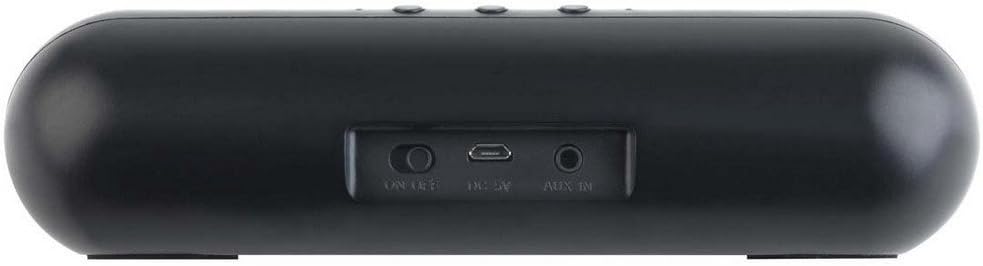
Figure 4.2: Rear view of the Intempo EE1104 speaker, highlighting the 'ON/OFF' switch, 'DC 5V' micro USB charging port, and 'AUX IN' 3.5mm audio jack.
Controls and Ports:
- Power Switch: Located at the rear, slide to turn the speaker ON or OFF.
- Play/Pause Button: Controls audio playback.
- Previous Track/Volume Down Button: Short press for previous track, long press to decrease volume.
- Next Track/Volume Up Button: Short press for next track, long press to increase volume.
- Microphone (MIC): For hands-free calling.
- DC 5V Port: Micro USB input for charging the speaker.
- AUX IN Port: 3.5mm audio input for wired connection to devices.
5. Setup
5.1 Charging the Speaker
- Connect the small end of the USB charging cable to the 'DC 5V' port on the rear of the speaker.
- Connect the larger end of the USB charging cable to a USB power adapter (not included) or a computer's USB port.
- The charging indicator light will illuminate during charging and turn off when fully charged.
- Allow approximately 2-3 hours for a full charge before first use.
5.2 Powering On/Off
- To turn ON: Slide the 'ON/OFF' switch on the rear of the speaker to the 'ON' position. A power-on tone will sound.
- To turn OFF: Slide the 'ON/OFF' switch to the 'OFF' position. A power-off tone will sound.
5.3 Bluetooth Pairing
- Ensure the speaker is fully charged and powered ON. The speaker will enter Bluetooth pairing mode automatically, indicated by a flashing LED light.
- Enable Bluetooth on your mobile device (smartphone, tablet, computer, etc.).
- Search for available Bluetooth devices. The speaker will appear as "EE1104" or "Intempo EE1104".
- Select "EE1104" from the list to connect. A confirmation tone will sound once paired successfully, and the LED light will stop flashing.
- If prompted for a password, enter "0000".
- The speaker will automatically reconnect to the last paired device when powered on, if the device's Bluetooth is active and within range.
5.4 AUX Connection
- Connect one end of the 3.5mm AUX cable to the 'AUX IN' port on the speaker.
- Connect the other end of the 3.5mm AUX cable to the headphone jack or audio output of your device (e.g., MP3 player, PC).
- The speaker will automatically switch to AUX mode.
6. Operating Instructions
6.1 Playing Audio
- Play/Pause: Press the Play/Pause button once to play or pause audio.
- Next Track: Short press the '+' button to skip to the next track.
- Previous Track: Short press the '-' button to go to the previous track.
- Volume Up: Long press the '+' button to increase the volume.
- Volume Down: Long press the '-' button to decrease the volume.
6.2 Hands-Free Calling (Bluetooth Mode Only)
- Answer Call: When a call comes in, press the Play/Pause button once to answer.
- End Call: During a call, press the Play/Pause button once to end the call.
- Reject Call: Long press the Play/Pause button to reject an incoming call.
- Redial Last Number: Double-press the Play/Pause button to redial the last number called.
7. Maintenance
- Cleaning: Use a soft, dry cloth to clean the speaker's exterior. Do not use abrasive cleaners or solvents.
- Storage: Store the speaker in a cool, dry place away from direct sunlight and extreme temperatures when not in use for extended periods.
- Battery Care: To prolong battery life, charge the speaker fully at least once every three months, even if not in regular use.
8. Troubleshooting
| Problem | Possible Cause | Solution |
|---|---|---|
| Speaker does not power on. | Battery is depleted. | Charge the speaker fully. |
| No sound from speaker. | Volume is too low or muted. Device not connected. | Increase speaker and device volume. Ensure proper Bluetooth or AUX connection. |
| Cannot pair via Bluetooth. | Speaker not in pairing mode. Device Bluetooth off. Too far from device. | Ensure speaker is ON and flashing. Turn device Bluetooth ON. Move speaker closer to device (within 10m). Forget device on phone and re-pair. |
| Sound distortion. | Volume too high. Low battery. Interference. | Reduce volume. Charge speaker. Move away from other electronic devices. |
9. Specifications
- Brand: Intempo
- Model: EE1104
- Connectivity Technology: Bluetooth
- Speaker Type: Computer Speaker
- Maximum Speaker Output Power: 2.2 Watt
- Power Source: Corded Electric (via USB charging)
- Audio Output Mode: Stereo
- Special Features: Wireless, Built-in Microphone
- Recommended Uses: For computers, MP3 players
- Approximate Dimensions (Package): 22.6 x 10.8 x 6.6 cm
- Approximate Weight (Package): 320 g
10. Disposal Information
This symbol on the product or its packaging indicates that this product must not be disposed of with your other household waste. Instead, it is your responsibility to dispose of your waste equipment by handing it over to a designated collection point for the recycling of waste electrical and electronic equipment. The separate collection and recycling of your waste equipment at the time of disposal will help to conserve natural resources and ensure that it is recycled in a manner that protects human health and the environment. For more information about where you can drop off your waste equipment for recycling, please contact your local city office, your household waste disposal service, or the shop where you purchased the product.


