
Important Safety Information
Please read this manual thoroughly before assembly and use. Keep these instructions for future reference. Incorrect assembly or use may result in damage to the product, property, or personal injury.
- Weight Capacity: Do not exceed the maximum weight capacity of 90 lbs (40 kg) for the TV bracket and 5.5 lbs (2.5 kg) for the middle glass shelf.
- TV Size: This stand is designed for TVs up to 65 inches. Ensure your TV's VESA pattern is compatible (up to 600x400mm).
- Stability: Always ensure the stand is placed on a flat, stable, and level surface.
- Assembly: Assembly should be performed by at least two adults. Follow all steps carefully.
- Children and Pets: Keep children and pets away from the assembly area. Do not allow children to climb on or play with the TV stand.
- Maintenance: Regularly check all screws and connections to ensure they remain tight and secure.
Package Contents
Verify that all components are present and undamaged before beginning assembly. If any parts are missing or damaged, contact customer support.
- Tempered Glass Base
- Central Aluminum Column
- TV Mounting Bracket (VESA compatible)
- Tempered Glass Shelf
- Hardware Kit (screws, washers, spacers, Allen keys)
- Cable Management Clips/Covers

Image: All main components of the SONOROUS PL-2710 TV stand, including the base, central column, TV bracket, and glass shelf.
Setup and Assembly Instructions
Follow these steps carefully for proper assembly. It is recommended to have two people for assembly.
- Unpack and Identify Parts: Carefully remove all components from the packaging. Lay them out on a soft, clean surface to prevent scratches. Refer to the 'Package Contents' section to ensure all parts are present.
- Attach Central Column to Base: Secure the central aluminum column to the tempered glass base using the provided screws and tools. Ensure the column is firmly seated and aligned.
- Install Glass Shelf: Attach the tempered glass shelf to the central column at the desired height using the designated fittings. Ensure it is level and secure.
- Assemble TV Mounting Bracket: Attach the horizontal TV mounting bar to the central column. Then, attach the vertical TV mounting arms to the back of your television, ensuring they align with your TV's VESA mounting holes. Use the appropriate screws, washers, and spacers from the hardware kit. Note: For some TV models, particularly newer Samsung TVs with curved backs, you may need to acquire longer machine screws (e.g., 43-45mm) and additional spacers (e.g., 20-25mm) for proper fit.
- Mount TV to Stand: With assistance, carefully lift your television and hook the vertical mounting arms onto the horizontal bar of the stand. Secure the TV in place using the safety screws or clips provided with the bracket.
- Cable Management: Route all TV and device cables through the integrated cable management system within the central column to maintain a tidy appearance.

Image: Detailed diagram showing the dimensions and key features of the TV stand, including swivel and bracket support.
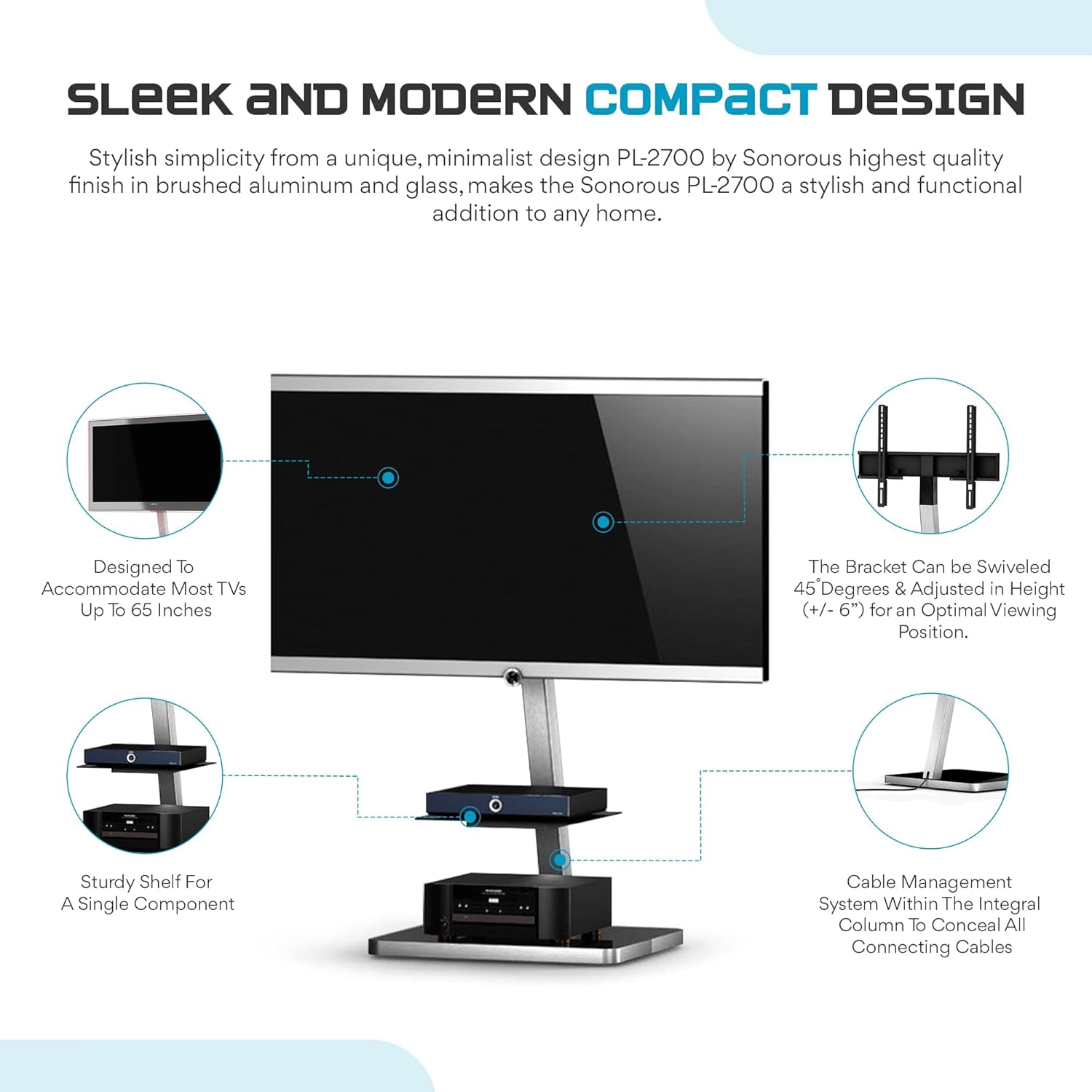
Image: Visual breakdown of the stand's design, highlighting TV compatibility, swivel adjustment, sturdy shelf, and cable management system.
Video: An official product video demonstrating the SONOROUS PL-2710 Modern TV Floor Stand Mount, showcasing its features and assembly process.
Operating Instructions
The SONOROUS PL-2710 TV stand offers flexible viewing options.
- Swivel Function: The TV mounting bracket allows for a 45-degree swivel in either direction (left or right). Gently rotate the television to achieve your desired viewing angle. Avoid forcing the swivel beyond its intended range.
- Height Adjustment: The TV bracket can be adjusted vertically by approximately 6 inches (15 cm). To adjust the height, loosen the securing bolts on the central column, reposition the bracket to the desired height, and then securely tighten the bolts. Ensure the TV is stable before releasing it.
- Cable Management: Utilize the cable management system integrated into the central column to keep all power and AV cables organized and out of sight. This helps maintain a clean and clutter-free entertainment area.
Maintenance
Proper care will ensure the longevity and appearance of your TV stand.
- Cleaning: Use a soft, damp cloth to clean the glass surfaces and aluminum column. Avoid abrasive cleaners or harsh chemicals that could damage the finish.
- Dusting: Regularly dust the stand to prevent buildup.
- Inspections: Periodically check all connections, especially the TV mounting screws and the column-to-base bolts, to ensure they are tight. Retighten if necessary.
Troubleshooting
| Problem | Possible Cause | Solution |
|---|---|---|
| TV does not fit the bracket. | Incorrect VESA pattern or TV weight exceeds capacity. | Verify your TV's VESA pattern (up to 600x400mm) and weight (max 90 lbs). |
| Stand feels wobbly after assembly. | Loose connections or uneven surface. | Ensure all screws, especially those connecting the column to the base and the TV bracket, are fully tightened. Place the stand on a level surface. |
| Screws provided do not fit my Samsung TV. | Some newer Samsung TVs require specific screw lengths and spacers due to design variations. | You may need to purchase longer machine screws (e.g., 43-45mm) and additional spacers (e.g., 20-25mm) from a hardware store to ensure a secure fit. |
| Cables are visible and untidy. | Cable management system not fully utilized. | Route all cables through the central column's integrated cable management channels. |
Specifications
| Feature | Detail |
|---|---|
| Model | PL-2710 |
| Brand | SONOROUS |
| Mounting Type | Floor Mount |
| Movement Type | Swivel (±45 Degrees) |
| Material | Aluminum, Tempered Glass |
| Color | Silver/Black |
| Compatible Devices | Television |
| Maximum Supported Screen Size | 65 Inches |
| Maximum TV Weight Capacity | 90 lbs (40 kg) |
| Maximum Middle Shelf Load | 5.5 lbs (2.5 kg) |
| Overall Dimensions (W x D x H) | 23" x 19.7" x 36.2" (58.4 cm x 50 cm x 91.9 cm) |
| VESA Compatibility | Up to 600x400mm |
Warranty and Support
This SONOROUS PL-2710 TV Stand comes with a 1 Year Manufacturer Warranty.
For warranty claims, missing parts, or technical assistance, please contact the seller, Vicis Trading, or refer to the contact information provided with your purchase documentation.
You can often find support details on the product's purchase page or by visiting the official SONOROUS website.


