
Introduction
This manual provides instructions for the proper setup, operation, and maintenance of your Motorola AURI3500W Cordless Phone. Please read this manual thoroughly before using your new phone to ensure safe and optimal performance.
The Motorola AURI3500W features DECT 6.0 wireless technology, caller ID, a reminder alarm, an integrated speakerphone, and an illuminated display and keypad for ease of use.
Package Contents
Verify that your package contains the following items:
- Motorola AURI3500W Handset
- Motorola AURI3500W Base Unit
- Power Adapter for Base Unit
- Telephone Line Cord
- Rechargeable Batteries (included)
- User Manual (this document)
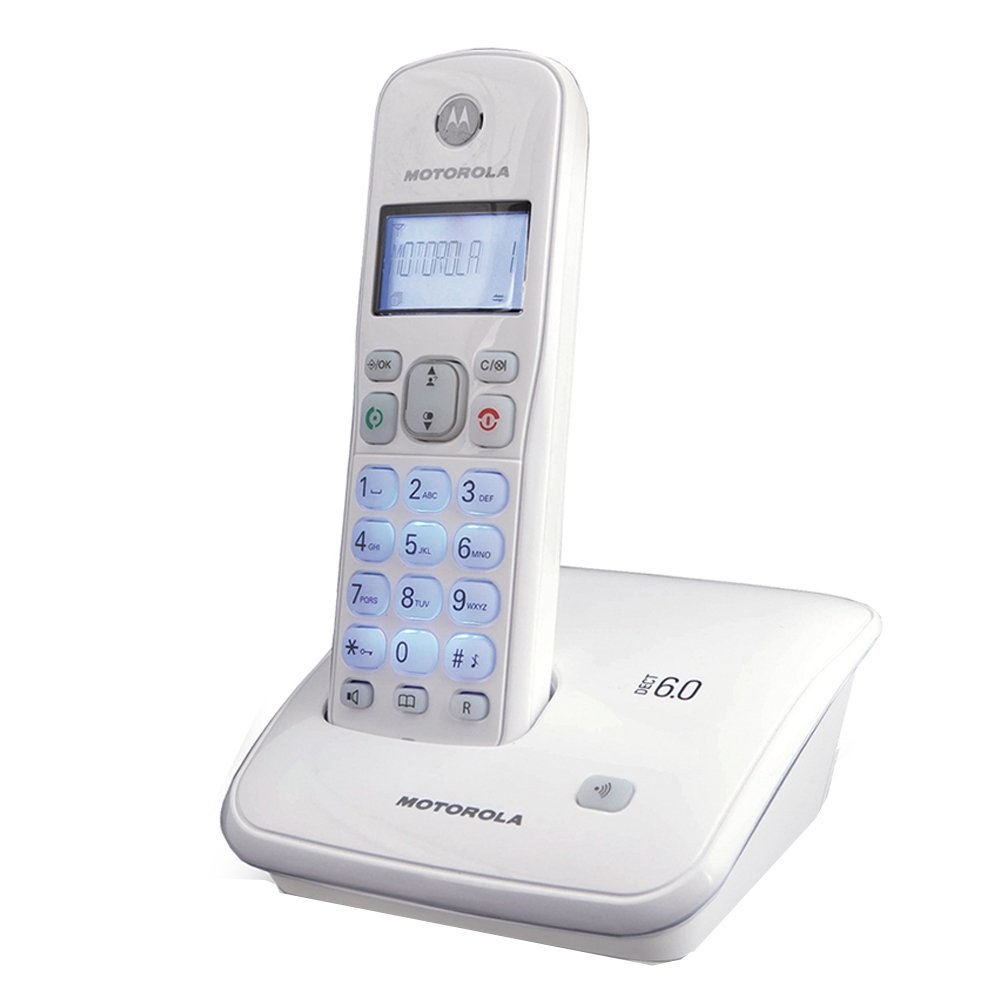
Image: Motorola AURI3500W Cordless Phone and Base Unit. This image shows the complete phone system, including the handset and its charging base.
Setup
1. Battery Installation
- Locate the battery compartment on the back of the handset.
- Slide the battery compartment cover downwards to open it.
- Insert the provided rechargeable batteries, observing the correct polarity (+ and - markings).
- Slide the battery compartment cover back into place until it clicks.
Note: Use only the rechargeable batteries supplied with your phone or recommended replacements. Non-rechargeable batteries may damage the device.
2. Base Unit Connection
- Place the base unit on a flat, stable surface near a power outlet and a telephone wall jack.
- Connect one end of the telephone line cord to the TEL LINE jack on the base unit.
- Connect the other end of the telephone line cord to your telephone wall jack.
- Connect the small end of the power adapter to the DC IN 6V jack on the base unit.
- Plug the large end of the power adapter into a standard electrical outlet.
Important: Use only the power adapter supplied with this product.
3. Initial Charging
Place the handset on the base unit's charging cradle. The handset will begin charging. Allow the handset to charge for at least 12-16 hours before its first use, even if the display indicates a full charge sooner. This ensures optimal battery performance.
Operating Instructions
Making a Call
- Press the TALK button or lift the handset from the base.
- Dial the desired phone number.
- Press the END button to hang up.
Receiving a Call
When the phone rings, press the TALK button or lift the handset from the base to answer.
Using the Speakerphone
During a call, press the SPEAKER button to activate the speakerphone. Press it again to return to handset mode.
Caller ID
If you subscribe to Caller ID service, the caller's name and number will appear on the handset display before you answer the call. You can review past calls using the CID button.
Reminder Alarm
Your phone includes a reminder alarm feature. Refer to the on-screen menu options for setting and managing alarms. Typically, this involves navigating to a "Settings" or "Alarm" menu item and following the prompts.
Illuminated Display and Keypad
The display and keypad illuminate automatically when a button is pressed or a call is received, enhancing visibility in low-light conditions.
Maintenance
Cleaning Your Phone
Wipe the phone and base unit with a soft, slightly damp cloth. Do not use cleaning sprays or abrasive cleaners, as these can damage the finish or electronic components.
Battery Care
- To maintain optimal battery life, always return the handset to the base unit when not in use.
- If the phone will not be used for an extended period, remove the batteries to prevent leakage.
- Dispose of old batteries responsibly according to local regulations.
Troubleshooting
No Dial Tone
- Ensure the telephone line cord is securely connected to both the base unit and the wall jack.
- Check if the power adapter is properly connected to the base unit and the electrical outlet.
- Verify that the handset batteries are charged.
Display is Blank or Dim
- Place the handset on the base unit to charge the batteries.
- Ensure the batteries are correctly installed.
- If the issue persists after charging, the batteries may need replacement.
Short Battery Life
- Ensure the handset is fully charged for 12-16 hours before initial use.
- Always return the handset to the base unit when not in use.
- Batteries have a limited lifespan and may need replacement after extended use.
Cannot Make or Receive Calls
- Check all cable connections (power, telephone line).
- Ensure the handset is within range of the base unit.
- Confirm that your telephone service is active.
Specifications
| Model Number: | AURI3500W |
| Brand: | Motorola |
| Wireless Technology: | DECT 6.0 |
| Display Size: | 1.5 Inches |
| Dimensions (L x W x H): | 11.5 x 11.5 x 15 cm |
| Weight: | 370 g |
| UPC: | 183420002134 |
| Features: | Caller ID, Reminder Alarm, Integrated Speakerphone, Illuminated Display & Keypad |
Warranty and Support
For warranty information and technical support, please refer to the warranty card included with your product or visit the official Motorola support website. Keep your purchase receipt as proof of purchase for warranty claims.
For further assistance, you may contact Motorola customer service through their official channels.


