
Motorola HKLN4604
Motorola HKLN4604 Swivel Earpiece with Microphone and PTT
Model: HKLN4604 | Brand: Motorola
Product Overview
The Motorola HKLN4604 Swivel Earpiece is designed for comfortable, all-day wear, providing clear audio and convenient communication for your two-way radio. Its in-line Push-to-Talk (PTT) feature ensures easy communication even when your radio is not readily accessible.
Key Features:
- Soft rubber C-ring Earpiece for enhanced comfort.
- Audio is heard directly into the user's ear for clear reception.
- Two in-line cable clips for secure cable management.
- Integrated in-line Push-to-Talk (PTT) button for easy transmission.
Package Contents
- 1 x Motorola HKLN4604 Swivel Earpiece with Microphone and PTT
Setup
Wearing the Earpiece
Gently place the C-ring earpiece over your ear. The soft rubber design is intended to sit comfortably without entering the ear canal, allowing for ambient sound awareness while providing clear radio audio.

Figure 1: Front view of the Motorola HKLN4604 Swivel Earpiece, showing the C-ring design and Motorola logo on the speaker housing.

Figure 2: Back view of the Motorola HKLN4604 Swivel Earpiece, showing the speaker grille and the C-ring that fits over the ear.
Connecting to Your Radio
Locate the two-pin audio jack on your compatible Motorola two-way radio. Align the two pins of the earpiece connector with the corresponding ports on your radio and firmly insert the connector until it clicks into place. Ensure a secure connection for optimal performance.

Figure 3: The two-pin connector of the earpiece, designed for compatibility with Motorola two-way radios.
Attaching the PTT/Microphone
The in-line Push-to-Talk (PTT) unit features a clip on its back. Use this clip to attach the PTT unit to your shirt collar, lapel, or any convenient location that allows for easy access during communication. Position it close to your mouth for clear voice transmission.
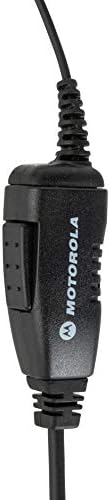
Figure 4: The in-line PTT (Push-to-Talk) unit with an integrated microphone and a clip for attachment to clothing.
Operating Instructions
Push-to-Talk (PTT) Function
To transmit your voice, press and hold the PTT button located on the in-line unit. Speak clearly into the microphone. Release the PTT button when you have finished speaking to return to receive mode.
Receiving Audio
Audio from your radio will be heard directly through the earpiece. Adjust the volume on your two-way radio to a comfortable listening level. The earpiece is designed to deliver clear audio while allowing you to remain aware of your surroundings.
Maintenance
- Cleaning: Wipe the earpiece and cable with a soft, damp cloth. Do not use harsh chemicals or abrasive cleaners.
- Storage: Store the earpiece in a cool, dry place away from direct sunlight and extreme temperatures. Avoid tangling the cable.
- Handling: Do not pull on the cable to disconnect the earpiece from the radio. Always grasp the connector firmly.
Troubleshooting
| Problem | Possible Cause | Solution |
|---|---|---|
| No audio from earpiece. | Earpiece not fully connected; radio volume too low; earpiece malfunction. | Ensure connector is fully inserted. Increase radio volume. Test with another earpiece if available. |
| Others cannot hear me. | PTT button not pressed; microphone blocked; microphone malfunction. | Press and hold PTT firmly while speaking. Ensure microphone is not covered. Test with another earpiece if available. |
| Audio is distorted or intermittent. | Loose connection; damaged cable; radio interference. | Check connection. Inspect cable for damage. Move away from potential interference sources. |
Specifications
| Feature | Detail |
|---|---|
| Model Name | HKLN4604 |
| Connectivity Technology | Wired |
| Headphones Jack | 2.5 mm Jack, 3.5 mm Jack (Note: Specific radio models may use one or both) |
| Material | Rubber |
| Compatible Devices | Motorola Two-Way Radios |
| Control Type | Push-to-Talk (PTT) |
| Item Weight | 2 Ounces (approx.) |
| Water Resistance Level | Water Resistant |
| Product Dimensions | 3 x 1.29 x 5 inches (approx.) |
Warranty and Support
For detailed warranty information and technical support, please refer to the official Motorola website or contact Motorola customer service. You may also find additional resources, including a PDF user manual, on the product's Amazon page or the Motorola support portal.
User Manual (PDF): Download Here
Related documentsHKLN4604


Ask a question about this manual
Ask about setup, troubleshooting, compatibility, parts, safety, or missing instructions. Manuals+ will review the question and use this page’s manual context to help answer it.