
Beiter DC Power PK1270-abc-193
Contents
Beiter DC Power GE Security Alarm Caddx/NetworX NX-6-12v 7ah Sealed Lead-Acid Battery Instruction Manual
Model: PK1270-abc-193
1. Introduction
This manual provides essential instructions for the safe and effective use of your Beiter DC Power GE Security Alarm Caddx/NetworX NX-6-12v 7ah Sealed Lead-Acid (SLA) battery. Please read this manual thoroughly before installation and operation to ensure optimal performance and longevity of your battery.
2. Product Overview
The Beiter DC Power SLA battery is a reliable power source designed for various applications, including security alarm systems. It features a maintenance-free, valve-regulated, and spill-proof design, allowing for safe operation in any orientation. The high-impact resistant ABS plastic case provides durability against shock, vibration, chemicals, and heat.

Figure 2.1: Front view of the Beiter DC Power Sealed Lead-Acid Battery, showing specifications and branding.
Key Features:
- Genuine Beiter DC Power Battery: A trusted sealed lead-acid battery.
- Battery Type: 20 Hour Sealed Lead Acid Battery.
- Maintenance-Free and Valve Regulated: Designed for ease of use and long life without maintenance.
- Rugged Construction: High-impact resistant non-conductive ABS plastic case for durability.
- Spill-Proof Design: Allows for trouble-free, safe operation in any orientation.
3. Specifications
| Specification | Value |
|---|---|
| Item Weight | 6 pounds |
| ASIN | B0128Z0U8Q |
| Item Model Number | PK1270-abc-193 |
| Brand | Beiter DC Power |
| Battery Cell Composition | Lead Acid |
| Battery Capacity | 7 Amp Hours |
| Unit Count | 1 Count |
| Voltage | 12 Volts |

Figure 3.1: Internal structure of a Sealed Lead-Acid battery, illustrating its components.
4. Setup and Installation
Proper installation is crucial for the safe and efficient operation of your SLA battery. Always follow the specific instructions provided by the manufacturer of the device in which this battery will be installed (e.g., GE Security Alarm Caddx/NetworX NX-6-12v system).
General Installation Guidelines:
- Safety First: Before handling the battery, ensure the device is powered off and disconnected from any power source. Wear appropriate personal protective equipment, including safety glasses and gloves.
- Identify Terminals: Locate the positive (+) and negative (-) terminals on both the new battery and the device. The positive terminal is typically marked with a red indicator or a plus sign, and the negative with a black indicator or a minus sign.
- Disconnect Old Battery (if applicable): If replacing an existing battery, disconnect the negative terminal first, then the positive terminal.
- Install New Battery: Carefully place the new battery into the battery compartment of your device. Ensure it fits securely.
- Connect Terminals: Connect the positive (+) terminal of the new battery to the positive terminal of the device first. Then, connect the negative (-) terminal of the new battery to the negative terminal of the device. Ensure all connections are tight and secure.
- Verify Polarity: Double-check that the polarity is correct before powering on the device. Incorrect polarity can cause damage to the battery and the device.
- Initial Charge: It is recommended to fully charge the battery before its first use, even if it appears to have some charge. Refer to the device's manual for charging instructions.
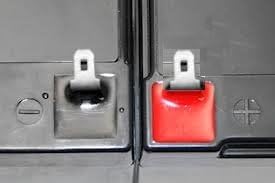
Figure 4.1: Close-up view of battery terminals, indicating positive (red) and negative (black) connections.
5. Operating Instructions
Once installed, your Beiter DC Power SLA battery operates as a reliable power source. Follow these general guidelines for optimal performance:
- Charging: Use a charger specifically designed for 12V sealed lead-acid batteries. Overcharging or undercharging can reduce battery life. Refer to the specifications table for recommended voltage regulation and initial current.
- Discharge: Avoid deep discharges. Total discharging (below 10.5V) can damage the battery.
- Temperature: Operate the battery within its specified temperature range. Extreme temperatures can affect performance and lifespan.
- Storage: If storing the battery for an extended period, ensure it is fully charged and stored in a cool, dry place. Periodically check the voltage and recharge if necessary to prevent self-discharge.
Video 5.1: An overview of Beiter DC Power batteries, highlighting their features and applications. This video demonstrates the versatility and reliability of Beiter DC Power's sealed lead-acid batteries.
6. Maintenance
Beiter DC Power SLA batteries are designed to be maintenance-free. However, following these simple practices can help extend their lifespan:
- Keep Clean: Periodically inspect the battery for dirt, dust, or corrosion on the terminals. Clean with a dry cloth if necessary. Do not use water or cleaning solutions directly on the battery.
- Check Connections: Ensure terminal connections remain tight and free from corrosion. Loose connections can lead to poor performance or overheating.
- Avoid Short Circuits: Prevent metal objects from bridging the positive and negative terminals, which can cause a short circuit and damage the battery.
- Regular Charging: For applications where the battery is not continuously charged (e.g., standby use), ensure it is recharged regularly to maintain optimal capacity.
7. Troubleshooting
If you experience issues with your Beiter DC Power SLA battery, consider the following common troubleshooting steps:
- Battery Not Holding Charge:
- Verify the charger is functioning correctly and is compatible with 12V SLA batteries.
- Check for proper terminal connections; ensure they are secure and free of corrosion.
- Ensure the battery has not been deeply discharged below 10.5V, which can cause irreversible damage.
- Consider the age of the battery; SLA batteries typically need replacement every 3-5 years.
- Device Not Powering On:
- Confirm the battery is fully charged.
- Inspect all wiring and connections between the battery and the device.
- Test the battery voltage with a multimeter to ensure it is within the operational range (typically 12.8V to 13.8V for standby use).
- Overheating Battery:
- Immediately disconnect the battery from the charger or device.
- Ensure the charging current is not too high.
- Verify the battery is not in a confined, poorly ventilated space.
- If overheating persists, discontinue use and contact support.
8. Safety Information
Observe the following safety precautions when handling and operating your SLA battery:
- Risk of Fire, Explosion, or Burns: Do not disassemble, heat above 60°C (140°F), or incinerate.
- Ventilation: Ensure adequate ventilation when charging to prevent gas accumulation.
- Eye and Skin Protection: Always wear safety glasses and gloves when handling batteries.
- Keep Away from Children: Store batteries out of reach of children.
- Proper Disposal: Do not dispose of batteries in household waste. Recycle according to local regulations.
- Proposition 65 Warning: This product contains chemicals known to the State of California to cause cancer and birth defects or other reproductive harm. Wash hands after handling.
9. Warranty and Support
This Beiter DC Power battery comes with a limited warranty. For specific warranty terms and conditions, please refer to the documentation included with your purchase or contact Beiter DC Power directly. The typical replacement period for these batteries is every 3-5 years under normal operating conditions.
For technical support, product inquiries, or warranty claims, please visit the official Beiter DC Power store or contact their customer service:
- Beiter DC Power Store: Visit Store
Ask a question about this manual
Ask about setup, troubleshooting, compatibility, parts, safety, or missing instructions. Manuals+ will review the question and use this page’s manual context to help answer it.