
Ninco NH93087
Ninco4RC 1/12 Buggy Storm Racer Car User Manual
Model: NH93087
Introduction
Welcome to the world of Ninco4RC! This manual provides essential information for the proper setup, operation, and maintenance of your new Ninco4RC 1/12 Buggy Storm Racer Car. Please read this manual thoroughly before using the product to ensure safe and optimal performance.
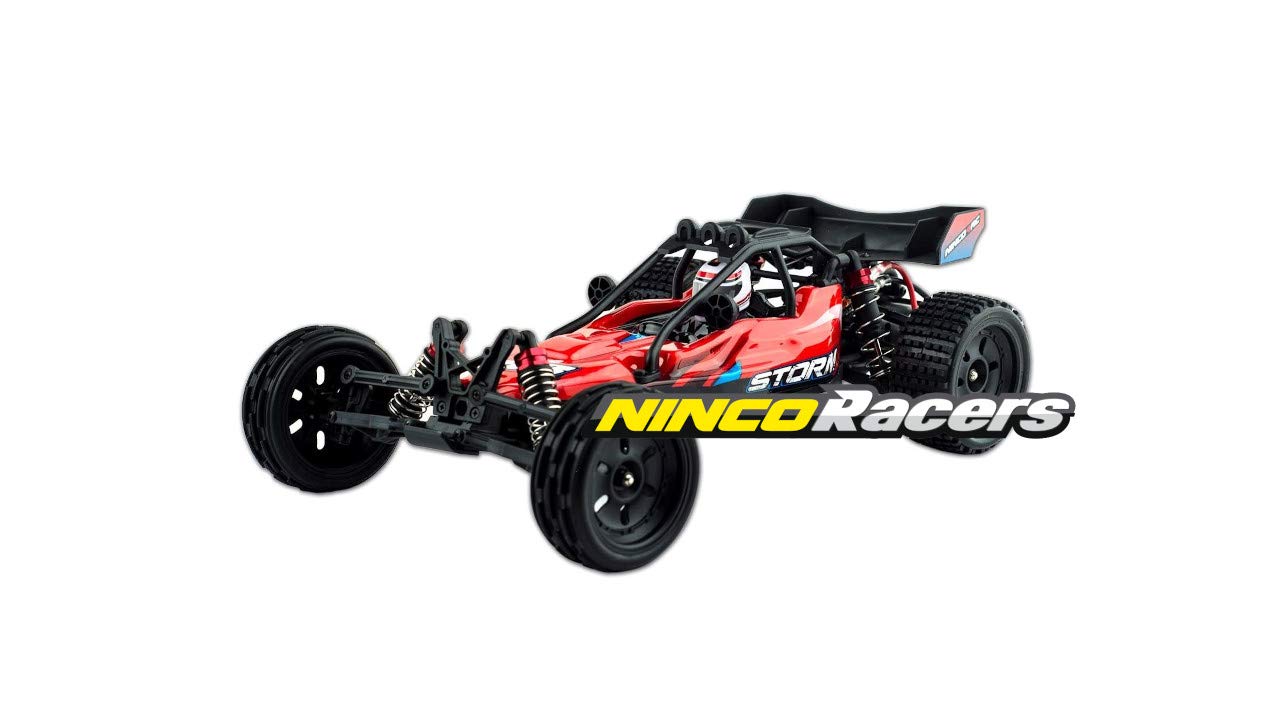
Figure 1: The Ninco4RC 1/12 Buggy Storm Racer Car. This image shows the complete remote control buggy from a front-side angle, highlighting its red and black chassis, large wheels, and aerodynamic design.
Safety Information
Always prioritize safety when operating your remote control vehicle. Failure to follow these guidelines may result in injury or damage to the product.
- WARNING: CHOKING HAZARD -- Small parts. Not for children under 3 years.
- Operate the vehicle in open areas away from people, pets, and obstacles.
- Do not operate in wet conditions or near water to prevent electrical damage.
- Keep fingers, hair, and loose clothing away from moving parts.
- Always turn off the vehicle and transmitter when not in use.
- Use only the provided charger and battery. Do not attempt to charge non-rechargeable batteries.
- Adult supervision is recommended for children operating this vehicle.
Package Contents
Carefully unpack all items and ensure the following components are present:
- Ninco4RC 1/12 Buggy Storm Racer Car (1)
- 2.4 Ghz Proportional Transmitter (1)
- Li-Po Battery 1500mAh 7.4V (1)
- 220V Charger (1)

Figure 2: Included components of the Ninco4RC Buggy. This image displays the remote control car, its 2.4 GHz proportional transmitter, the Li-Po battery, and the 220V charger, alongside the product packaging.
Setup
1. Charging the Vehicle Battery
- Connect the Li-Po battery to the 220V charger.
- Plug the charger into a standard 220V wall outlet.
- Allow the battery to charge fully. Refer to the charger's indicator light for charging status (e.g., red for charging, green for full). Charging typically takes approximately 2-3 hours for a full charge, providing up to 15 minutes of play time.
- Once charged, disconnect the battery from the charger.
2. Installing Vehicle Battery
- Locate the battery compartment on the underside of the vehicle.
- Carefully open the battery compartment cover.
- Insert the charged Li-Po battery, ensuring the connectors align correctly.
- Securely close the battery compartment cover.

Figure 3: View of the Ninco4RC Buggy chassis with the body removed. This image shows the internal components, including the battery compartment, which is essential for battery installation and maintenance.
3. Installing Transmitter Batteries
The transmitter requires 8 AA LR6 batteries (not included).
- Open the battery compartment on the back of the 2.4 Ghz proportional transmitter.
- Insert 8 AA LR6 batteries, observing the correct polarity (+/-).
- Close the battery compartment cover securely.
Operating Instructions
1. Powering On and Pairing
- Ensure both the vehicle and transmitter are turned off.
- First, turn on the transmitter. The indicator light should blink.
- Next, turn on the vehicle. The vehicle's indicator light should also blink.
- The transmitter and vehicle will automatically pair. Once paired, the indicator lights on both devices will become solid.
2. Basic Controls
- Throttle Trigger: Pull the trigger to move forward, push to brake or reverse.
- Steering Wheel: Turn the wheel left or right to steer the vehicle.
- Steering Trim: Adjust this dial on the transmitter to ensure the vehicle drives straight when the steering wheel is centered.
- Throttle Trim: Adjust this dial to ensure the vehicle remains stationary when the throttle trigger is released.
- Dual-Rate Potentiometer: Adjusts the angle and speed of turns, allowing customization for different driving skill levels.

Figure 4: Side profile of the Ninco4RC 1/12 Buggy Storm Racer Car. This view highlights the vehicle's suspension system, including the oil shock absorbers, and the overall chassis design.
3. Driving Tips
- Start slowly to get a feel for the controls.
- Practice steering and throttle control in an open area.
- Avoid driving on extremely rough terrain or through deep water.
- The 2.4 GHz technology provides long-range, interference-free operation.
Maintenance
Regular maintenance will extend the life and performance of your Ninco4RC Buggy.
- Cleaning: After each use, gently wipe down the vehicle with a soft, dry cloth to remove dirt and debris. Avoid using water or harsh chemicals.
- Battery Care: Always fully charge the Li-Po battery before storage if it will not be used for an extended period. Do not overcharge or completely discharge the battery. Store in a cool, dry place.
- Inspection: Periodically check for loose screws, damaged parts, or worn tires. The suspension includes oil shocks at each wheel with fully adjustable anodized aluminum caps and shock mounts; inspect these for proper function.
- Motor Cooling: The 390-engine includes an aluminum heatsink to help cool the temperature and improve performance. Ensure it is free from debris.
- Chassis: The chassis is made of ultra-durable plastic and reinforced with an anodized aluminum sub-chassis. Inspect for cracks or damage.
Troubleshooting
If you encounter issues with your Ninco4RC Buggy, refer to the following common problems and solutions:
| Problem | Possible Cause | Solution |
|---|---|---|
| Vehicle does not respond to transmitter. |
|
|
| Short operating range or interference. |
|
|
| Vehicle drives crooked. |
|
|
Specifications
| Feature | Detail |
|---|---|
| Model Number | NH93087 |
| Scale | 1/12 |
| Drive Type | 2 Wheel Drive |
| Radio Control Frequency | 2.4 GHz |
| Vehicle Battery | 1500mAh 7.4V Li-Po (included) |
| Transmitter Batteries | 8 AA LR6 (not included) |
| Play Time | Up to 15 minutes per charge |
| Charger | 220V Charger (included) |
| Material | Aluminium, Plastic |
| Product Dimensions (LxWxH) | 48.2 x 24.6 x 18 cm |
| Item Weight | 998 g |
| Recommended Age | 36 months - 14 years |
| Manufacturer | NINCO RC TOYS |
Warranty and Support
Ninco products are manufactured to high-quality standards. For information regarding warranty coverage, technical support, or spare parts, please visit the official Ninco website or contact their customer service department. Keep your purchase receipt as proof of purchase.
For further assistance, please refer to the contact information provided on the product packaging or the official Ninco website: www.ninco.com
Related documentsNH93087


Ask a question about this manual
Ask about setup, troubleshooting, compatibility, parts, safety, or missing instructions. Manuals+ will review the question and use this page’s manual context to help answer it.