
1. Introduction
The Greenlee FI-100-KIT Fiber Identifier Kit is designed for fast, simple, and robust fiber identification. This non-intrusive tool features low insertion loss, preventing alarm conditions during operation. It identifies fiber with tone detection and provides a clear indication of signal transmission direction, simplifying operation. The kit supports common fiber types including 250µm, 900µm, 2mm, and 3mm, and is capable of sensing light in bend-insensitive fibers.
2. Kit Contents
The FI-100-KIT includes the following components:
- FI-100 Fiber Identifier Tool
- FI-100-250 250µm Adapter
- FI-100-900 900µm Adapter
- FI-100-2MM 2mm Adapter
- FI-100-3MM 3mm Adapter
- FI-100-CASE Soft Carry Case
- FI-100-MANUAL Instruction Manual (this document)
- FI-100-SUNSHADE Sun Shade
- Two (2) AAA Alkaline Batteries

Figure 1: The Greenlee FI-100-KIT Fiber Identifier Kit, showing the identifier tool, soft carry case, and various fiber adapters.
3. Setup
3.1 Battery Installation
- Locate the battery compartment on the rear of the FI-100 Fiber Identifier.
- Open the battery compartment cover.
- Insert two (2) AAA Alkaline batteries, ensuring correct polarity (+/-).
- Close the battery compartment cover securely.
3.2 Adapter Attachment
Select the appropriate adapter based on the fiber diameter you intend to test (250µm, 900µm, 2mm, or 3mm). The adapters slide onto the fiber identifier's sensing head.

Figure 2: The FI-100 Fiber Identifier shown with various fiber adapters (250µm, 900µm, 2mm) detached, ready for selection and attachment.
4. Operating Instructions
4.1 Fiber Identification
- Ensure the correct fiber adapter is attached to the FI-100.
- Gently place the fiber into the designated slot on the identifier.
- The device will automatically detect the presence of a signal.
- The display will show the signal power in dBm.
- LED indicators will illuminate to show the direction of signal transmission (Left or Right).
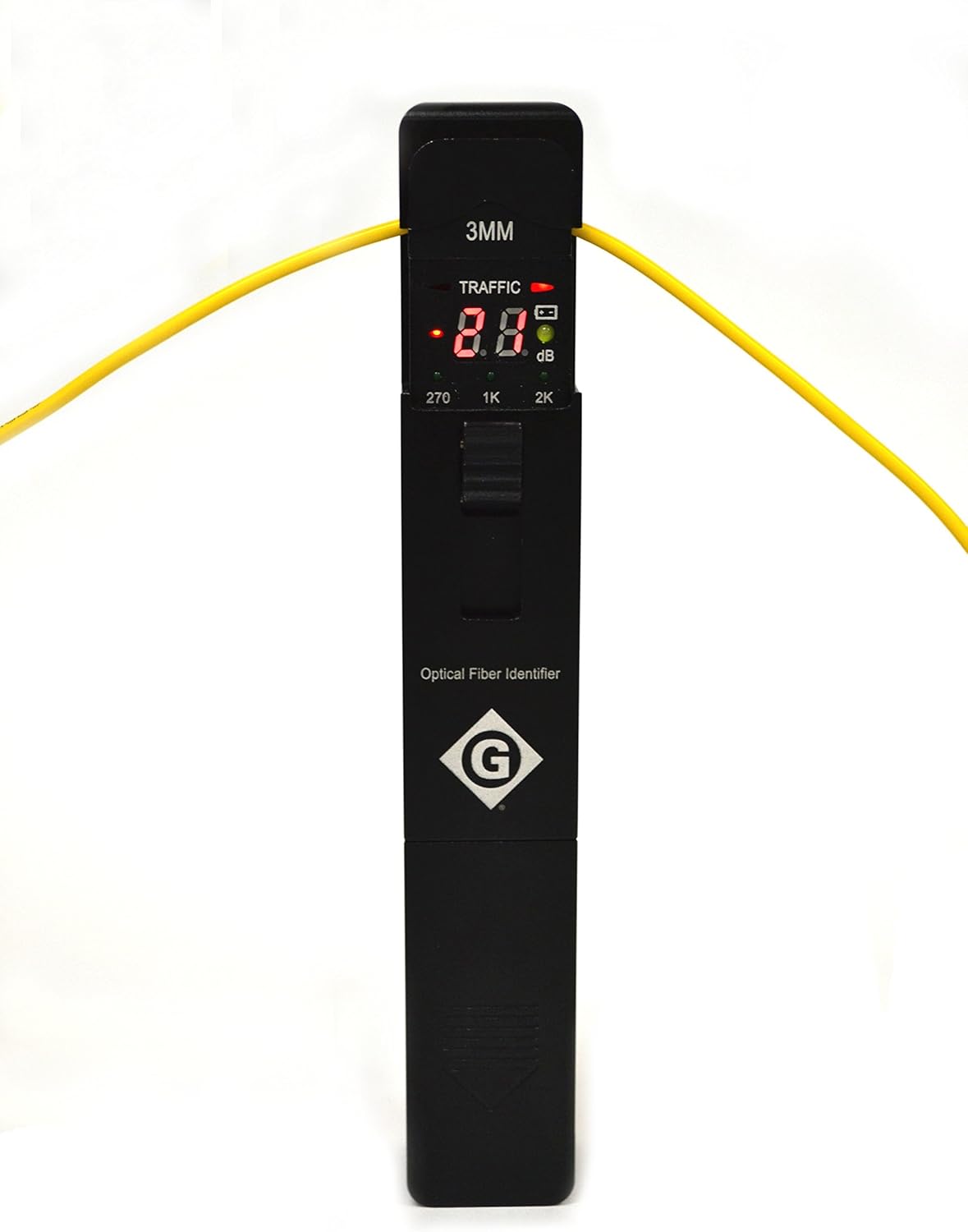
Figure 3: The FI-100 Fiber Identifier actively measuring a yellow fiber optic cable, displaying signal information and direction.
4.2 Tone Detection
The FI-100 can detect modulated signals at 270Hz, 1kHz, and 2kHz. When a modulated signal is detected, the corresponding frequency will be displayed on the unit.
4.3 Signal Direction Indication
The device features clear LED indicators (Left and Right) to show the direction of the optical signal, aiding in troubleshooting and installation.
4.4 Power Measurement
The FI-100 provides a real-time display of the optical signal power in dBm, allowing for quick assessment of signal strength.
5. Maintenance
5.1 Cleaning
- Keep the fiber identifier and adapters clean.
- Use a soft, dry cloth to wipe the exterior.
- Ensure the optical sensing area is free from dust and debris for accurate readings.
5.2 Battery Replacement
Replace batteries when the low battery indicator appears on the display or when the device fails to power on. Refer to Section 3.1 for battery installation instructions.
5.3 Storage
Store the kit in its soft carry case in a dry environment, away from extreme temperatures. The recommended storage temperature is -25°C to +70°C.
6. Troubleshooting
| Problem | Possible Cause | Solution |
|---|---|---|
| Device does not power on. | Dead or incorrectly installed batteries. | Replace batteries, ensuring correct polarity. |
| Inaccurate or no signal reading. | Incorrect adapter, dirty optical sensor, fiber not properly seated, or no signal on fiber. | Verify adapter, clean sensor, re-seat fiber, or check fiber source. |
| Tone detection not working. | Signal is not modulated at 270Hz, 1kHz, or 2kHz, or signal is too weak. | Ensure signal source is transmitting a compatible tone. Check signal strength. |
7. Specifications
| Parameter | Value |
|---|---|
| Identified Wavelength Range | 800-1700nm |
| Identified Signal Type | 270Hz ±5%, 1kHz ±5%, 2kHz ±5% |
| Detector Type | 1mm InGaAs |
| Signal Indication | Left and Right LED |
| Signal Direction Test Range (CW/0.9mm fiber) | -46 to 10dBm (1310nm), -50 to 10dBm (1550nm) |
| Signal Power Test Range (CW/0.9mm fiber) | -50 to +10dBm |
| Signal Frequency Display | 270Hz, 1kHz, 2kHz |
| Insertion Loss (Typical/Maximum) | 0.3 / 0.8dB at 1310nm, 1.5 / 2.5dB at 1550nm |
| Operating Temperature | -10°C to +60°C |
| Storage Temperature | -25°C to +70°C |
| Tone Detect Test Range (Average) - Diameter 0.9, 2.0, 3.0 | -30 to 0dBm (270Hz, 1kHz), -25 to 0dBm (2kHz) |
| Tone Detect Test Range (Average) - Diameter 0.25 | -25 to 0dBm (1kHz, 2kHz), -20 to 0dBm (2kHz) |
| Batteries | 2 AAA Alkaline (included) |
| Certifications | CE, FCC, WEEE |
| Item Weight | 11.2 ounces (0.32 kg) |
| Product Dimensions | 2.5 x 2 x 9 inches (6.35 x 5.08 x 22.86 cm) |
| Material | Plastic, Metal, Semiconductor |
8. Warranty Information
This product is covered by a standard manufacturer's warranty. For specific details regarding warranty coverage, terms, and conditions, please refer to the documentation provided with your purchase or contact Greenlee customer support.
9. Customer Support
For technical assistance, troubleshooting beyond this manual, or warranty inquiries, please contact Greenlee customer support. Visit the official Greenlee website for the most current contact information and support resources.
Manufacturer: Tempo Communications
Brand: Greenlee
Website: www.greenlee.com