
1. Introduction
This manual provides essential information for the safe and efficient installation, operation, and maintenance of your Johnson Pump Proline Bilge Pump 500 GPH. Please read these instructions thoroughly before installation and use to ensure optimal performance and longevity of the product. Keep this manual for future reference.
2. Safety Information
Always observe the following safety precautions to prevent personal injury and damage to the pump or vessel:
- Disconnect power before installing, servicing, or performing any maintenance on the pump.
- Ensure all electrical connections are waterproof and properly insulated to prevent short circuits and corrosion.
- Do not run the pump dry for extended periods, as this can cause overheating and damage.
- Verify that the voltage supply matches the pump's requirements (12V DC).
- Install an appropriate fuse (5A recommended) in the positive lead as close to the power source as possible.
- This pump is designed for pumping bilge water only. Do not use it for flammable liquids, chemicals, or other hazardous materials.
3. Package Contents
Upon unpacking, please verify that all components are present and undamaged:
- Johnson Pump Proline Bilge Pump 500 GPH
- DuraPort connection (3/4" hose connection)
- Instruction Manual (this document)
If any items are missing or damaged, please contact your supplier immediately.
4. Setup and Installation
4.1 Mounting the Pump
The pump should be mounted in the lowest part of the bilge where water collects. Ensure the pump is securely fastened to a solid surface using appropriate marine-grade fasteners (not included). The pump can be mounted horizontally or vertically, but ensure the outlet port is positioned to allow for proper hose routing without kinks.
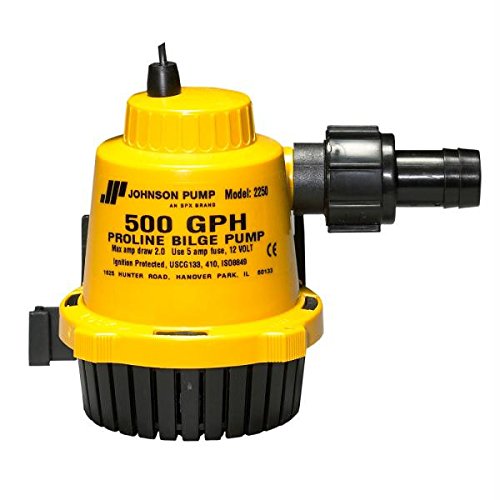
Image: A Johnson Pump Proline Bilge Pump 500 GPH, showing its compact design suitable for bilge installation. The pump features a black body with a red base and a clear top housing, indicating its robust construction.
4.2 Electrical Connections
Proper electrical wiring is crucial for safe and reliable operation. Refer to the following guidelines:
- Power Source: Connect the pump to a 12V DC power source.
- Fuse: Install a 5A fuse in the positive (+) lead as close to the battery as possible.
- Wiring: Use marine-grade wire of appropriate gauge for the length of the run. Ensure all connections are crimped, soldered, and sealed with heat-shrink tubing or marine-grade sealant to prevent corrosion.
- Ground: Connect the negative (-) wire directly to the vessel's common ground or battery negative terminal.
4.3 Hose Connection (DuraPort)
The pump is equipped with a 3/4" DuraPort connection. This connection is designed for easy and secure hose attachment. Attach a marine-grade bilge hose (not included) to the DuraPort outlet and secure it with a stainless steel hose clamp. Route the hose upwards to a through-hull fitting above the waterline, ensuring a continuous upward slope to prevent backflow.
5. Operating Instructions
The Johnson Pump Proline Bilge Pump 500 GPH is designed for automatic operation when connected to a float switch (sold separately) or can be manually operated via a switch. When power is supplied and water reaches the activation level (for automatic systems), the pump will activate and begin pumping water out of the bilge.
- Capacity: The pump has a capacity of 500 Gallons Per Hour (GPH) at a 3-foot (0.9m) head, and up to 630 GPH in a straight flow configuration.
- Amperage: The pump draws approximately 2.5 Amperes during operation.
- Continuous Operation: Avoid running the pump continuously without water, as this can lead to premature wear.
6. Maintenance
Regular maintenance ensures the longevity and reliable operation of your bilge pump.
- Inspection: Periodically inspect the pump for debris, such as leaves, hair, or other foreign objects that may clog the intake or impeller. Clean as necessary.
- Wiring: Check all electrical connections for corrosion or loose terminals. Clean and re-seal any compromised connections.
- Hose: Inspect the bilge hose for kinks, cracks, or leaks. Ensure hose clamps are secure.
- Float Switch (if applicable): Test the float switch regularly to ensure it activates the pump correctly.
- Winterization: In freezing climates, ensure the pump and hoses are drained to prevent ice damage.
7. Troubleshooting
| Problem | Possible Cause | Solution |
|---|---|---|
| Pump does not run | No power; Blown fuse; Loose wiring; Faulty switch/float switch; Motor failure | Check battery voltage; Replace fuse; Tighten connections; Test switch/float switch; Contact support if motor is faulty |
| Pump runs but no water is discharged | Clogged intake/impeller; Air lock; Kinked or blocked discharge hose; Pump mounted too high | Clear debris from intake/impeller; Ensure pump is submerged; Clear hose obstruction; Re-mount pump lower in bilge |
| Pump runs continuously | Faulty float switch; Backflow from discharge hose; Leak in discharge hose | Inspect/replace float switch; Ensure hose has upward slope and check valve (if installed); Repair or replace hose |
| Low flow rate | Partially clogged intake/impeller; Low voltage; Excessive head (lift height) | Clean intake/impeller; Check battery voltage and wiring; Verify installation height is within specifications |
8. Specifications
| Feature | Detail |
|---|---|
| Model | CW48752 |
| Capacity (3' / 0.9m head) | 500 GPH (33 L/M) |
| Capacity (Straight) | 630 GPH (40 L/M) |
| Voltage | 12V DC |
| Amperage | 2.5A |
| Fuse Size | 5A |
| Connection | 3/4" DuraPort |
| Material | Stainless Steel (internal components/shaft) |
| Product Dimensions (L x W x H) | 7" x 6" x 4" |
| Item Weight | 0.85 lbs (approx. 385g) |
| Maximum Lifting Height | 3 feet |
| UPC | 729321225021 |
9. Warranty Information
Johnson Pump products are manufactured to high-quality standards. For specific warranty terms and conditions, please refer to the warranty card included with your product or visit the official Johnson Pump website. Keep your proof of purchase for any warranty claims.
10. Customer Support
If you encounter any issues or have questions not covered in this manual, please contact your authorized Johnson Pump dealer or visit the Johnson Pump Marine website for further assistance. You can also visit the Johnson Pump Store on Amazon for product information.