
Drive Medical 15033BV-PKG-2
Instruction Manual
Drive Medical Delta Ultra Light Full Electric Bed
Model: 15033BV-PKG-2
1. Introduction
The Drive Medical Delta Ultra Light Full Electric Bed is designed for comfort and ease of use, providing adjustable positioning for users. This lightweight and easily assembled electric bed features interchangeable head and foot boards with high-impact composite end panels. Its unique single motor and junction box design ensure quiet operation, minimizing disruptions. In the event of a power failure, a built-in 9-volt battery allows for up to nine adjustments of the head and foot sections.
2. Important Information Before Use
ATTENTION:
- Please provide a reliable phone number for shipping contact. Failure to do so may result in delays or returns.
- Upon receipt or delivery, thoroughly inspect the product for any damages before signing. The seller is not responsible for damaged shipments not signed and reported as "damaged upon arrival."
- Contact customer support for any questions or concerns regarding delivery or product condition.
3. Components Overview
The Delta Ultra Light Full Electric Bed includes the main bed frame, headboard, footboard, full rails, and a foam mattress. The bed frame incorporates the electric motor system for height and position adjustments.

Figure 3.1: Fully assembled Drive Medical Delta Ultra Light Full Electric Bed, showing the mattress, full rails, and wooden head and footboards.
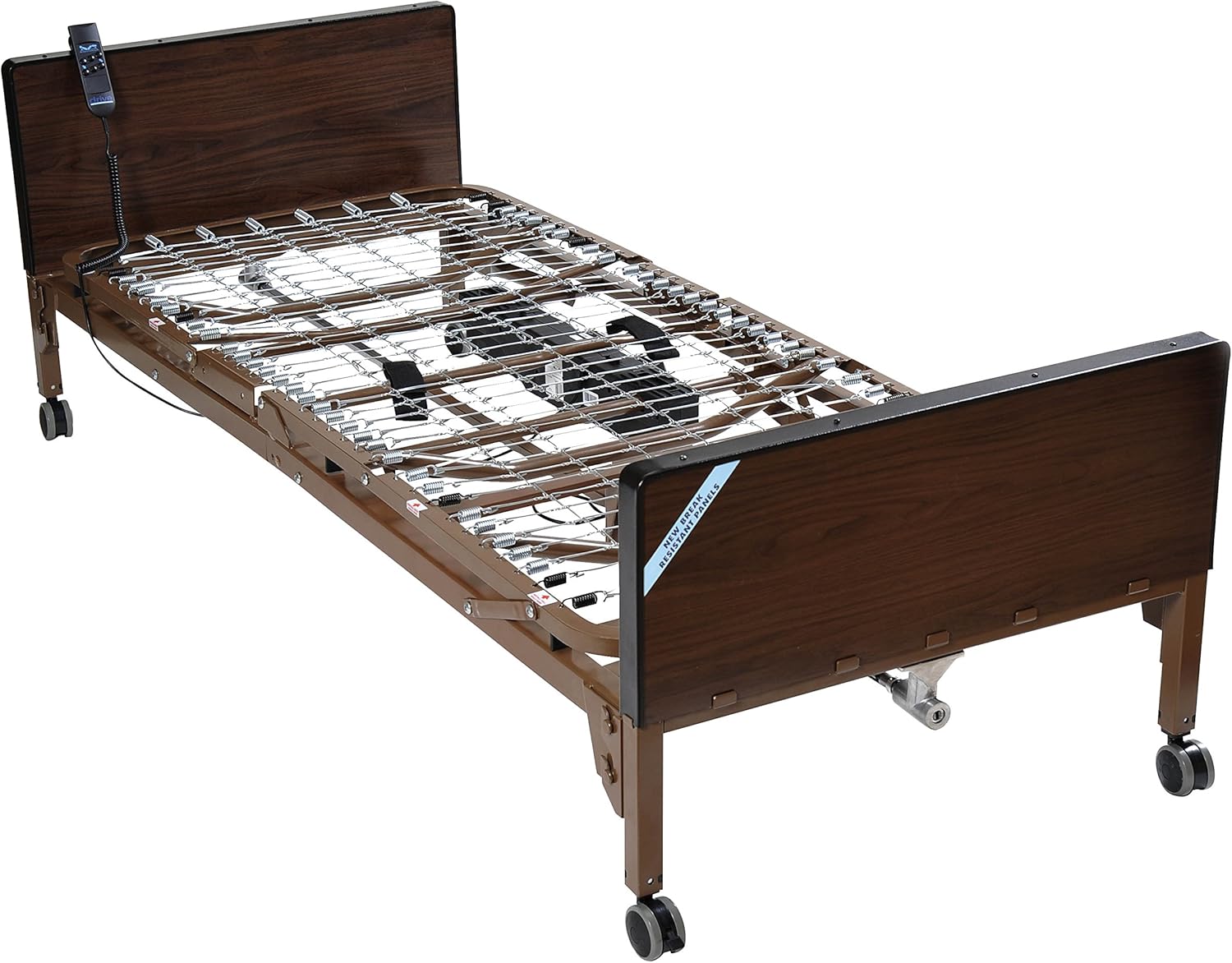
Figure 3.2: The bed frame without the mattress, illustrating the sturdy steel construction and adjustable sections.
4. Setup and Assembly
The Drive Medical Delta Ultra Light bed is designed for straightforward assembly. All necessary components and an instruction manual are included in the packaging. The height adjustment motor comes pre-installed on the foot section, and can be installed or removed without tools, even with a patient in the bed.
Follow the detailed instructions provided in the included assembly manual for proper and safe setup. Ensure all connections are secure and the bed is stable before use.
5. Operating Instructions
The bed features an electric motor system for adjusting the head, foot, and overall bed height. Use the remote control (if applicable, not explicitly mentioned but implied by "electric bed") to operate these functions. The motor system is designed to be quiet, allowing for adjustments without significant disturbance.
5.1. Adjusting Head and Foot Sections
Use the designated buttons on the control panel or remote to raise or lower the head and foot sections of the bed to the desired position. These adjustments allow for comfortable seating, leg elevation, or other therapeutic positions.
5.2. Adjusting Bed Height
The overall height of the bed can be adjusted to facilitate easier patient transfer or care. Use the height adjustment controls to raise or lower the entire bed frame. Ensure the bed is at a safe and stable height before transferring a patient.
5.3. Power Failure Operation
In the event of a power outage, the bed is equipped with a 9-volt battery backup located in the motor. This battery allows for the lowering of the head and foot sections up to nine times, ensuring the patient can be comfortably positioned even without external power.
5.4. Safety Rails
The full rails provide support when entering or exiting the bed and act as safety barriers to prevent falls, especially for users who move frequently during sleep. Ensure rails are securely in place when needed.
6. Maintenance
To maintain the longevity and cleanliness of your Drive Medical bed, follow these simple care instructions:
- Cleaning: Wipe the bed frame and head/foot boards with a dry cloth. For the mattress, refer to its specific care instructions.
- Inspection: Periodically check all bolts, screws, and connections to ensure they are tight and secure.
- Motor Care: Keep the motor and electrical components free from dust and moisture. Do not attempt to service the motor yourself; contact qualified personnel if issues arise.
7. Troubleshooting
If you encounter any issues with your Drive Medical Delta Ultra Light Full Electric Bed, please refer to the following general troubleshooting tips:
- Bed Not Responding to Controls:
- Check if the power cord is securely plugged into a working electrical outlet.
- Verify that the remote control cable is properly connected to the bed's junction box.
- If there is a power outage, ensure the 9-volt backup battery is installed and functional.
- Unusual Noises from Motor:
- Ensure no obstructions are interfering with the bed's moving parts.
- If the noise persists, discontinue use and contact customer support.
- Bed Wobbles or Feels Unstable:
- Check that all assembly bolts and screws are tightened.
- Ensure the bed is placed on a flat, level surface.
For issues not resolved by these steps, please contact Drive Medical customer support.
8. Specifications
| Feature | Detail |
|---|---|
| Brand | Drive Medical |
| Model | 15033BV-PKG-2 |
| Material | Alloy Steel |
| Color | Brown |
| Size | Full |
| Product Dimensions (L x W x H) | 88.5 x 35.75 x 35.75 inches |
| Actual Product Weight | 162 lbs |
| Product Weight Capacity | 450 lbs |
| Bed Height (Min/Max) | 12" / 19.5" |
| Bed Height w/ Casters (Min/Max) | 15" / 19.5" |
| Casters | 3" |
| Power Failure Battery | 1 x 9V (for lowering head/foot sections) |
| Motor Models | 15037MN (Head and Foot), 15033MHLN-MGBA (Hi/Low) |
| UPC | 682055556567 |
9. Warranty and Support
For information regarding product warranty, please refer to the documentation included with your purchase or visit the official Drive Medical website. For any technical assistance, parts, or service inquiries, please contact Drive Medical customer support.
You may also consider available protection plans for extended coverage, such as 2-Year or 3-Year Protection Plans, or the Complete Protect monthly plan, which can be found where the product was purchased.
Related documents15033BV-PKG-2


Ask a question about this manual
Ask about setup, troubleshooting, compatibility, parts, safety, or missing instructions. Manuals+ will review the question and use this page’s manual context to help answer it.