
1. Introduction
Thank you for choosing the BoxWave Universal FineTouch Capacitive Stylus. This stylus is designed to provide a precise and responsive touch experience on all capacitive touch screens, including smartphones and tablets. Its pen-like form factor ensures comfortable use and portability.

Image: The BoxWave FineTouch Capacitive Stylus in Jet Black, demonstrating its use on a tablet screen with the text "Ultra Accurate & Responsive".
Key Features:
- Universal Compatibility: Works with all capacitive touch screens.
- Convenient Design: Pen-like form for easy carrying and comfortable grip.
- Durable Construction: Built to last with a clear disc tip for enhanced precision.
- Enhanced Precision: The clear disc tip allows you to see exactly where your input is being registered.
- Lightweight: Designed for natural and effortless writing and navigation.
2. Setup
The BoxWave FineTouch Capacitive Stylus requires no special setup, pairing, or charging. It is ready for immediate use right out of the packaging.
- Remove the stylus from its packaging.
- Ensure the clear disc tip is clean and free of debris.
- Begin using the stylus directly on your device's capacitive touchscreen.
3. Operating Instructions
The FineTouch Capacitive Stylus simulates the touch of your finger, providing a more precise and comfortable interaction with your touchscreen device.

Image: A user writing naturally on a tablet screen with the FineTouch Capacitive Stylus, demonstrating its ease of use without pairing.
Using the Clear Disc Tip:
The unique clear disc tip is designed to enhance precision. The disc itself is conductive and makes contact with the screen, while its transparency allows you to see exactly where your input is being registered. This is particularly useful for detailed tasks like drawing, writing, or precise selection.
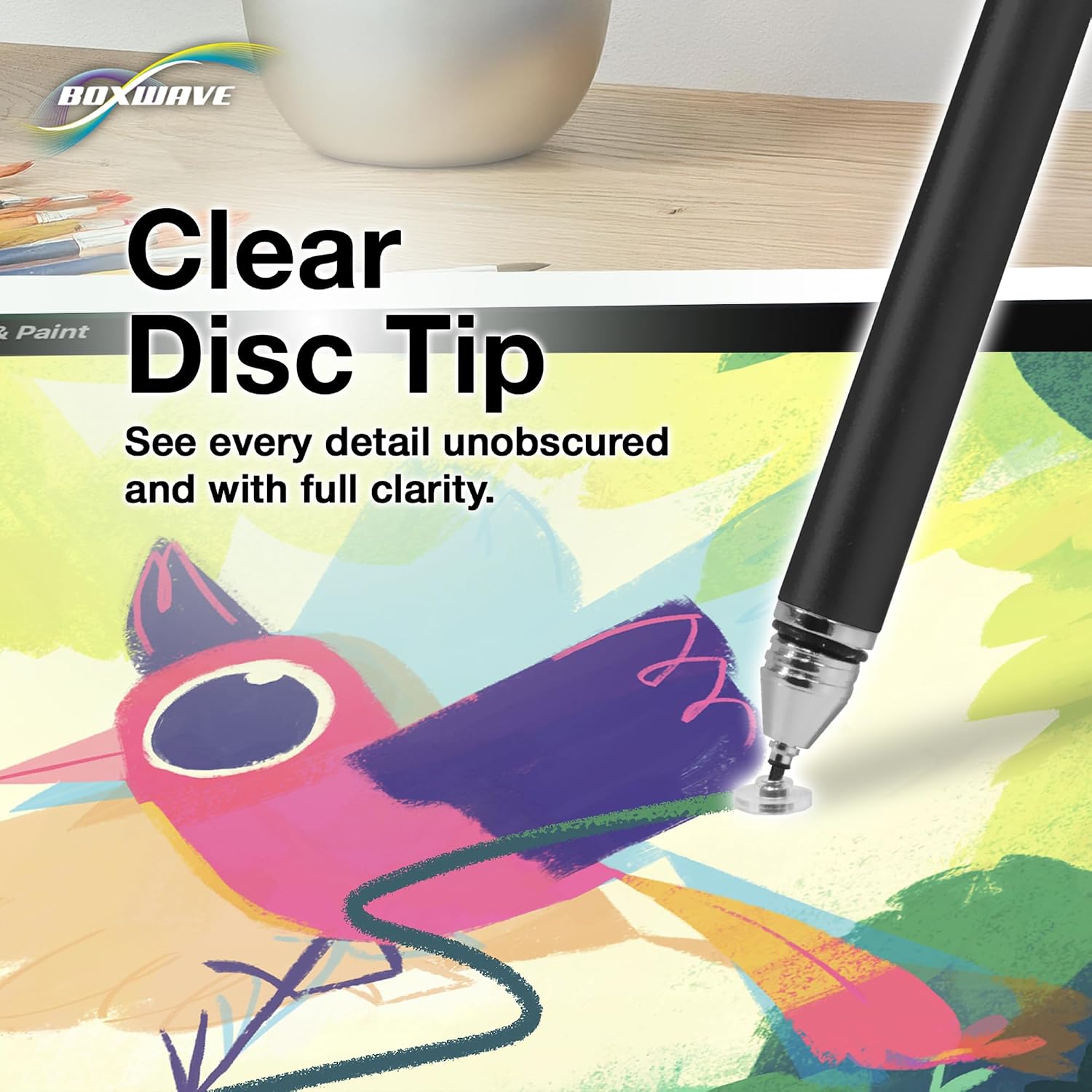
Image: A close-up view of the stylus's clear disc tip interacting with a tablet screen, highlighting its transparent design for precise input.
- Tapping: Gently tap the screen with the disc tip for selections and navigation.
- Swiping: Glide the disc tip across the screen for scrolling or gesture controls.
- Writing/Drawing: Apply light pressure and move the stylus as you would a pen on paper for writing or artistic creation.
The stylus is also ideal for use in cold weather, allowing you to interact with your device without removing gloves.
4. Maintenance
Proper care will ensure the longevity and optimal performance of your BoxWave FineTouch Capacitive Stylus.
- Cleaning: Wipe the stylus body and the clear disc tip with a soft, dry, lint-free cloth. Avoid using harsh chemicals or abrasive materials.
- Tip Protection: The stylus includes a threaded cap to protect the clear disc tip when not in use. Always replace the cap to prevent damage.
- Storage: Store the stylus in a clean, dry place, away from extreme temperatures and direct sunlight.

Image: A close-up of the stylus with its threaded cap, emphasizing the protection it offers to the FineTouch tip.
5. Troubleshooting
If you experience issues with your stylus, consider the following common solutions:
| Problem | Possible Cause | Solution |
|---|---|---|
| Stylus is unresponsive or inaccurate. |
|
|
| Stylus leaves marks on the screen. | Debris on the stylus tip or screen. | Clean both the stylus tip and the device screen thoroughly before use. |
6. Specifications
| Feature | Detail |
|---|---|
| Brand | BoxWave |
| Model Number | bw-1265-0-9179 |
| UPC | 852668129889 |
| Color | Jet Black (other colors available separately) |
| Material | Metal, Plastic |
| Item Weight | 1 ounce |
| Compatible Devices | All Capacitive Touchscreen Smartphones and Tablets |
7. Warranty and Support
For information regarding warranty coverage or technical support, please refer to the official BoxWave website or contact their customer service directly. Contact details are typically found on the product packaging or the manufacturer's official website.
You can visit the BoxWave website for more information: www.boxwave.com