
1. Introduction
Thank you for purchasing the QFX SBX-61150BTL Professional PA Speaker with Built-In Amplifier. This powerful and versatile speaker is designed to deliver high-quality audio for various applications, from personal entertainment to professional events. Featuring a 15-inch LED-lit woofer, multiple input options, and a built-in amplifier, this unit provides robust sound and dynamic visual effects. Please read this manual thoroughly before operating the unit to ensure proper use and to maximize its performance and longevity.
2. Important Safety Information
To reduce the risk of electric shock, fire, or injury, always follow basic safety precautions when using this product. Keep these instructions for future reference.
- Read Instructions: Read all safety and operating instructions before operating the appliance.
- Retain Instructions: Keep the safety and operating instructions for future reference.
- Heed Warnings: Adhere to all warnings on the appliance and in the operating instructions.
- Follow Instructions: Follow all operating and use instructions.
- Water and Moisture: Do not use this apparatus near water.
- Cleaning: Clean only with a dry cloth.
- Ventilation: Do not block any ventilation openings. Install in accordance with the manufacturer's instructions.
- Heat: Do not install near any heat sources such as radiators, heat registers, stoves, or other apparatus (including amplifiers) that produce heat.
- Power-Cord Protection: Protect the power cord from being walked on or pinched, particularly at plugs, convenience receptacles, and the point where they exit from the apparatus.
- Lightning: Unplug this apparatus during lightning storms or when unused for long periods of time.
- Servicing: Refer all servicing to qualified service personnel. Servicing is required when the apparatus has been damaged in any way.
3. Package Contents
Please check that all items are present and in good condition upon opening the package. If anything is missing or damaged, contact your retailer immediately.
- QFX SBX-61150BTL Professional PA Speaker
- Remote Control
- Power Cable
- User Manual (this document)
4. Product Features
The QFX SBX-61150BTL speaker is equipped with a range of features designed for optimal audio performance and user convenience:
- Integrated USB/SD Card Player for direct media playback.
- Built-in FM Radio Tuner for listening to your favorite stations.
- Wireless Bluetooth Connectivity for streaming audio from compatible devices.
- Dual 1/4 inch TRS Microphone Connectors for vocal performances or announcements.
- Dedicated Guitar Input for connecting musical instruments.
- Vibrant 15-inch LED-Lit Woofer for dynamic visual effects.
- Powerful 4500 Watt PMPO (Peak Music Power Output) for robust sound.
- RCA Input/Output for connecting to external audio sources or other speakers.
- Full-function Remote Control for convenient operation.
5. Controls and Connections
Familiarize yourself with the various controls and connection ports on your speaker. Refer to the image below for a visual guide.

Figure 5.1: Front view of the QFX SBX-61150BTL speaker highlighting key features and inputs. This image shows the speaker with labels for Bluetooth, FM, USB Port, SD Port, EQ Remote, Microphone Input, Guitar Input, and RCA In/Output.
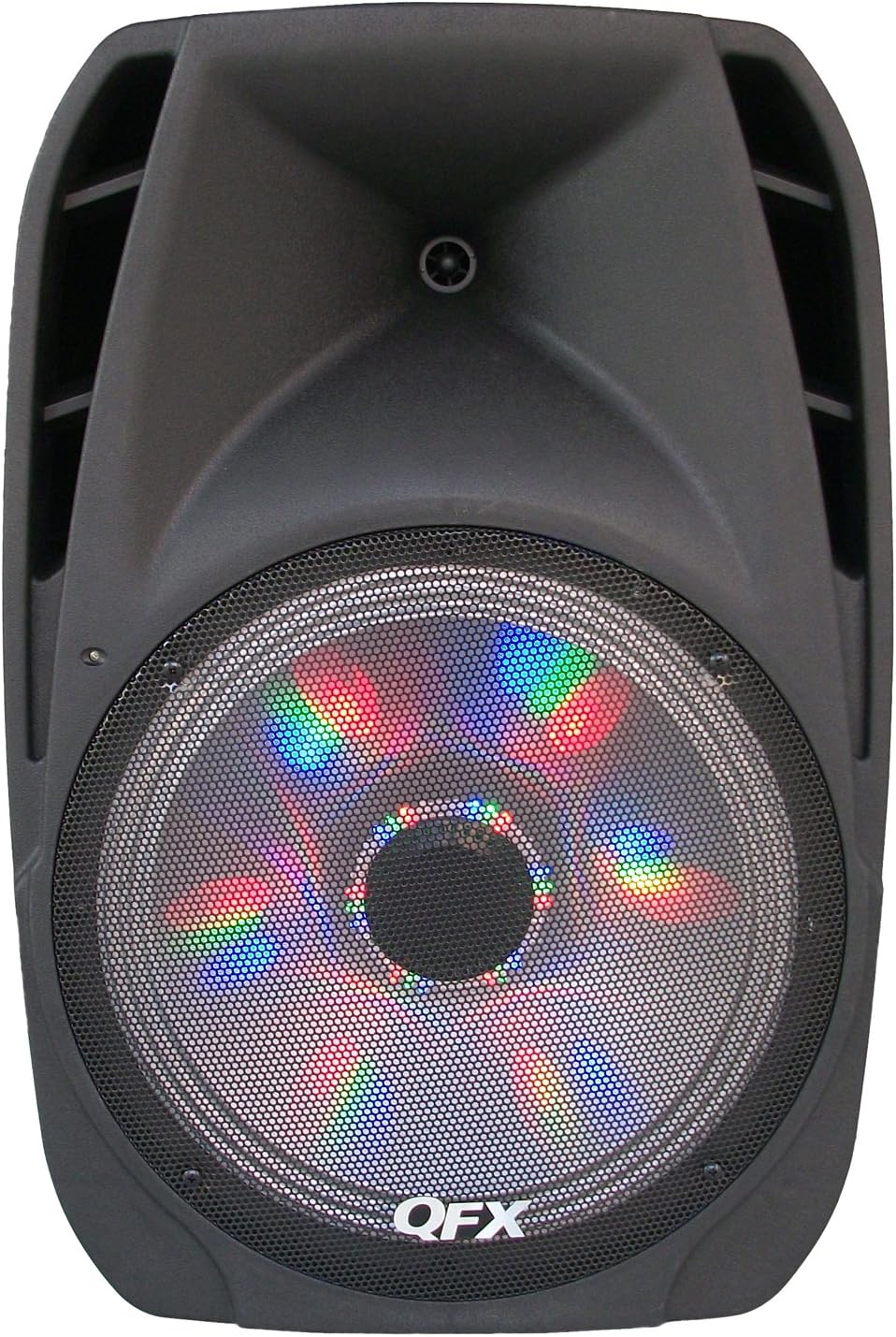
Figure 5.2: Front view of the QFX SBX-61150BTL speaker showcasing the 15-inch LED-lit woofer.
Control Panel (Rear/Top Panel - typical layout)
- Power Switch: Turns the unit ON or OFF.
- Master Volume: Adjusts the overall output volume.
- Bass/Treble Controls: Adjusts the low and high frequencies of the audio.
- Echo/Mic Volume: Controls the echo effect and volume for microphone inputs.
- Mode Button: Switches between input modes (Bluetooth, FM, USB, SD, AUX).
- Play/Pause Button: Controls playback for USB/SD and Bluetooth modes.
- Previous/Next Buttons: Navigates tracks or FM stations.
- USB Port: For connecting USB flash drives.
- SD Card Slot: For inserting SD memory cards.
- FM Antenna: For improved FM radio reception.
- Microphone Inputs (MIC IN): 1/4 inch jacks for connecting microphones.
- Guitar Input (GUITAR IN): 1/4 inch jack for connecting a guitar.
- RCA Input (LINE IN): Red and white RCA jacks for connecting external audio devices.
- RCA Output (LINE OUT): Red and white RCA jacks for connecting to another speaker or audio system.
- AC Power Input: For connecting the power cable.
6. Setup
6.1 Initial Placement
Place the speaker on a stable, flat surface or a compatible speaker stand. Ensure there is adequate ventilation around the unit and avoid placing it near heat sources or in direct sunlight. For optimal sound dispersion, position the speaker at ear level for the audience.
6.2 Power Connection
- Ensure the speaker's power switch is in the OFF position.
- Connect the supplied power cable to the AC Power Input on the speaker.
- Plug the other end of the power cable into a suitable wall outlet (AC 120V/60Hz).
6.3 Connecting Audio Sources
- Microphones: Insert 1/4 inch microphone cables into the MIC IN jacks.
- Guitar: Insert a 1/4 inch guitar cable into the GUITAR IN jack.
- External Audio Devices (e.g., CD player, mixer): Connect RCA cables from your device's audio output to the LINE IN (RCA) jacks on the speaker.
- USB/SD Media: Insert a USB flash drive into the USB port or an SD card into the SD card slot.
7. Operating Instructions
7.1 Basic Operation
- Turn the Master Volume knob to its minimum position before powering on.
- Flip the Power Switch to the ON position.
- Press the MODE button to select your desired input source (Bluetooth, FM, USB, SD, AUX/LINE IN).
- Slowly increase the Master Volume to a comfortable listening level.
7.2 Bluetooth Pairing
- Press the MODE button until "BLUETOOTH" or "BT" appears on the display. The speaker will enter pairing mode, indicated by a flashing Bluetooth icon or sound.
- Enable Bluetooth on your mobile device (smartphone, tablet, etc.).
- Search for "QFX SBX-61150BTL" or similar in your device's Bluetooth list.
- Select the speaker to pair. Once connected, you will hear a confirmation sound, and the Bluetooth indicator will stop flashing.
- You can now play audio from your device through the speaker. Use your device's volume controls in conjunction with the speaker's Master Volume.
7.3 USB/SD Playback
- Insert a USB flash drive into the USB port or an SD card into the SD card slot.
- The speaker will automatically switch to USB/SD mode and begin playing compatible audio files (e.g., MP3). If not, press the MODE button to select USB or SD.
- Use the PLAY/PAUSE, PREVIOUS, and NEXT buttons on the speaker or remote control to manage playback.
7.4 FM Radio Operation
- Press the MODE button to select FM radio mode.
- Extend the FM antenna for better reception.
- Press and hold the PLAY/PAUSE button to initiate an automatic scan for available FM stations. The speaker will save found stations.
- Use the PREVIOUS and NEXT buttons to navigate through the saved stations.
7.5 Microphone and Guitar Use
- Connect your microphone(s) or guitar to the respective 1/4 inch input jacks.
- Adjust the MIC VOLUME knob to control the microphone's output level.
- Use the ECHO knob to add an echo effect to the microphone input.
- Ensure the Master Volume is set appropriately.
7.6 LED Light Control
The 15-inch woofer features integrated LED lights. Depending on the model, there may be a dedicated switch or button to turn these lights ON/OFF or cycle through different light modes. Refer to the control panel for this specific function.
8. Maintenance
8.1 Cleaning
- Always unplug the speaker from the power outlet before cleaning.
- Use a soft, dry cloth to wipe down the exterior surfaces.
- Do not use liquid cleaners, aerosols, or abrasive chemicals, as they may damage the finish or internal components.
- Keep the ventilation openings free of dust and debris.
8.2 Storage
If storing the speaker for an extended period, ensure it is clean and dry. Store it in a cool, dry place away from direct sunlight and extreme temperatures. It is recommended to use the original packaging for protection during storage.
9. Troubleshooting
If you encounter issues with your QFX SBX-61150BTL speaker, refer to the table below for common problems and their solutions.
| Problem | Possible Cause | Solution |
|---|---|---|
| No power | Power cable not connected; Power outlet not working; Speaker power switch OFF. | Ensure power cable is securely connected. Test the outlet with another device. Turn the speaker's power switch ON. |
| No sound output | Master Volume too low; Incorrect input mode selected; Audio source not playing or connected incorrectly. | Increase Master Volume. Press MODE to select the correct input. Check audio source connection and playback. |
| Bluetooth not pairing | Speaker not in pairing mode; Device Bluetooth OFF; Speaker too far from device. | Ensure speaker is in Bluetooth pairing mode. Turn Bluetooth ON on your device. Move device closer to speaker (within 10 meters). |
| USB/SD playback issues | Unsupported file format; Corrupted files; USB/SD card not inserted correctly. | Ensure files are in a supported format (e.g., MP3). Try another USB/SD card. Reinsert the USB/SD card. |
| Microphone/Guitar not working | Microphone/Guitar volume too low; Cable faulty; Instrument/Mic not ON. | Increase MIC VOLUME. Test with a different cable or microphone/guitar. Ensure instrument/mic is powered on if applicable. |
If the problem persists after trying these solutions, please contact QFX customer support for further assistance.
10. Specifications
| Feature | Detail |
|---|---|
| Model Number | SBX-61150BTL |
| Brand | QFX |
| Output Wattage | 4500 Watts PMPO (Peak Music Power Output) |
| Woofer Size | 15 inch (with LED lighting) |
| Connectivity | Bluetooth, USB, SD, FM Radio, RCA In/Out, 1/4" Mic In, 1/4" Guitar In |
| Product Dimensions (L x W x H) | 48.51 x 38.99 x 73 cm (19.1 x 15.35 x 28.74 inches) |
| Item Weight | 14.4 kg (31.7 lbs) |
| Manufacturer | QFX USA |
| Date First Available | August 14, 2015 |
| UPC | 606540030615 |
| ASIN | B0115MTT2Q |
11. Warranty and Support
11.1 Limited Warranty
QFX products are designed and manufactured to the highest quality standards. This product is covered by a limited warranty against defects in materials and workmanship for a period typically of one (1) year from the original date of purchase. This warranty does not cover damage caused by misuse, abuse, accident, unauthorized modifications, or normal wear and tear. Please retain your proof of purchase for warranty claims.
11.2 Customer Support
For technical assistance, warranty inquiries, or service requests, please contact QFX customer support. Visit the official QFX website for the most up-to-date contact information, including phone numbers and email addresses. When contacting support, please have your product model number (SBX-61150BTL) and proof of purchase readily available.
QFX Official Website: www.qfxusa.com