1. Product Overview
The WAGO 8001-001/K010-9890/0000-0400 is an industrial interface module designed for reliable electrical connections in various applications, including prototyping boards and semiconductor product interfaces. This module facilitates secure and organized wiring within industrial electrical systems, ensuring efficient signal and power distribution.
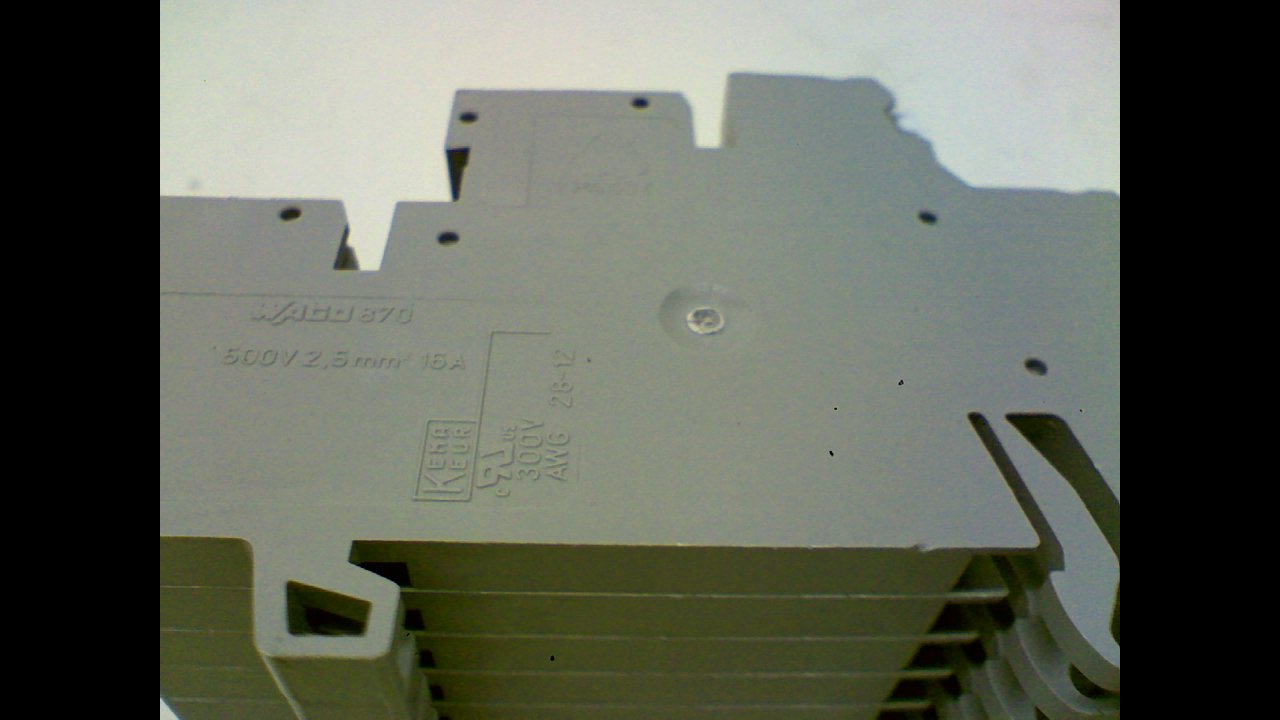
Figure 1: Close-up view of the WAGO 8001-001/K010-9890/0000-0400 industrial interface module, displaying its model number and electrical specifications such as 500V/2.5mm² 16A. This image highlights the detailed markings on the side of the module.
2. Safety Information
Please read and understand all safety instructions before installing, operating, or maintaining this product. Failure to follow these instructions may result in electric shock, fire, serious injury, or death.
- Qualified Personnel: Installation and maintenance must be performed by qualified and authorized personnel only.
- Power Disconnection: Always disconnect power to the circuit before working on the module or making any connections. Verify that power is off using appropriate testing equipment.
- Proper Tools: Use only insulated tools suitable for electrical work.
- Environmental Conditions: Ensure the operating environment is free from excessive moisture, dust, corrosive gases, and extreme temperatures.
- Wiring Standards: Adhere to all local and national electrical codes and standards.
3. Setup
Proper setup is crucial for the reliable operation of the WAGO interface module.
3.1 Mounting
- Select a suitable mounting location within the control cabinet or enclosure, ensuring adequate space for wiring and ventilation.
- Mount the module securely onto a DIN rail using its integrated mounting mechanism. Ensure it clicks firmly into place.
- Verify that the module is stable and will not vibrate loose during operation.
3.2 Wiring Connections
The module features multiple connection points for various signals and power lines.
- Identify the appropriate terminals for your application (e.g., input, output, power, ground). Refer to your system's wiring diagram.
- Strip wire insulation to the recommended length (typically 8-10 mm) to ensure proper contact without exposed conductors.
- Insert the stripped wire into the designated terminal opening.
- Actuate the clamping mechanism (e.g., push-in or lever) to secure the wire firmly. Gently pull on the wire to confirm it is properly seated and cannot be easily dislodged.
- Repeat for all necessary connections, ensuring correct polarity and signal assignment.

Figure 2: Side view of the WAGO 8001-001/K010-9890/0000-0400 module, illustrating its multi-level design which allows for high-density wiring in a compact form factor. This view helps in understanding the physical dimensions and structure for mounting.

Figure 3: Top-down view of the WAGO 8001-001/K010-9890/0000-0400 module, providing a clear perspective of the numbered connection points. This view is essential for accurate wiring and identification of individual terminals.
4. Operating Instructions
Once properly installed and wired, the WAGO interface module operates passively, providing reliable electrical connections. Its primary function is to serve as a robust and organized interface for signals and power within an industrial control system.
- Power Application: After all connections are verified, apply power to the circuit.
- Signal Flow: Signals and power will pass through the module according to your system's design.
- Monitoring: Monitor connected devices for proper operation. The module itself does not require active control or programming.
5. Maintenance
The WAGO interface module is designed for minimal maintenance. Regular inspections are recommended to ensure continued reliable operation.
- Visual Inspection: Periodically inspect the module for any signs of physical damage, discoloration, or loose connections.
- Connection Integrity: Ensure all wires remain securely fastened in their terminals. Re-tighten or re-insert any loose connections after disconnecting power.
- Cleaning: If necessary, gently clean the module with a dry, lint-free cloth. Do not use solvents or abrasive cleaners. Ensure power is disconnected before cleaning.
- Environmental Check: Verify that the operating environment continues to meet the specified conditions (temperature, humidity, absence of contaminants).
6. Troubleshooting
If you encounter issues, consider the following troubleshooting steps:
- No Signal/Power:
- Verify that power is supplied to the circuit.
- Check all connections to and from the module for proper seating and continuity.
- Ensure correct wiring according to your system diagram.
- Intermittent Connection:
- Inspect for loose wires or damaged insulation.
- Ensure wires are stripped to the correct length and fully inserted into the terminals.
- Physical Damage:
- If the module shows signs of physical damage (e.g., cracks, burns), it should be replaced immediately.
If problems persist after following these steps, consult a qualified electrician or contact WAGO technical support.
7. Specifications
| Attribute | Value |
|---|---|
| Model Number | 8001-001/K010-9890/0000-0400 |
| Manufacturer | WAGO |
| ASIN | B0115HA4E |
| Date First Available | July 7, 2015 |
| Typical Application | Industrial Electrical, Semiconductor Interfaces, Prototyping |
8. Warranty and Support
For specific warranty information regarding the WAGO 8001-001/K010-9890/0000-0400 module, please refer to the official WAGO website or contact your authorized WAGO distributor. WAGO products are typically covered by a manufacturer's warranty against defects in materials and workmanship.
For technical support, product inquiries, or assistance with troubleshooting, please visit the official WAGO website or contact their customer service department. You can often find detailed product documentation, FAQs, and contact information on their site.
WAGO Official Website: www.wago.com


