
Introduction to Your Printer
The Epson Expression Photo XP-960 is a versatile wireless wide-format Small-in-One printer designed for professional-quality photo printing. It integrates printing, scanning, and copying functionalities into a compact unit. Equipped with six-color Ultra HD inks, this printer delivers stunning borderless photos up to 11" x 17" and sharp text. Its intuitive 4.3" touchscreen simplifies operation, and it offers flexible connectivity options including Wi-Fi and mobile printing capabilities.
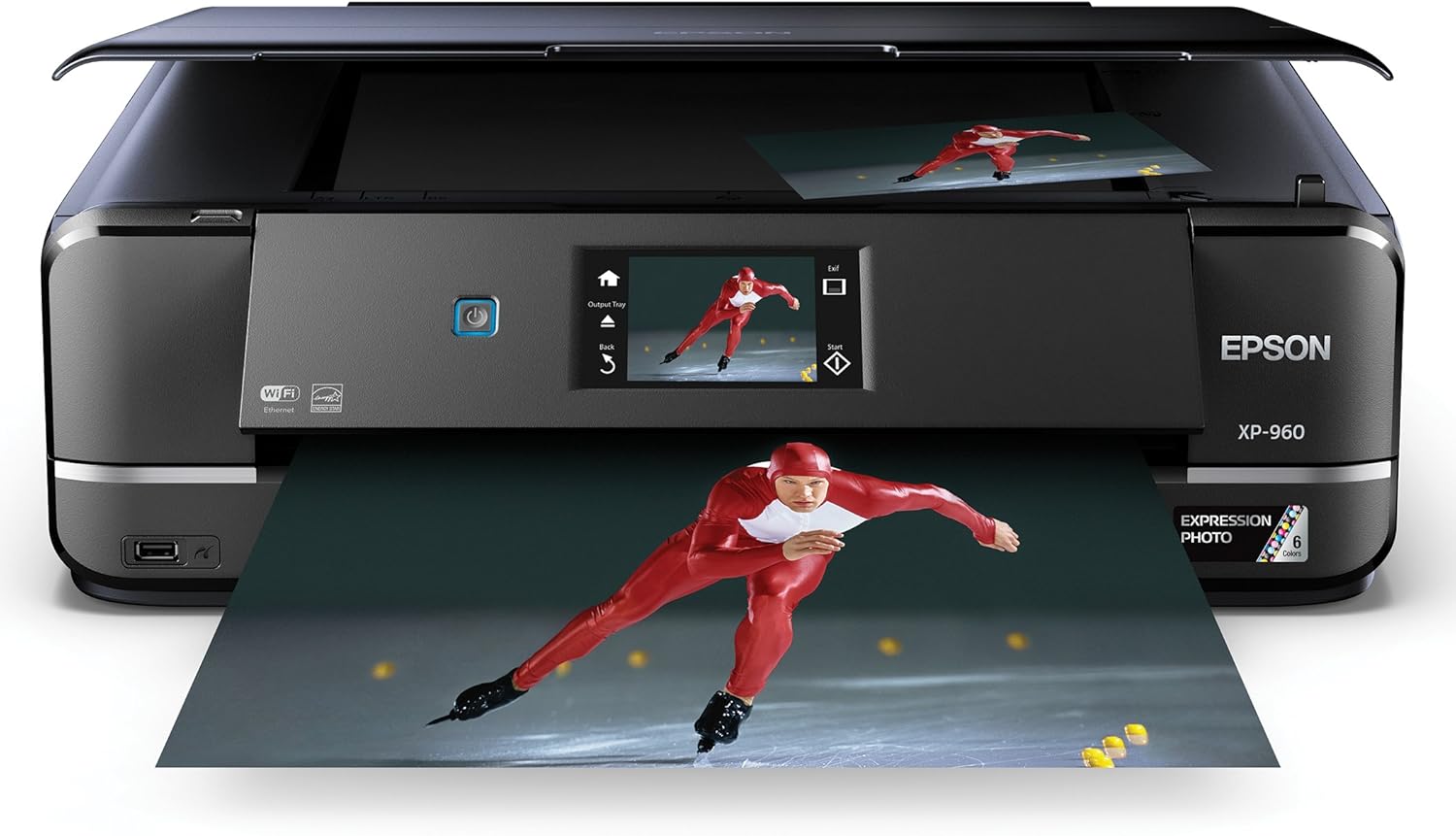
Image: The Epson Expression Photo XP-960 printer, showcasing its compact design and ability to print high-quality photos, with a printed image of a speed skater emerging from the output tray.
What's in the Box
Upon unboxing your Epson Expression Photo XP-960, please verify that all the following components are included:
- Printer / copier / scanner unit
- Black ink cartridge
- Cyan ink cartridge
- Magenta ink cartridge
- Yellow ink cartridge
- Light Cyan ink cartridge
- Light Magenta ink cartridge
- Power cord
- CD and documentation (USB cable not included)

Image: A visual representation of the items included in the Epson Expression Photo XP-960 package, such as the printer, initial ink cartridges, power cable, and setup documentation.
Setup Guide
Follow these steps to set up your Epson Expression Photo XP-960 printer for the first time:
- Unpack the Printer: Remove all protective materials and tape from the printer.
- Connect Power: Plug the power cord into the printer and then into a wall outlet. Turn on the printer.
- Install Ink Cartridges: Open the ink cartridge cover and install the included ink cartridges into their corresponding slots. Ensure they click into place. The printer will then initiate an ink charging process.
- Load Paper: Load plain paper into the paper tray.
- Initial Setup on Touchscreen: Follow the on-screen instructions on the 4.3" touchscreen to select your language, date, and time.
- Connect to a Network:
- Wireless (Wi-Fi): Navigate to the Wi-Fi setup menu on the touchscreen. Select your network name (SSID) and enter the password. The printer supports Wi-Fi Direct for router-free printing.
- Ethernet: Connect an Ethernet cable from your printer to your router or network hub.
- USB: For a direct connection, connect a USB cable (not included) from your printer to your computer.
- Install Software: Insert the provided CD into your computer's CD/DVD drive and follow the on-screen instructions to install the printer drivers and utility software. Alternatively, download the latest software from the official Epson support website.

Image: An overview of the Epson Expression Photo XP-960's key features, highlighting its wireless capabilities, wide-format printing, copying, scanning, Ultra HD photo quality, and Ethernet connectivity.
Operating Your Printer
The XP-960 offers a range of functions accessible via its touchscreen and connected devices.
Printing
- Photo Printing: Utilize the six-color Claria Photo HD Inks for vibrant, professional-quality photos. The printer can produce 4" x 6" photos in as fast as 11 seconds and supports borderless printing up to 11" x 17".
- Specialty Media: The rear paper feed accommodates various specialty papers up to 23 mil thickness, allowing for creative projects. You can also print directly onto compatible CDs/DVDs.
- Mobile Printing: Print directly from your iPhone, iPad, Android mobile devices, and more using Epson Connect. Wi-Fi Direct enables printing without a router. The Epson Creative Print app allows for printing Facebook photos and creating custom cards.
- Document Printing: Print documents with sharp text quality. The printer supports automatic duplex (two-sided) printing.
Scanning and Copying
- Scanning: The integrated scanner allows you to digitize documents and photos. The innovative fold-over scan lid helps hold originals securely in place.
- Copying: Make copies of documents and photos directly from the printer's control panel.

Image: The Epson Expression Photo XP-960 highlighting its speed for 4x6 photos, the interactive 4.3-inch touchscreen, the convenient scan lid, and its compatibility with smartphone printing.
Ink Cartridges and Genuine Epson Ink Promise
The Epson Expression Photo XP-960 uses six individual Claria Photo HD ink cartridges (Black, Cyan, Magenta, Yellow, Light Cyan, Light Magenta) to achieve its superior photo quality. For optimal performance and to ensure your warranty remains valid, Epson strongly recommends the exclusive use of Genuine Epson inks.
Using non-Epson inks or inks not specifically formulated for your printer may lead to improper function or damage not covered by the Epson warranty. Epson periodically releases firmware updates that may affect the functionality of third-party ink cartridges.

Image: The Epson Genuine Ink Promise, a golden star logo, reinforcing Epson's commitment to quality and reliability when using their authentic ink products.
Maintenance
Regular maintenance ensures the longevity and optimal performance of your printer.
- Nozzle Check and Head Cleaning: If print quality declines (e.g., missing lines, incorrect colors), perform a nozzle check and head cleaning using the printer's utility software or the touchscreen menu.
- Print Head Alignment: If prints appear blurry or misaligned, perform a print head alignment.
- Cleaning the Printer: Regularly wipe the exterior of the printer with a soft, damp cloth. Avoid using abrasive cleaners. Clean the scanner glass periodically to prevent streaks on scanned documents.
- Firmware Updates: Periodically check for and install firmware updates from the Epson support website. These updates can improve performance, address bugs, and enhance security.
Troubleshooting Common Issues
This section addresses common issues you might encounter. For detailed troubleshooting, refer to the full user manual available on the Epson support website.
| Issue | Possible Cause / Solution |
|---|---|
| Printer not responding | Check power connection, USB/network cable, and ensure printer is turned on. Restart printer and computer. |
| Poor print quality (streaks, faded colors) | Perform a nozzle check and head cleaning. Ensure genuine Epson ink cartridges are used and not low. Check paper type settings. |
| Paper jams | Remove jammed paper carefully. Ensure paper is loaded correctly and not creased or too thick/thin for the tray. |
| Cannot connect to Wi-Fi | Verify Wi-Fi password. Ensure printer is within range of the router. Restart router and printer. |
Specifications
Key technical specifications for the Epson Expression Photo XP-960 printer:
| Feature | Detail |
|---|---|
| Model Name | XP-960 |
| Product Dimensions | 23.6"D x 18.9"W x 11.6"H |
| Item Weight | 21.5 pounds |
| Printing Technology | Inkjet |
| Printer Output | Color |
| Ink Color | Cyan, Magenta, Yellow, Black, Light Cyan, Light Magenta |
| Maximum Color Print Resolution | 4800 dpi |
| Maximum Black and White Print Resolution | 9600 dpi |
| Max Print Speed (Color) | 9 ppm |
| Max Print Speed (Monochrome) | 28 ppm |
| Scanner Type | Document |
| Max Copy Speed (Black & White) | 28 ppm |
| Maximum Media Size | 8.5 x 14 inch (supports up to 11 x 17 inch via rear feed) |
| Connectivity Technology | Wi-Fi, USB, Ethernet |
| Display Type | LCD (4.3" Touchscreen) |
| Duplex Printing | Automatic |
| Power Consumption | 21 watts (on-mode) |
| Memory Storage Capacity | 64 MB |
Warranty and Support
Your Epson Expression Photo XP-960 printer comes with a manufacturer's warranty. For specific details regarding coverage and duration, please refer to the warranty documentation included with your product or visit the official Epson support website.
For comprehensive support, including detailed troubleshooting guides, driver downloads, and contact information, please visit the official Epson support website. You can also refer to the User Manual (PDF) for in-depth instructions.
Epson is committed to environmental responsibility. For convenient and responsible recycling options for your product, please visit www.Epson.com/recycle.


