
Introduction
Thank you for choosing the Altec Lansing MZX856-WHT Bluetooth Active Earbuds. These earbuds are designed to provide high-quality audio and durability for an active lifestyle. Featuring IPX67 waterproof protection and a long-lasting battery, they are suitable for various environments and activities. This manual provides detailed instructions on setup, operation, maintenance, and troubleshooting to ensure optimal performance of your earbuds.
Product Overview
Package Contents
- Altec Lansing MZX856-WHT Bluetooth Active Earbuds
- 3 sets of Freebit ear tips (Small, Medium, Large)
- Flat tangle-free cable
- Carry pouch
Key Features
- IPX67 Waterproof / Everything Proof: Designed to withstand water immersion and other elements, and they float.
- 20 Hours Battery Life: Extended playback time with spoken battery level notifications.
- 33' Wireless Range: Maintain connection from a significant distance.
- 9mm Neodymium Drivers: For clear and powerful audio.
- Freebit Ear Tips: Ensures a comfortable and secure fit for active use.
Component Identification

Figure 1: Overview of the Altec Lansing MZX856-WHT Bluetooth Active Earbuds, showing the earbuds, inline remote control, and the battery pack.
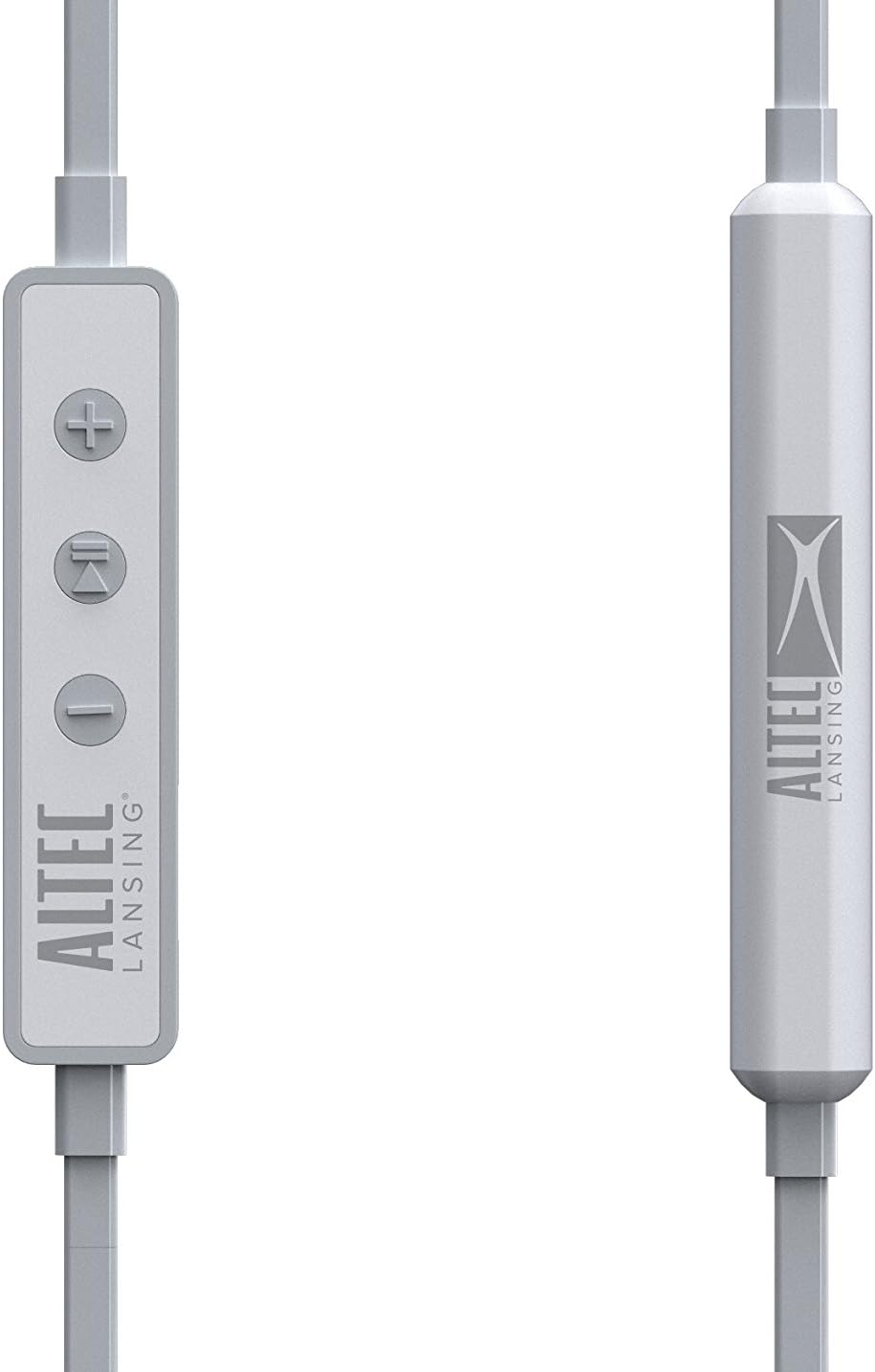
Figure 2: Detailed view of the inline remote control, featuring volume up (+), multi-function (play/pause/call), and volume down (-) buttons. The battery pack is also visible.

Figure 3: The three included sizes of Freebit ear tips (Small, Medium, Large) designed for a secure and comfortable fit.

Figure 4: The earbuds with the Freebit ear tips attached, illustrating how they provide stability in the ear.
Setup
Charging the Earbuds
Before first use, fully charge your earbuds. Connect the USB charging cable (not explicitly listed as included, but implied by 'USB' headphones jack) to the USB port on the earbuds and to a power source. The charging indicator light will show the charging status. A full charge provides approximately 20 hours of battery life.
Powering On/Off
- To Power On: Press and hold the multi-function button (center button on the inline remote) until the indicator light illuminates and you hear an audible prompt.
- To Power Off: Press and hold the multi-function button until the indicator light turns off and you hear an audible prompt.
Bluetooth Pairing
To connect your earbuds to a Bluetooth-enabled device:
- Ensure the earbuds are powered off.
- Press and hold the multi-function button for approximately 5-7 seconds until the indicator light flashes rapidly (usually blue and red), indicating pairing mode.
- On your device (smartphone, tablet, computer), enable Bluetooth and search for available devices.
- Select "MZX856-WHT" from the list of found devices.
- Once connected, the indicator light on the earbuds will typically flash slowly or turn solid blue, and you will hear a confirmation tone.
- If prompted for a passcode, enter "0000".
The earbuds will automatically attempt to reconnect to the last paired device when powered on.
Operating Instructions
Music Playback
- Play/Pause: Press the multi-function button once.
- Volume Up: Press the '+' button.
- Volume Down: Press the '-' button.
- Next Track: Press and hold the '+' button.
- Previous Track: Press and hold the '-' button.
Call Management
- Answer/End Call: Press the multi-function button once during an incoming call or during an active call.
- Reject Call: Press and hold the multi-function button for approximately 2 seconds during an incoming call.
- Voice Assistant: Double-press the multi-function button to activate your device's voice assistant (e.g., Siri, Google Assistant).
Wearing the Earbuds
Select the Freebit ear tips that provide the most comfortable and secure fit for your ears. The ear tips are designed to sit snugly within the outer ear to prevent the earbuds from falling out during movement. Experiment with the different sizes (Small, Medium, Large) to find your ideal fit.
Care and Maintenance
- Cleaning: Regularly clean the earbuds and ear tips with a soft, dry cloth. For the ear tips, you may use a slightly damp cloth and mild soap, ensuring they are completely dry before reattaching.
- Waterproof Rating: The MZX856-WHT earbuds are IPX67 rated, meaning they are protected from dust ingress and can withstand immersion in water up to 1 meter for 30 minutes. Ensure the USB port cover is securely closed before exposing the earbuds to water.
- Storage: When not in use, store the earbuds in the provided carry pouch to protect them from dust and damage. Avoid storing in extreme temperatures.
- Cable Care: The flat tangle-free cable is designed to resist tangling. Avoid sharp bends or excessive pulling on the cable.
Troubleshooting
| Problem | Possible Cause | Solution |
|---|---|---|
| Earbuds do not power on. | Low or no battery charge. | Charge the earbuds fully using the USB cable. |
| Cannot pair with device. | Earbuds not in pairing mode; Bluetooth off on device; device too far. | Ensure earbuds are in pairing mode (flashing red/blue). Turn Bluetooth on your device. Move device closer to earbuds (within 33 feet). Forget previous pairings on your device and try again. |
| No sound or low volume. | Volume too low on earbuds or device; earbuds not properly connected. | Increase volume on both earbuds and connected device. Re-pair the earbuds. Ensure earbuds are securely seated in your ears. |
| Sound cuts in and out. | Interference; device too far; low battery. | Move closer to the connected device. Avoid environments with strong Wi-Fi or other wireless interference. Charge the earbuds. |
| Ear tips keep coming off. | Incorrect size or improper attachment. | Ensure ear tips are securely attached to the earbuds. Try a different size of Freebit ear tips for a better fit. |
Technical Specifications
| Feature | Specification |
|---|---|
| Model Name | MZX856-WHT |
| Connectivity Technology | Wireless (Bluetooth) |
| Wireless Range | 33 feet (approx. 10 meters) |
| Battery Life | Up to 20 Hours |
| Water Resistance Level | IPX67 (Waterproof) |
| Driver Size | 9mm Neodymium |
| Control Type | Media Control |
| Ear Placement | In Ear |
| Form Factor | In Ear |
| Headphones Jack | USB (for charging) |
| Material | Plastic |
| Item Weight | 8.8 ounces (approx. 249 grams) |
| Product Dimensions | 4.5 x 2.3 x 5.8 inches |
| Manufacturer | Sakar International, Inc. |
Warranty and Support
For warranty information and customer support, please refer to the documentation included with your product or visit the official Altec Lansing website. You may also contact Sakar International, Inc., the manufacturer, for assistance. Keep your proof of purchase for any warranty claims.
A digital version of the user guide may be available at: Altec Lansing MZX856 User Guide (PDF)

