1. Introduction
This manual provides comprehensive instructions for the safe and efficient operation, setup, and maintenance of the RP-TOOLS RP-R-U120PN Fully Automatic Tire Balancing Machine. This professional wheel balancing machine utilizes advanced microprocessor technology for precise balancing of car, truck, and motorcycle wheels. The PN series features an improved design, offering enhanced effectiveness in various work steps. Please read this manual thoroughly before operating the machine to ensure proper usage and to prevent damage or injury.

Figure 1: RP-TOOLS RP-R-U120PN Fully Automatic Tire Balancing Machine with its protective cover open, ready for operation. The machine features a robust blue base and a black control panel with integrated storage trays.
2. Safety Instructions
Always adhere to the following safety guidelines to ensure safe operation and prevent personal injury or damage to the equipment.
- Ensure the machine is installed on a stable, level surface.
- Connect the machine only to a grounded power outlet with the correct voltage (230V).
- Keep hands, hair, and loose clothing away from moving parts during operation.
- Always wear appropriate personal protective equipment (PPE), including safety glasses and gloves.
- Do not operate the machine if any parts are damaged or missing.
- Disconnect power before performing any maintenance or cleaning.
- Only trained personnel should operate or service this equipment.
- Keep the work area clean and well-lit.
3. Product Overview
The RP-R-U120PN is designed for high-precision wheel balancing. Key components include:
- Main Unit: Houses the motor, electronics, and measurement system.
- Wheel Shaft: For mounting the wheel assembly.
- Protective Hood: Covers the wheel during operation for safety.
- Control Panel: Features an LED display and buttons for program selection and operation.
- Storage Trays: Integrated into the control panel for weights and tools.
- Cones and Clamping System: For securing various wheel sizes.
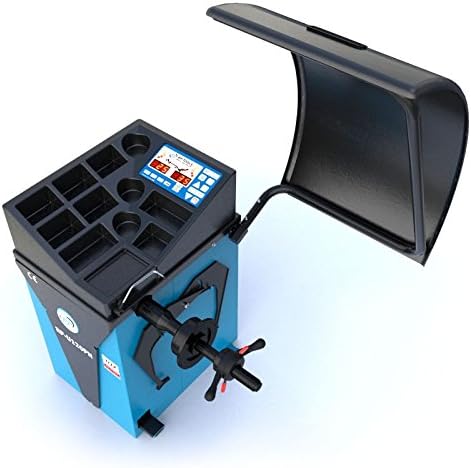
Figure 2: Top-down view of the RP-R-U120PN's control panel, showing the LED display, operational buttons, and convenient storage trays for balancing weights and tools.
4. Setup and Installation
Follow these steps for initial setup of your balancing machine:
- Unpacking: Carefully remove the machine from its packaging. Inspect for any shipping damage.
- Placement: Position the machine on a firm, level concrete floor capable of supporting its weight (approx. 157 kg). Ensure adequate space around the machine for operation and maintenance.
- Leveling: Use the adjustable feet (if present) and a spirit level to ensure the machine is perfectly level.
- Power Connection: Connect the power cable to a 230V, grounded electrical outlet. Ensure the power switch is in the OFF position before connecting.
- Accessory Installation: Attach any accessories such as the protective hood arm or additional storage extensions as per the included assembly diagrams.
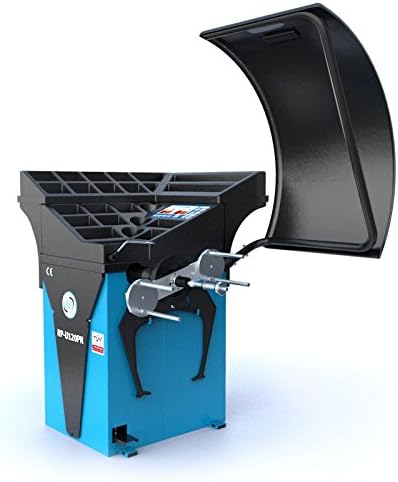
Figure 3: Side view of the RP-R-U120PN, highlighting the robust wheel shaft and the various cones used for securely mounting different wheel sizes during the balancing process.
5. Operating Instructions
This section details the steps for balancing a wheel using the RP-R-U120PN.
- Power On: Turn on the main power switch. The LED display will illuminate.
- Mount the Wheel: Select the appropriate cone for the wheel's center bore. Mount the wheel securely onto the wheel shaft, ensuring it is centered and tightened with the quick-release nut.
- Input Wheel Data: Use the control panel to input the wheel's rim diameter (10-32 inches), rim width, and distance from the machine. The G2 measurement technology assists in precise data acquisition.
- Select Balancing Program: Choose the desired balancing program (e.g., static, dynamic, ALU programs) using the function buttons.
- Start Measurement: Lower the protective hood. The machine will automatically start the balancing cycle, spinning the wheel to measure imbalance.
- Apply Weights: The display will indicate the required weight amount and position. Apply the appropriate balancing weights to the inner and/or outer rim as instructed.
- Verify Balance: Close the hood again to re-spin the wheel and verify the balance. Repeat weight application if necessary until the display shows zero imbalance.
- Remove Wheel: Once balanced, raise the protective hood and carefully remove the wheel.

Figure 4: The RP-R-U120PN with a car wheel securely mounted on the shaft, demonstrating the machine's readiness for a balancing cycle. The protective cover is shown in the open position.
6. Maintenance
Regular maintenance ensures the longevity and accuracy of your balancing machine.
- Daily Cleaning: Wipe down the machine, especially the wheel shaft and clamping area, to remove dust, dirt, and balancing weight residue.
- Weekly Inspection: Check all cables and connections for wear or damage. Ensure all bolts and fasteners are tight.
- Sensor Calibration: Periodically check and calibrate the machine's sensors as per the instructions in the advanced settings menu to maintain measurement accuracy.
- Lubrication: Apply a light lubricant to moving parts, such as the protective hood hinges, as needed.
- Storage: When not in use for extended periods, disconnect power and cover the machine to protect it from dust and moisture.
7. Troubleshooting
Refer to this section for common issues and their solutions.
| Problem | Possible Cause | Solution |
|---|---|---|
| Machine does not power on. | No power supply; tripped circuit breaker; faulty power cable. | Check power connection and outlet; reset circuit breaker; inspect power cable for damage. |
| Inaccurate balancing results. | Improper wheel mounting; incorrect data input; machine not level; sensor calibration needed. | Re-mount wheel securely; verify data input; level the machine; perform sensor calibration. |
| Wheel does not spin. | Protective hood not closed; motor issue; emergency stop engaged. | Ensure hood is fully closed; check for obstructions; disengage emergency stop button. |
If the problem persists, contact RP-TOOLS customer support.
8. Technical Specifications
| Parameter | Value |
|---|---|
| Brand | RP-TOOLS |
| Model | RP-R-U120PN |
| Voltage | 230 Volt |
| Clamping Range (Cone) | 44 - 132 mm |
| Rim Diameter | 10 - 32 inches (255 - 810 mm) |
| Balancing Speed | 150 RPM |
| Item Weight | 157 Kilograms |
| Package Dimensions | 11.51 x 10.01 x 7.49 cm |
| Manufacturer Reference | RP-R-U120PN |
| First Available | May 20, 2016 |
9. Warranty and Support
For warranty information, technical support, or service inquiries, please contact RP-TOOLS directly. Refer to your purchase documentation for specific warranty terms and conditions. RP-TOOLS is committed to providing high-quality products and customer satisfaction.
For further assistance, visit the official RP-TOOLS website or contact their customer service department. Keep your model number (RP-R-U120PN) and purchase date ready when contacting support.


