Introduction
The Marineland Magniflow 400 Canister Filter is designed to provide comprehensive three-stage filtration for both freshwater and saltwater aquariums up to 100 gallons. This manual provides instructions for setup, operation, maintenance, and troubleshooting to ensure optimal performance and a healthy aquatic environment.
Product Components
The Magniflow 400 Canister Filter includes several key components for effective filtration and easy operation.

Image: Exploded view of the Marineland Magniflow 400 Canister Filter showing all included parts and their arrangement.
- Canister Lid: Ensures a watertight seal and allows for easy removal.
- Quick Prime Button: Fills the filter chamber with water for self-priming system startup.
- Stack N’ Flo™ Filter Trays: Designed to guide water through mechanical, chemical, and biological media layers.
- Intake/Outlet U-Tubes: Connect the filter to the aquarium.
- Strainer, Elbow & Diffuser: Components for water intake and return.
- Suction Cups: Secure tubing and other components.
- Vinyl Tubing: Connects the filter to the aquarium's intake and output.
Included Filter Media:
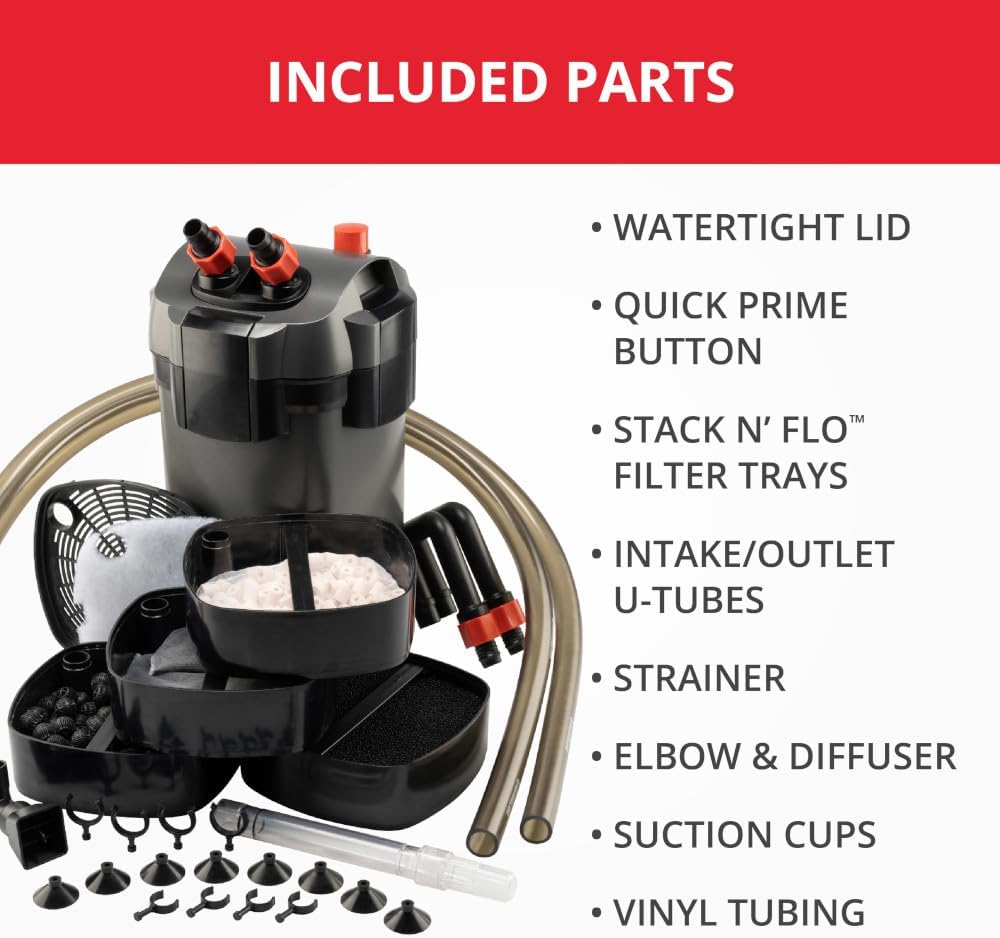
Image: Various filter media included with the Marineland Magniflow 400 Canister Filter, such as filter foam, carbon bags, bio-filter balls, ceramic rings, and polishing pads.
- Rite-Size™ T Filter Foam Pads: Screens out dirt and debris (mechanical filtration) and enhances biological filtration.
- Premium Activated Carbon Bags: Removes odors, discoloration, and water impurities (chemical filtration).
- Bio-Filter Balls and Ceramic Filter Rings: Provide a large surface area for beneficial bacteria growth (biological filtration).
- Rite-Size™ T Polishing Filter Pads: Removes fine particulate dirt and debris (water polishing).
Setup Instructions
Follow these steps to properly set up your Marineland Magniflow 400 Canister Filter.
- Unpack and Inspect: Carefully remove all components from the packaging. Inspect for any damage. Ensure all parts listed in the "Product Components" section are present.
- Prepare Filter Media:
- Rinse filter foam pads and ceramic rings thoroughly under cool tap water to remove any dust.
- Place activated carbon bags and bio-filter balls into their designated trays. Do not rinse activated carbon.
- Arrange the media in the Stack N’ Flo™ Filter Trays according to the manufacturer's recommendations (typically mechanical, then biological, then chemical).
- Assemble Canister: Place the filled filter trays into the canister body. Ensure they are stacked correctly and securely. Close the canister lid, ensuring a watertight seal by engaging all clamps.
- Connect Tubing:
- Attach the vinyl tubing to the intake/outlet U-tubes and then to the filter's valve block.
- Position the intake strainer and outlet diffuser within your aquarium using the provided suction cups. Ensure the intake is near the bottom and the outlet is positioned to create good water circulation.
- Position Filter: Place the canister filter below the aquarium water level to facilitate proper water flow and priming.
- Prime the Filter: Before plugging in the unit, press the quick prime button repeatedly until water fills the filter chamber and begins to flow through the outlet tube into the aquarium. This removes air from the system.
- Start Operation: Once the filter is primed and water is flowing, plug the filter into a grounded electrical outlet. The filter should start operating immediately.
Operating Instructions
The Marineland Magniflow 400 Canister Filter is designed for continuous operation to maintain water quality.
- Continuous Filtration: The filter should run 24/7 to ensure consistent water purification.
- Flow Rate: The filter processes 400 gallons per hour, suitable for aquariums up to 100 gallons.
- Monitoring: Regularly observe the water flow from the diffuser to ensure it remains strong. A reduced flow rate may indicate clogged media or a need for maintenance.
Maintenance
Regular maintenance is crucial for the longevity and efficiency of your filter and the health of your aquarium.
Routine Cleaning (Monthly):
- Disconnect Power: Always unplug the filter from the electrical outlet before performing any maintenance.
- Shut Off Water Flow: Close the valves on the valve block to prevent water from flowing out of the aquarium.
- Remove Filter: Disconnect the valve block from the canister lid and carefully remove the canister.
- Disassemble and Clean:
- Open the canister lid and remove the filter trays.
- Rinse filter foam pads and ceramic rings in old aquarium water (from a water change) to preserve beneficial bacteria. Do not use tap water directly as chlorine can harm bacteria.
- Replace activated carbon bags and polishing filter pads as needed (typically monthly).
- Clean the impeller and impeller housing. Remove any debris or buildup.
- Wipe down the inside of the canister body and lid.
- Reassemble and Restart: Reassemble the filter in reverse order, ensuring all seals are properly seated. Reconnect the valve block, open the valves, prime the filter using the quick prime button, and then plug it back in.
Video: A short preview demonstrating the ease of maintenance for the Marineland Magniflow Canister Filter. This video highlights the quick prime button and easy lid removal for media access.
Water Changes:
Perform regular water changes to maintain water quality. It is recommended to change 30% of the aquarium water every 30 days, taking approximately 30 minutes.
Video: An animated guide explaining the "30-30-30" rule for aquarium water changes, emphasizing the importance of regular partial water changes for a healthy aquatic environment.
Troubleshooting
Refer to this section for common issues and their solutions.
| Problem | Possible Cause | Solution |
|---|---|---|
| Reduced Water Flow | Clogged filter media, dirty impeller, kinked tubing. | Clean or replace filter media. Clean the impeller and housing. Check and straighten tubing. |
| Filter Not Priming | Air in the system, filter not below water level, quick prime button not used correctly. | Ensure filter is below aquarium water level. Press quick prime button repeatedly until water flows. Check for air leaks in tubing connections. |
| Leaking | Improperly seated O-ring/gasket, loose clamps, cracked housing. | Check and reseat the O-ring/gasket. Ensure all clamps are securely fastened. Inspect canister for damage. |
| Noisy Operation | Air in the system, dirty impeller, filter not level. | Re-prime the filter to remove air. Clean the impeller. Ensure the filter is on a stable, level surface. |
Specifications
- Model: ML90751
- Capacity: Filters up to 100-gallon aquariums
- Flow Rate: 400 Gallons per Hour (GPH)
- Filtration Stages: 3-stage (Mechanical, Chemical, Biological)
- Dimensions (LxWxH): 14 x 11.02 x 18 inches
- Item Weight: 19.6 pounds
- Material: Plastic
- Color: Black
- Compatible Media: Marineland Rite-Size™ T filter media
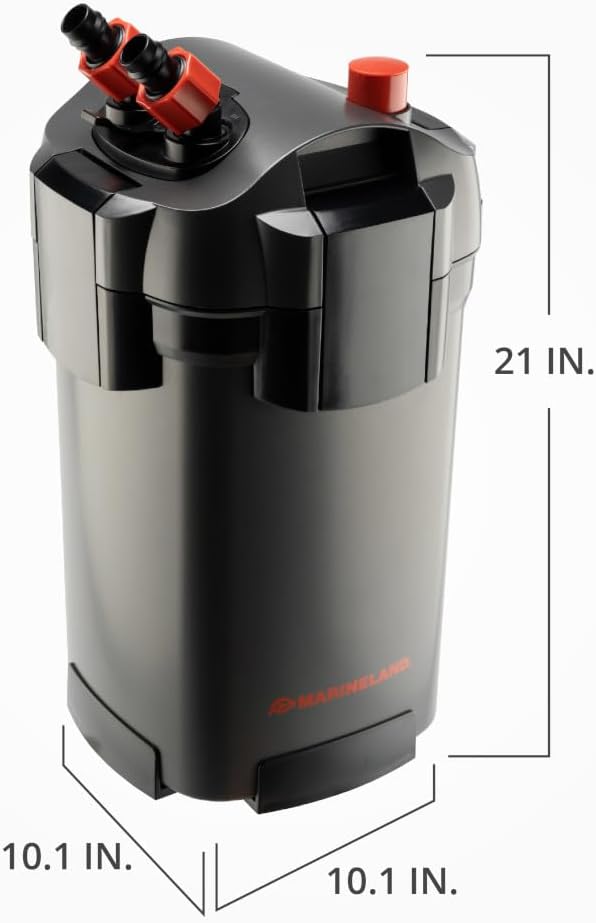
Image: Diagram showing the dimensions of the Marineland Magniflow 400 Canister Filter: 10.1 inches wide, 10.1 inches deep, and 21 inches high.
Warranty Information
This product comes with a limited warranty. For specific details regarding the warranty period and coverage, please refer to the product packaging or the official Marineland website. Keep your proof of purchase for warranty claims.
Warranty Description: See label for details.
Support & Contact
For further assistance, technical support, or to purchase replacement parts, please visit the official Marineland website or contact their customer service department.
Brand: MarineLand
Manufacturer: United Pet Group
Official Website: Visit the MarineLand Store


