
VTech CS6509
VTech CS6509 Accessory Cordless Handset User Manual
Brand: VTech | Model: CS6509
Introduction
The VTech CS6509 is an accessory cordless handset designed to expand your existing VTech CS6519, CS6528, or CS6529 series phone system. This handset cannot operate independently and requires one of the compatible base units to function. It enhances your communication experience by providing additional mobility and access to features such as Caller ID, call waiting, and a convenient speakerphone.
With the CS6509, you can monitor calls with a 50-number Caller ID, be aware of incoming calls with call waiting, and know when you have new messages via the voicemail waiting indicator. The handset also offers 14 minutes of answering system recording time and allows for quick redial of the last ten numbers. Its full hearing aid compatibility ensures clear communication for all users. The design includes a convenient wall mount option to help manage desk space.

Figure 1: VTech CS6509 Accessory Cordless Handset in its charging cradle.
Key Features
- Accessory Handset: Designed to work with VTech CS6519, CS6528, or CS6529 series phone systems. It is not a standalone phone.
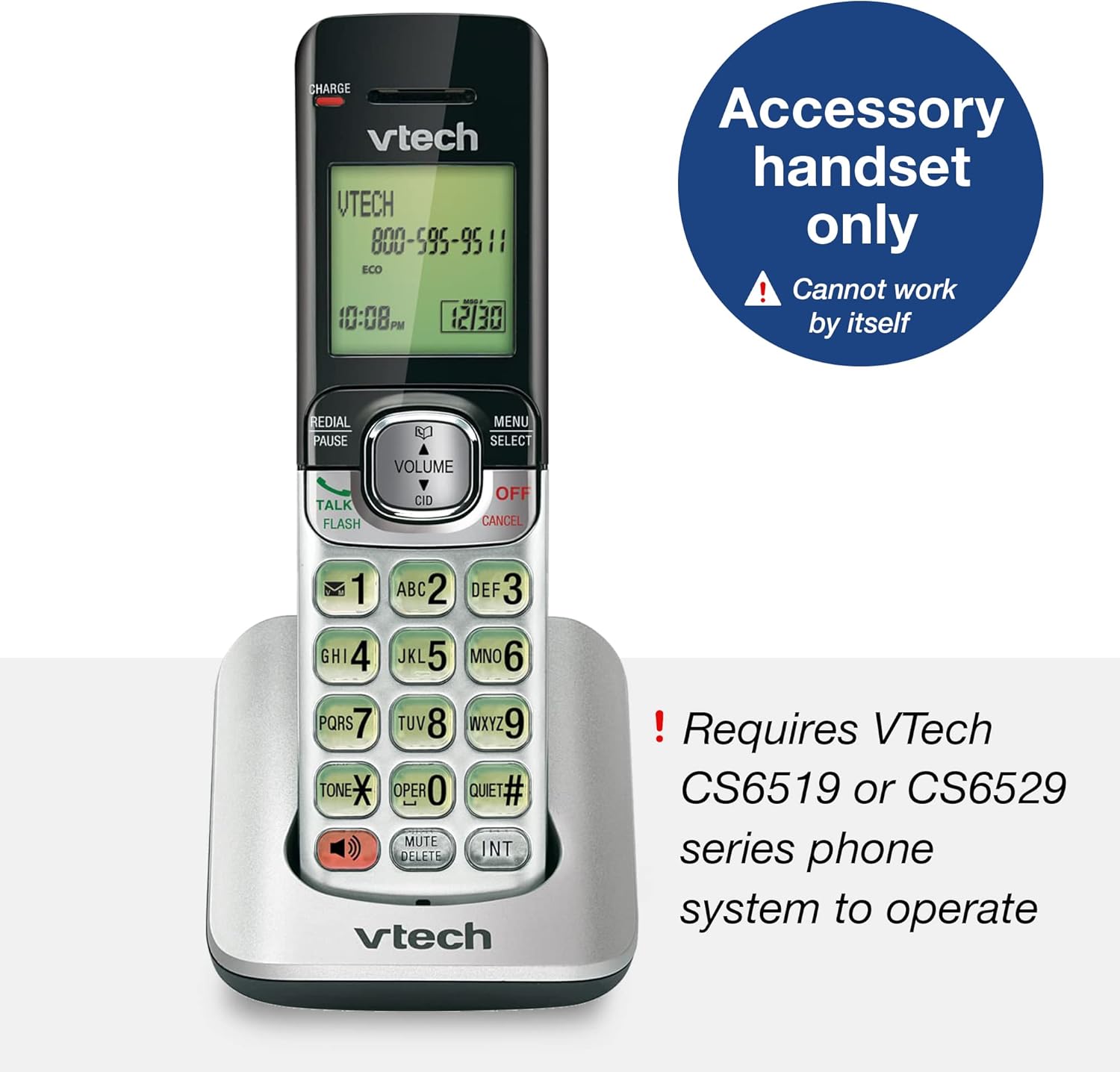
Figure 2: The CS6509 is an accessory handset requiring a compatible VTech base unit.
- Caller ID/Call Waiting & Phonebook: Stores up to 50 calls, displaying the name, number, time, and date of incoming calls. Includes a 50 name and number phonebook directory.

Figure 3: The handset display provides Caller ID and call waiting information, and access to the phonebook.
- Handset Speakerphone: Enables hands-free conversations with the touch of a button.

Figure 4: The full duplex handset speakerphone allows for convenient hands-free communication.
- Backlit Keypad and Display: The entire keypad and LCD screen illuminate for easier viewing in dim light.

Figure 5: The backlit keypad and display ensure visibility in low-light conditions.
- ECO Mode Power-Conserving Technology: Manages power consumption for optimal battery performance.

Figure 6: ECO mode technology helps conserve battery power.
- Last Ten Number Redial: Quickly redial previously called numbers.

Figure 7: The redial function allows quick access to the last ten dialed numbers.
- 9-Number Speed Dial: Program frequently called numbers for quick access.

Figure 8: Utilize 9-number speed dial for quick access to important contacts.
- Conference Call Capability: Facilitates conference calls between an outside line and up to two cordless handsets.

Figure 9: Conduct conference calls with ease using multiple handsets.
- Quiet Mode: Temporarily silences the ringer on the handset.

Figure 10: Activate Quiet mode to silence the handset ringer.
- Digital Answering System (Base Unit Feature): When connected to a compatible base, the system offers up to 14 minutes of recording time and remote access to messages.

Figure 11: The compatible base unit features a digital answering system with message counter.
- Wall-Mountable: The charging cradle can be mounted on a wall to save space.

Figure 12: The handset and base can be conveniently wall-mounted.
Setup
1. Battery Installation and Charging
- Open the battery compartment cover on the back of the handset.
- Connect the battery pack connector securely into the jack inside the compartment.
- Place the battery pack into the compartment.
- Close the battery compartment cover.
- Place the handset in the charging cradle. The CHARGE light on the handset will illuminate, indicating it is charging.
- Allow the handset to charge for at least 10-12 hours before initial use to ensure full battery capacity.
2. Registering the Handset
The CS6509 is an accessory handset and must be registered to a compatible VTech CS6519, CS6528, or CS6529 series base unit to function. Refer to the user manual of your main VTech phone system for detailed instructions on how to register new handsets. Typically, this involves placing the handset in the base unit's charger and initiating a registration process from the base unit or the handset itself.
If you encounter difficulties, ensure the base unit is powered on and within range. You may need to reset the base unit or the handset if registration fails on the first attempt.
Operating Instructions
Making and Receiving Calls
- To Make a Call: Press TALK/FLASH or SPEAKER, then dial the phone number.
- To Answer a Call: When the phone rings, press TALK/FLASH or SPEAKER.
- To End a Call: Press OFF/CANCEL or place the handset back in the charging cradle.
Using the Speakerphone
During a call, press the SPEAKER button to switch between handset and speakerphone mode. The speakerphone indicator will light up when active.
Caller ID and Call Waiting
- When a new call comes in and you are already on the phone, you will hear a call waiting tone. The caller's information will appear on the display if you subscribe to Caller ID with Call Waiting service.
- To answer the new call, press FLASH. Your current call will be put on hold.
- To switch between calls, press FLASH again.
Redial
Press REDIAL/PAUSE to view the last ten numbers dialed. Press TALK/FLASH or SPEAKER to call the selected number.
Quiet Mode
To temporarily silence the ringer, press and hold the QUIET# button. The handset will not ring for incoming calls until the mode is deactivated or a set time expires (refer to your main system's manual for duration settings).
Intercom and Conference Calls
- Intercom: To call another registered handset, press INT and then the number of the desired handset.
- Conference Call: During an outside call, press INT, then dial the number of the internal handset you wish to add. Once the internal handset answers, press CONF (or a similar button, refer to your main system's manual) to join all parties.
Maintenance
Cleaning the Handset
Wipe the handset and charging cradle with a soft, slightly damp cloth. Do not use cleaning sprays or harsh chemicals, as they may damage the finish or electrical components. Ensure the device is unplugged from power before cleaning.
Battery Care
- Always use the original VTech battery pack provided with the handset.
- If the handset will not be used for an extended period, remove the battery to prevent leakage.
- Dispose of old batteries responsibly according to local regulations. Do not dispose of batteries in fire.
Troubleshooting
| Problem | Possible Cause | Solution |
|---|---|---|
| Handset does not turn on or has no power. | Battery is not charged or not installed correctly. | Ensure the battery is properly connected and charge the handset for at least 10-12 hours. |
| Handset does not register to the base unit. | Handset is out of range, base unit is off, or registration process was not completed correctly. | Move the handset closer to the base unit. Ensure the base unit is powered on. Follow the registration steps in your main system's manual carefully. You may need to reset both the handset and base unit. |
| No dial tone. | Handset is not registered, or telephone line is disconnected. | Verify handset registration. Check the telephone line connection to the base unit and the wall jack. |
| Poor sound quality or static. | Interference from other electronic devices, or handset is too far from the base unit. | Move the handset closer to the base unit. Avoid placing the base unit near other electronic appliances (e.g., microwaves, computers). |
| Caller ID does not display. | Service not subscribed, or call is from an unlisted number. | Contact your telephone service provider to ensure Caller ID service is active. |
For more detailed troubleshooting, please refer to the full user manual for your VTech CS6519, CS6528, or CS6529 series phone system, which can often be found on the VTech support website or via the provided PDF link in the product documentation.
Specifications
| Feature | Detail |
|---|---|
| Product Dimensions (L x W x H) | 4.41 x 6.77 x 2.28 inches |
| Item Weight | 8 ounces (0.5 Pounds) |
| Model Number | CS6509 |
| Batteries | 3 Product Specific batteries required (included) |
| Power Source | Battery Powered |
| Telephone Type | Cordless |
| Compatible Devices | VTech CS6519, CS6528, CS6529 series phone systems |
| Answering System Type | Digital (when connected to compatible base) |
| Recording Capacity | 14 minutes (when connected to compatible base) |
| Color | Silver/Black |

Figure 13: Physical dimensions of the VTech CS6509 Accessory Handset.
Warranty and Support
For warranty information and technical support, please refer to the documentation included with your main VTech CS6519, CS6528, or CS6529 series phone system. You can also visit the official VTech website for support resources, FAQs, and contact information.
A digital version of the user manual for the compatible base units is available:
Related documentsCS6509


Ask a question about this manual
Ask about setup, troubleshooting, compatibility, parts, safety, or missing instructions. Manuals+ will review the question and use this page’s manual context to help answer it.