
Terk OMNITVEXZ
TERK Digital Outdoor HDTV Antenna User Manual
Model: OMNITVEXZ
Introduction
The TERK Digital Outdoor HDTV Antenna is engineered to provide superior reception of free over-the-air digital broadcast channels. Its advanced design is optimized for challenging reception environments, ensuring a clear and reliable signal for your television viewing.
Key features include:
- Enjoy top rated HDTV network programming and your favorite shows for Free. No monthly fee, no subscription, no contract.
- Patented 360° multi-directional design eliminates need for constant adjustments.
- Supports up to 1080i HDTV broadcasts for high-quality picture and sound.
- New SmartBoost amplifier design outperforms all other brands and boosts weak signals.
- Adapts to almost any outdoor or attic setting with ultra-compact design.
Setup and Installation
Proper installation is crucial for optimal performance. The TERK Digital Outdoor HDTV Antenna is designed for flexible placement in outdoor or attic environments.
1. Unpacking and Component Check
Carefully remove all components from the packaging. Verify that all parts are present before beginning installation.
2. Antenna Placement
Due to its 360-degree multi-directional reception technology, the antenna does not require specific orientation towards broadcast towers. However, placing the antenna in a location with minimal obstructions (such as buildings, trees, or large metal objects) will generally yield better results. Consider mounting it on a mast, wall, or within an attic.
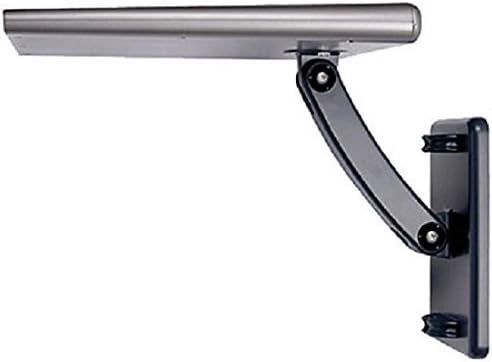
Figure 1: The TERK Digital Outdoor HDTV Antenna shown mounted on an exterior wall using its adjustable bracket.
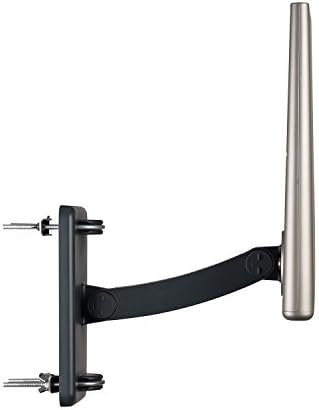
Figure 2: Side profile of the antenna, illustrating the adjustable mounting arm for versatile positioning.
3. Mounting the Antenna
- Secure the mounting bracket to your chosen surface (wall, mast, etc.) using appropriate hardware (not included). Ensure the mounting surface is sturdy enough to support the antenna.
- Attach the antenna unit to the mounting bracket. The design allows for various angles and orientations.
- Tighten all connections to ensure the antenna is stable and secure, especially in outdoor installations where wind exposure is a factor.
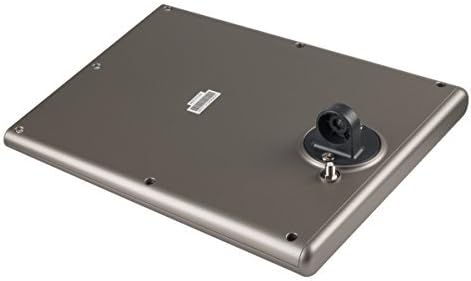
Figure 3: Underside of the antenna, highlighting the coaxial cable connection point.
4. Connecting to Your Television
- Connect one end of a coaxial cable (RG6 recommended) to the antenna's output port.
- Connect the other end of the coaxial cable to the "Antenna In" or "RF In" port on your digital television or digital converter box.
- If using the SmartBoost amplifier, ensure it is properly connected in-line between the antenna and your television/converter box, and powered on.
Operating Instructions
Once the antenna is physically installed and connected, you will need to scan for available channels on your television.
1. Performing a Channel Scan
- Turn on your television and select the correct input source (e.g., "TV," "Antenna," or "Air").
- Navigate to your TV's menu settings. Look for options such as "Channel Scan," "Auto Program," "Auto Tune," or "Setup."
- Select the "Antenna" or "Air" option for the scan type, not "Cable."
- Initiate the channel scan. This process may take several minutes. Your TV will search for and store all available digital channels.
- Once the scan is complete, exit the menu. You should now be able to browse the received channels.
2. SmartBoost Amplifier
The integrated SmartBoost amplifier is designed to enhance weak signals, allowing you to receive more HD channels and improve overall picture quality. Ensure the amplifier is powered for optimal performance. If you experience signal overload in strong signal areas, you may try operating the antenna without the amplifier, though this is generally not recommended for most installations.
Maintenance
The TERK Digital Outdoor HDTV Antenna is built for durability and requires minimal maintenance. However, periodic checks can help ensure long-term performance.
- Cleaning: Gently wipe the antenna's exterior with a soft, damp cloth to remove dust, dirt, or debris. Avoid using harsh chemicals or abrasive cleaners.
- Connection Check: Periodically inspect all coaxial cable connections to ensure they are secure and free from corrosion. A loose or corroded connection can degrade signal quality.
- Physical Inspection: For outdoor installations, regularly check the mounting hardware for any signs of loosening or damage, especially after severe weather conditions.
- Water Ingress: While designed for outdoor use, some user reports indicate potential for water ingress over time. To mitigate this, consider mounting the antenna in a location that offers some protection from direct heavy rainfall, or apply a weather-resistant sealant around cable entry points if necessary.
Troubleshooting
If you experience issues with your TERK Digital Outdoor HDTV Antenna, refer to the following common troubleshooting steps:
| Problem | Possible Cause / Solution |
|---|---|
| No channels found or poor reception. |
|
| Picture pixelates or freezes. |
|
| Antenna not powering on (if applicable to SmartBoost). |
|
Specifications
| Brand | Terk |
| Model Number | OMNITVEXZ |
| Product Dimensions | 13.6 x 30.99 x 1.51 inches |
| Item Weight | 3.61 pounds |
| Color | Grey |
| Antenna Type | Television |
| Number of Channels | 1 (refers to single input, not number of receivable channels) |
| Impedance | 0.1 Ohm |
| Maximum Range | 343200 Feet (approx. 65 miles) |
| UPC | 044476116469 |
| Manufacturer | VOXX International Corporation |
Warranty and Support
For warranty information and technical support regarding your TERK Digital Outdoor HDTV Antenna, please contact VOXX International Corporation, the manufacturer. Refer to the product packaging or the manufacturer's official website for the most current contact details and warranty terms.
Manufacturer: VOXX International Corporation
Ask a question about this manual
Ask about setup, troubleshooting, compatibility, parts, safety, or missing instructions. Manuals+ will review the question and use this page’s manual context to help answer it.