1. Product Overview
The Bosch QuietCast BC990 Premium Ceramic Disc Brake Pad Set is engineered for optimal performance, durability, and quiet operation. These front brake pads feature a proprietary ceramic friction material designed for robust stopping power and low dust. The set includes pads for one axle (two wheels), a hardware kit (where applicable), and synthetic lubricant for reduced resistance on sliding contact points. Compatible with select Scion iQ (2012-15), xA (2004), xB (2004), and Toyota Echo (2003-05), MR2 Spyder (2003-05), Prius (2003-09) vehicles.

Image 1: Bosch QuietCast Premium Ceramic Disc Brake Pad Set, showing the product packaging and the brake pads themselves.
2. Safety Information
Always prioritize safety when working on vehicle braking systems. Improper installation can lead to brake failure, serious injury, or death. If you are not confident in your ability to perform this installation, consult a qualified automotive technician.
- Wear appropriate personal protective equipment (PPE), including safety glasses and gloves.
- Ensure the vehicle is securely supported on jack stands on a level surface before beginning work. Never rely solely on a jack.
- Allow the brake system to cool completely before handling components.
- Do not contaminate brake pads or rotor surfaces with grease, oil, or other fluids.
- Refer to your vehicle's service manual for specific torque specifications and procedures.
- After installation, pump the brake pedal several times to ensure proper caliper piston seating before driving.
- Perform a test drive in a safe area to confirm proper brake function.
3. What's in the Box
Your Bosch BC990 QuietCast Premium Ceramic Disc Brake Pad Set includes the following components:
- Four (4) Ceramic Disc Brake Pads (for one front axle)
- Hardware Kit (where applicable, includes clips and shims)
- Synthetic Lubricant Packet
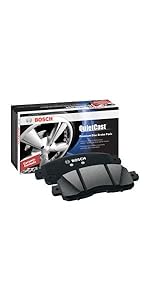
Image 2: Detailed view of Bosch QuietCast brake pads and associated hardware components.
4. Installation
This section provides general steps for installing the Bosch BC990 brake pads. Always consult your vehicle's specific service manual for detailed instructions and torque specifications.
- Prepare the Vehicle: Park the vehicle on a level surface, engage the parking brake, and block the rear wheels. Loosen the lug nuts on the front wheels, then raise the front of the vehicle and secure it with jack stands. Remove the front wheels.
- Remove Old Brake Pads: Remove the caliper bolts and carefully slide the caliper off the rotor. Support the caliper to prevent stress on the brake hose. Remove the old brake pads and any old hardware clips.
- Clean Components: Thoroughly clean the caliper bracket to remove rust and debris. Clean the rotor surface if not replacing the rotor. Inspect slide pins for wear, lubricate them, and ensure bushings are flexible and not cracked.
- Install New Hardware: Apply synthetic lubricant to the new hardware clips and install them onto the caliper bracket.
- Install New Brake Pads: Insert the new Bosch QuietCast brake pads into the caliper bracket.
- Retract Caliper Piston: Use a C-clamp or piston installation tool to push the brake caliper piston back into the caliper bore. Ensure the piston seal is not cracked.
- Reinstall Caliper: Slide the caliper over the new brake pads and onto the caliper mounting bracket. Ensure the brake hose is not twisted. Install and tighten the caliper bolts to the manufacturer's specified torque.
- Final Steps: Reinstall the wheels and tighten lug nuts. Lower the vehicle and fully torque the lug nuts. Pump the brake pedal several times until it feels firm. Check the brake fluid level and top off if necessary.
Video 1: Bosch Brakes for your vehicle - order online. This video provides a general overview of Bosch brake components and their benefits.
Video 2: Bosch Braking: What's Stopping You? This video highlights the quality and performance of Bosch braking components.
5. Operating & Break-in Procedure
After installing new brake pads, a proper break-in procedure is crucial for optimal performance and longevity. This process helps to transfer an even layer of friction material to the rotor surface.
- Drive at a moderate speed (e.g., 30-40 mph) and perform 5-6 moderate stops, allowing the vehicle to slow down to about 10 mph. Avoid coming to a complete stop.
- Drive for several minutes without braking to allow the pads and rotors to cool.
- Repeat the moderate stops, this time from a slightly higher speed (e.g., 40-50 mph), for another 5-6 repetitions.
- Allow the brakes to cool completely for at least 15-20 minutes before normal driving.
During the break-in period, avoid hard braking, sudden stops, or prolonged braking (like driving down a long hill) to prevent overheating and glazing of the pads.
6. Maintenance
Regular inspection and maintenance of your braking system are essential for safety and performance.
- Regular Inspection: Inspect brake pads, rotors, calipers, and brake fluid levels at least every 12,000 miles or annually, or as recommended by your vehicle manufacturer.
- Brake Pad Wear: Replace brake pads when the friction material wears down to 2-3mm or if the wear indicators are audible.
- Rotor Condition: Check rotors for excessive wear, scoring, cracks, or warping. Replace rotors if they are below minimum thickness specifications or show significant damage.
- Brake Fluid: Ensure brake fluid is at the proper level and is clean. Brake fluid should be flushed and replaced according to your vehicle manufacturer's recommendations.
- Caliper Function: Ensure calipers move freely and are not seized. Lubricate caliper slide pins as part of routine maintenance.
7. Troubleshooting
| Symptom | Possible Cause | Solution |
|---|---|---|
| Squealing/Grinding Noise | Worn pads, improper installation, glazed rotors, foreign material. | Inspect pads for wear, re-lubricate hardware, clean/replace rotors, check for debris. |
| Vibration/Pulsation | Warped rotors, uneven pad wear, loose wheel bearings. | Inspect and replace warped rotors, check wheel bearings. |
| Soft/Spongy Pedal | Air in brake lines, low brake fluid, faulty master cylinder. | Bleed brake system, check fluid level, inspect master cylinder. |
| Vehicle Pulls to One Side | Seized caliper, uneven pad wear, contaminated brake fluid. | Inspect calipers, check for uneven wear, flush brake fluid. |
8. Specifications
- Brand: Bosch
- Model Number: BC990
- Material: Ceramic
- Auto Part Position: Front
- Vehicle Service Type: Automotive
- Specification Met: OEM
- Item Weight: Approximately 1 pound (per pad)
- Product Dimensions: Approximately 8.5 x 5.3 x 3.33 inches
- UPC: 077212161065
9. Warranty and Support
Bosch stands behind the quality of its products. For specific warranty information, please refer to the documentation included with your product or visit the official Bosch Automotive website. For technical support or further assistance, please contact Bosch customer service.
- Manufacturer: Bosch Automotive
- Contact: Refer to product packaging or Bosch Automotive website for current contact information.
- Online Resources: Bosch Auto Parts Official Website


