
Introduction
This manual provides detailed instructions for the safe and efficient operation of your Showlite FLP-5x8W LED Projector Set, which includes the Showlite DMX Master Pro USB Controller and Pronomic DMX Cables. Please read this manual thoroughly before use to ensure proper setup and functionality.
Product Overview
Showlite FLP-5x8W LED Projectors
The Showlite FLP-5x8W LED projectors are powerful and bright LED spots designed for main lighting or accentuation on stages, in halls, or clubs. They feature RGBW multichip LEDs for continuous color mixing.
- Color Mixing: 5 Quad Color Multichip RGBW LEDs.
- Beam Angle: 25°.
- Connections: DMX In/Out (XLR), Power In/Out.
- DMX Channels: 7.
- Functions: Strobe function, stand-alone modes (color changes, sound activation via integrated microphone).
- Power Supply: 100-240V - 50/60Hz.
- Lifespan: 80,000-100,000 hours.

Image: Front view of the Showlite FLP-5x8W LED Projector, showing the five LED lenses.

Image: The Showlite FLP-5x8W LED Projector mounted on a lighting bar, demonstrating its bracket for installation.

Image: Rear panel of the Showlite FLP-5x8W LED Projector, showing the DMX In/Out, Power In/Out, and control display with buttons.
Showlite DMX Master Pro USB Controller
The Showlite Master Pro USB is a 19-inch rack-format DMX controller with a USB interface for data backup. It can control up to 12 DMX devices, including LED fixtures, each with a maximum of 16 DMX channels.
- DMX Channels: 192 channels.
- Device Control: Up to 12 DMX devices, each with max. 16 channels.
- USB Port: For saving data to a USB stick.
- Scene Memory: 30 memory banks with 8 slots each (max. 240 memory slots).
- Chasers: 6 programmable chasers.
- Control: Joystick for Tilt/Pan control, 8 channel faders with two pages (Page A: Ch. 1-8, Page B: Ch. 9-16).
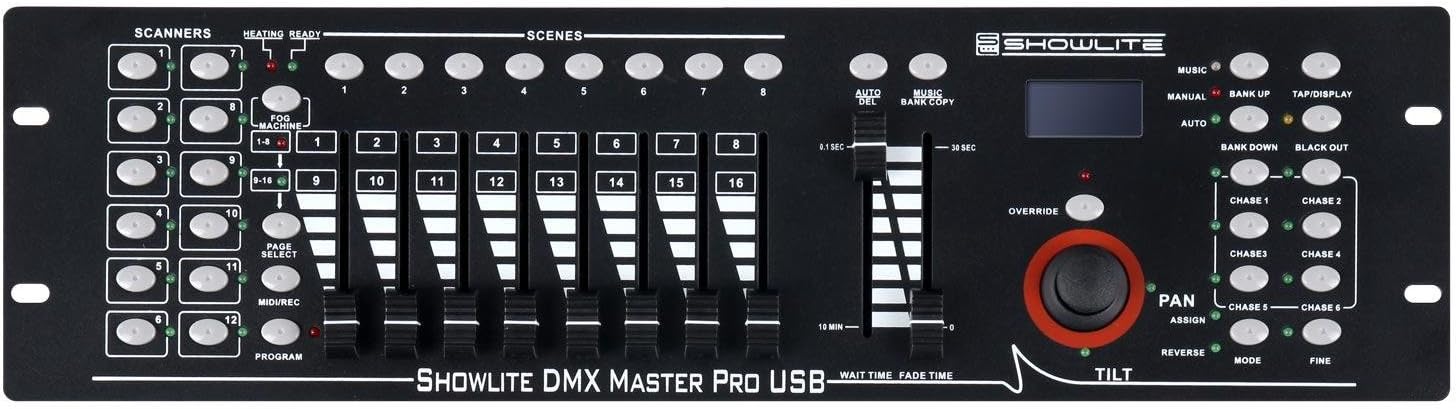
Image: Front panel of the Showlite DMX Master Pro USB Controller, displaying faders, buttons, joystick, and display screen.

Image: Rear panel of the Showlite DMX Master Pro USB Controller, showing USB, Audio, MIDI, DMX Out, Fog Machine, DC Input, and Power connections.
Pronomic Stage Pro-Line DMX Cables
The Pronomic Stage Pro-Line DMX cables ensure clean signal transmission and durable components, suitable for demanding stage environments.
- Type: Professional balanced XLR cable.
- Lengths: Includes 3x 1m and 1x 10m cables.
- Construction: High-quality connectors and flexible, robust outer jacket.

Image: A coiled blue Pronomic Stage Pro-Line DMX cable with XLR connectors.

Image: A disassembled XLR connector from a Pronomic DMX cable, showing its internal components.
Setup
- Unpacking: Carefully remove all components from the packaging. Inspect for any damage.
- Mounting Projectors: Use the included mounting brackets to position the FLP-5x8W projectors securely. Ensure they are stable and pointed in the desired direction.
- Power Connection: Connect the power cables to the "Power In" port of each projector and then to a suitable power outlet (100-240V, 50/60Hz).
- DMX Connection (for DMX Control):
- Connect the DMX Master Pro USB Controller to a power source.
- Connect a DMX cable from the "DMX Out" port of the controller to the "DMX In" port of the first FLP-5x8W projector.
- For multiple projectors, daisy-chain them by connecting a DMX cable from the "DMX Out" of the first projector to the "DMX In" of the second, and so on.
- Ensure the last projector in the chain has a DMX terminator (not included) connected to its "DMX Out" port for optimal signal integrity.
- Stand-Alone Operation (Projectors): If not using DMX control, the projectors can operate in stand-alone modes. Use the buttons on the rear panel of each projector to select modes such as automatic color changes or sound-activated programs.
- USB Data Backup (Controller): If desired, connect a USB stick to the DMX Master Pro USB Controller's USB port for saving scene data.
Operating
Showlite FLP-5x8W LED Projector (Stand-Alone)
When not connected to a DMX controller, the FLP-5x8W projectors can operate independently:
- Menu Buttons: Use the MENU, UP, DOWN, and ENTER buttons on the rear panel to navigate through the projector's internal programs.
- Modes: Select from various modes including static colors, automatic color fades/jumps, and sound-activated programs. The speed of color changes can be adjusted.
- Sound Activation: The integrated microphone allows the projector to react to music or ambient sound.
Showlite DMX Master Pro USB Controller
The DMX Master Pro USB Controller provides comprehensive control over your DMX-compatible lighting fixtures.
- Power On: Ensure the controller is connected to power and switch it on.
- Device Selection: Use the "SCANNERS" buttons (1-12) to select the DMX fixture you wish to control.
- Channel Control:
- Use the 8 faders to adjust DMX channel values.
- Toggle between "Page A" (channels 1-8) and "Page B" (channels 9-16) using the PAGE SELECT button if your fixture requires more than 8 channels.
- Pan/Tilt Control: Use the joystick to control the Pan (left/right) and Tilt (up/down) functions of moving head fixtures or other devices with these capabilities.
- Scene Programming:
- Adjust the faders and joystick to create a desired lighting state (a "scene").
- Save this scene into one of the 240 memory slots (30 banks x 8 slots). Refer to the controller's specific manual for detailed saving procedures.
- Chaser Programming: Combine multiple scenes into a sequence (a "chaser") to create dynamic lighting effects. The controller supports 6 programmable chasers.
- Playback: Use the dedicated buttons to play back programmed scenes or chasers. Adjust speed and fade times as needed.
- USB Backup: Regularly back up your programmed scenes and chasers to a USB stick via the USB port to prevent data loss.
Maintenance
- Cleaning: Regularly clean the lenses of the projectors with a soft, lint-free cloth to ensure optimal light output. Do not use abrasive cleaners.
- Ventilation: Ensure the ventilation openings on the projectors are clear of dust and debris to prevent overheating.
- Cable Inspection: Periodically inspect all DMX and power cables for signs of wear or damage. Replace any damaged cables immediately.
- LED Lifespan: The LED technology offers an extremely long lifespan (80,000-100,000 hours), minimizing the need for lamp replacement.
- Controller Care: Keep the DMX controller free from dust and liquids. Store in a dry, cool environment.
Troubleshooting
| Problem | Possible Cause | Solution |
|---|---|---|
| Projector does not light up. | No power, faulty cable, projector off. | Check power connection and outlet. Ensure power cable is securely connected. Verify projector is switched on. |
| Projector not responding to DMX controller. | Incorrect DMX address, faulty DMX cable, DMX chain issue, controller not sending signal. | Verify DMX address on projector matches controller setting. Check DMX cable connections. Ensure DMX terminator is used on the last fixture. Confirm controller is powered and sending DMX. |
| Colors are incorrect or flickering. | DMX signal interference, incorrect DMX mode, faulty fixture. | Check DMX cable quality and connections. Ensure projector is in the correct DMX mode (e.g., 7-channel mode). Try a different DMX cable. |
| DMX Controller not responding. | No power, internal error. | Check power connection. Restart the controller. If issues persist, consult manufacturer support. |
Specifications
Showlite FLP-5x8W LED Projector
- LEDs: 5x Quad Color Multichip RGBW LEDs
- Beam Angle: 25°
- DMX Channels: 7
- Connections: DMX In/Out (XLR), Power In/Out
- Functions: RGBW color mixing, Strobe, Stand-alone modes (Auto, Sound-activated)
- Power Supply: 100-240V AC, 50/60Hz
- Lifespan: 80,000-100,000 hours
- Style: Compact
Showlite DMX Master Pro USB Controller
- DMX Channels: 192
- Controllable Devices: Up to 12 DMX devices (max. 16 channels each)
- Memory Banks: 30 banks with 8 scene slots each (total 240 scenes)
- Chasers: 6 programmable
- Control: 8 channel faders (Page A: Ch. 1-8, Page B: Ch. 9-16), Joystick for Pan/Tilt
- Interface: USB port for data backup
- Format: 19" Rack mountable
Pronomic Stage Pro-Line DMX Cables
- Type: Balanced XLR DMX cable
- Included Lengths: 3x 1 meter, 1x 10 meter
- Connectors: High-quality XLR
Model Number: 00040780
ASIN: B010BZ9YFA
Warranty and Support
Information regarding warranty and availability of spare parts is not provided in the product details. For support or warranty inquiries, please contact your retailer or the manufacturer directly.


