
Makita 417880-1
Makita 417880-1 Front/Rear Change Lever Instruction Manual
Model: 417880-1
Introduction
The Makita 417880-1 Front/Rear Change Lever is an original equipment manufacturer (OEM) authorized replacement part designed for various Makita power tools. This component is crucial for the proper functioning of the tool's front/rear change mechanism.
This manual provides essential information regarding the part's specifications, compatibility, and general guidance for installation.
Product Overview
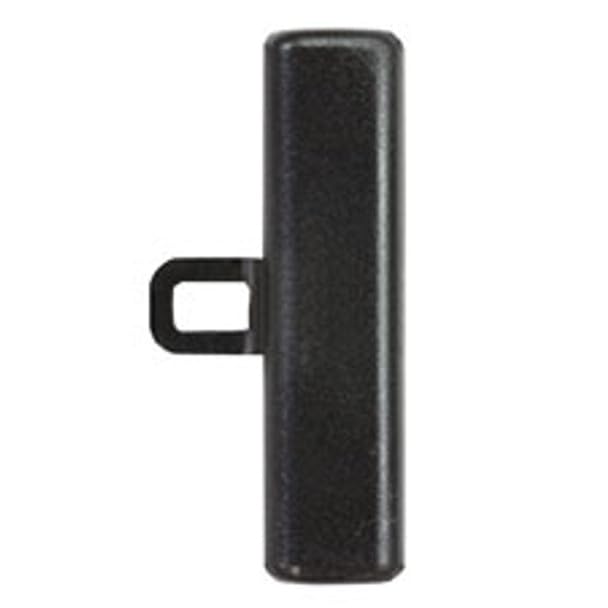
Image: The Makita 417880-1 Front/Rear Change Lever, a black, cylindrical component with a rectangular protrusion for engagement.
The 417880-1 change lever is a genuine Makita replacement part, ensuring compatibility and performance with your Makita power tools. It is manufactured to the original specifications to maintain the tool's integrity and operational efficiency.
Compatibility
This OEM part is designed to fit various Makita models. To ensure proper fitment, always cross-reference the part number 417880-1 with your tool's specific model number and parts diagram. Using the correct replacement part is essential for safe and effective operation.
Installation Instructions
Installation of the Front/Rear Change Lever typically involves disassembling the relevant section of your Makita tool, removing the old lever, and installing the new one. Due to the variety of Makita models, specific steps may vary. Always refer to your tool's original service manual or exploded parts diagram for detailed, model-specific instructions.
- Safety First: Disconnect the tool from its power source (unplug from outlet or remove battery pack) before beginning any repair or maintenance.
- Access the Component: Carefully disassemble the tool casing or housing to gain access to the existing front/rear change lever. This may require removing screws and separating housing halves.
- Remove Old Lever: Identify how the old lever is secured (e.g., pin, screw, snap-fit) and carefully remove it. Note its orientation for correct installation of the new part.
- Install New Lever: Position the new Makita 417880-1 lever in the correct orientation and secure it using the original fasteners or mechanism. Ensure it moves freely and engages properly.
- Reassemble Tool: Carefully reassemble the tool casing, ensuring all screws are tightened appropriately and no wires are pinched.
- Test Functionality: After reassembly, test the front/rear change mechanism to ensure it operates smoothly and correctly before using the tool for any work.
If you are unsure about any step, it is recommended to consult a qualified service technician or contact Makita customer support.
Specifications
| Attribute | Detail |
|---|---|
| Part Number | 417880-1 |
| Brand | Makita |
| Manufacturer | Makita |
| Item Weight | 1.01 pounds |
| Product Dimensions | 7 x 5 x 3 inches |
| Exterior Finish | Smooth |
| Special Feature | Easy to Install |
| Unit Count | 1.0 Count |
| Number of Items | 1 |
Maintenance and Care
As a replacement part, the Makita 417880-1 Front/Rear Change Lever requires no specific maintenance beyond ensuring it remains clean and free from debris. Regular inspection of the tool's internal components during routine maintenance can help identify any wear or damage to the lever, prompting timely replacement if necessary.
Troubleshooting
- Lever Not Engaging: Ensure the lever is correctly seated and aligned with the internal mechanism. Check for any obstructions or misaligned components within the tool.
- Stiff Operation: If the lever feels stiff after installation, verify that no parts are binding and that all components are properly lubricated according to the tool's original service manual.
- Incorrect Part: Double-check the part number against your tool's requirements. An incorrect part may not fit or function properly.
For persistent issues, refer to your tool's comprehensive service manual or contact Makita customer support.
Warranty and Support
Makita replacement parts are typically covered by a limited warranty against defects in materials and workmanship. For specific warranty terms and conditions, please refer to the documentation provided with your original Makita tool or visit the official Makita website. For technical support or assistance with part identification, contact Makita customer service directly.
You can visit the official Makita store for more information: Makita Store on Amazon
Ask a question about this manual
Ask about setup, troubleshooting, compatibility, parts, safety, or missing instructions. Manuals+ will review the question and use this page’s manual context to help answer it.