
VITEK B1010AB7F4C
VITEK Multi Cooker + Bread Maker 5G User Manual
Model: B1010AB7F4C
1. Introduction
Thank you for choosing the VITEK Multi Cooker + Bread Maker 5G. This appliance is designed to simplify your cooking and baking needs, offering a wide range of functions from multi-cooking to bread making. Please read this manual thoroughly before first use to ensure safe and optimal operation.
This manual provides essential information on setup, operation, maintenance, and troubleshooting for your appliance.
2. Important Safety Instructions
Always follow basic safety precautions when using electrical appliances to reduce the risk of fire, electric shock, and/or injury to persons.
- Read all instructions before using the appliance.
- Do not touch hot surfaces. Use handles or knobs.
- To protect against electrical shock, do not immerse cord, plugs, or the main unit in water or other liquid.
- Close supervision is necessary when any appliance is used by or near children.
- Unplug from outlet when not in use and before cleaning. Allow to cool before putting on or taking off parts.
- Do not operate any appliance with a damaged cord or plug or after the appliance malfunctions or has been damaged in any manner.
- The use of accessory attachments not recommended by the appliance manufacturer may cause injuries.
- Do not use outdoors.
- Do not let cord hang over edge of table or counter, or touch hot surfaces.
- Do not place on or near a hot gas or electric burner, or in a heated oven.
- Extreme caution must be used when moving an appliance containing hot oil or other hot liquids.
- Always attach plug to appliance first, then plug cord into the wall outlet. To disconnect, turn any control to "off", then remove plug from wall outlet.
- Do not use appliance for other than intended use.
3. Product Overview
The VITEK Multi Cooker + Bread Maker 5G is a versatile kitchen appliance designed for various cooking and baking tasks. It features a control panel with a digital display and multiple function buttons.
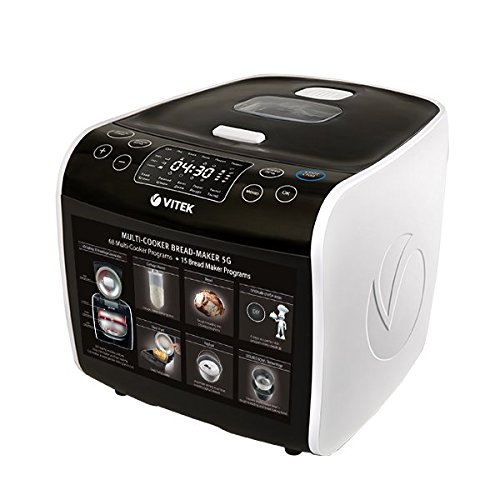
Figure 1: Front view of the VITEK Multi Cooker + Bread Maker 5G. The appliance is white and black, featuring a digital display showing "04:30" and various control buttons. The front panel also indicates "MULTI-COOKER BREAD-MAKER 5G" with "60 Multi-Cooker Programs + 15 Bread Maker Programs".
3.1. Components
- Main Unit (housing the heating element and control board)
- Removable Inner Pot
- Lid with steam vent
- Control Panel with Digital Display
- Power Cord
- Measuring Cup (if included)
- Spatula (if included)
4. Setup
4.1. Unpacking
- Carefully remove the appliance and all accessories from the packaging.
- Remove any packaging materials, stickers, or labels.
- Inspect the appliance for any damage. Do not use if damaged.
4.2. Initial Cleaning
- Before first use, wash the inner pot, lid, and any accessories (measuring cup, spatula) with warm soapy water.
- Rinse thoroughly and dry completely.
- Wipe the exterior of the main unit with a damp cloth. Do not immerse the main unit in water.
4.3. Placement
- Place the appliance on a stable, flat, heat-resistant surface.
- Ensure there is adequate ventilation around the appliance, especially above the steam vent.
- Keep away from walls, cabinets, and other appliances.
- Do not place on or near a hot gas or electric burner, or in a heated oven.
5. Operating Instructions
5.1. Control Panel Overview
The control panel features a digital display and various buttons for program selection, time adjustment, and start/stop functions.
- Display: Shows cooking time, program selection, and status.
- Program Buttons: Select specific cooking or bread making programs (e.g., Rice, Soup, Bake, Bread, Dough).
- Time/Temperature Adjustment Buttons: Adjust cooking time or temperature settings.
- Start/Stop Button: Initiates or cancels a cooking program.
- Keep Warm/Cancel Button: Activates keep warm function or cancels current operation.
5.2. General Operation Steps
- Prepare your ingredients according to your recipe.
- Place the inner pot into the main unit.
- Add ingredients to the inner pot.
- Close the lid securely.
- Plug the power cord into a suitable electrical outlet.
- Select the desired cooking or bread making program using the program buttons.
- Adjust cooking time or temperature if necessary using the adjustment buttons.
- Press the Start button to begin the cooking cycle.
- Once the program is complete, the appliance may switch to a "Keep Warm" mode or beep to indicate completion.
- Carefully open the lid, avoiding steam.
- Unplug the appliance after use.
5.3. Specific Program Usage (Examples)
Refer to the included recipe book for detailed instructions on specific programs and recipes.
5.3.1. Multi-Cooker Programs (60 Programs)
These programs are designed for various cooking methods such as steaming, stewing, frying, and slow cooking.
- Rice: For cooking various types of rice.
- Soup: For preparing soups and broths.
- Steam: For steaming vegetables, fish, etc.
- Stew: For slow-cooked dishes.
- Fry: For sautéing or frying ingredients.
5.3.2. Bread Maker Programs (15 Programs)
These programs are dedicated to bread making, from kneading dough to baking a finished loaf.
- Basic Bread: For standard white or whole wheat bread.
- French Bread: For crusty French loaves.
- Sweet Bread: For breads with high sugar content.
- Dough: For preparing dough for pizzas, rolls, etc., without baking.
- Bake: For baking pre-made dough or cakes.
6. Maintenance and Cleaning
Regular cleaning and maintenance will ensure the longevity and optimal performance of your VITEK Multi Cooker + Bread Maker 5G.
6.1. Cleaning After Each Use
- Always unplug the appliance and allow it to cool completely before cleaning.
- Remove the inner pot and wash it with warm, soapy water. Use a non-abrasive sponge to prevent scratching the non-stick coating.
- Wash the lid and any removable accessories (e.g., measuring cup, spatula) with warm, soapy water.
- Rinse all washed parts thoroughly and dry them completely before reassembling or storing.
6.2. Cleaning the Main Unit
- Wipe the exterior of the main unit with a soft, damp cloth.
- Do not use abrasive cleaners or scouring pads, as they may damage the surface.
- Ensure no water enters the electrical components. Never immerse the main unit in water or any other liquid.
- Clean the heating plate inside the main unit with a damp cloth, ensuring it is dry before next use.
6.3. Storage
Store the appliance in a cool, dry place, away from direct sunlight and moisture. Ensure all parts are clean and dry before storage.
7. Troubleshooting
If you encounter issues with your VITEK Multi Cooker + Bread Maker 5G, refer to the table below for common problems and solutions.
| Problem | Possible Cause | Solution |
|---|---|---|
| Appliance does not turn on. | Not plugged in; power outlet malfunction; damaged power cord. | Ensure power cord is securely plugged into a working outlet. Check household circuit breaker. Contact customer support if cord is damaged. |
| Food not cooking properly. | Incorrect program selected; insufficient liquid; lid not properly closed. | Verify program selection and cooking time. Ensure adequate liquid is added. Check that the lid is securely closed. |
| Bread does not rise. | Yeast is old or inactive; incorrect ingredient measurements; wrong program. | Check yeast expiration date. Ensure accurate measurements of all ingredients. Select the correct bread program. |
| Error code on display. | Specific internal malfunction. | Note the error code and refer to the full troubleshooting guide (if available) or contact customer support. Unplug and plug back in to reset. |
If the problem persists after attempting these solutions, please contact VITEK customer support.
8. Specifications
| Feature | Detail |
|---|---|
| Model Number | B1010AB7F4C |
| Brand | VITEK |
| Type | Multi Cooker + Bread Maker |
| Color | White & Black |
| Material | Plastic |
| Item Weight | 9 kg 360 g |
| Included Components | Multi cooker + Bread maker |
| Product Care Instructions | Wipe with Dry Cloth |
9. Warranty and Support
VITEK products are manufactured to high-quality standards. For warranty information and customer support, please refer to the warranty card included with your purchase or visit the official VITEK website.
For service or inquiries, please contact VITEK customer service. Keep your purchase receipt as proof of purchase for warranty claims.
Manufacturer: Vitek
Related documentsB1010AB7F4C


Ask a question about this manual
Ask about setup, troubleshooting, compatibility, parts, safety, or missing instructions. Manuals+ will review the question and use this page’s manual context to help answer it.