1. Introduction
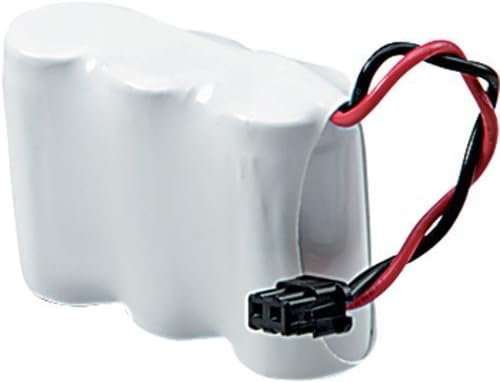
Thank you for choosing Synergy Digital replacement cordless phone batteries. This manual provides essential information for the safe and effective use of your new batteries. These batteries are designed as a compatible replacement for cordless phones using Sony BP-T26 and Panasonic P-P511 battery models. Please read this manual thoroughly before installation and use.
2. Safety Information
- Do not short-circuit the battery terminals.
- Do not expose batteries to excessive heat, fire, or direct sunlight.
- Do not disassemble, puncture, or modify the battery.
- Keep batteries out of reach of children.
- Dispose of used batteries according to local regulations. Do not dispose of in household waste.
- Use only with compatible cordless phone models as specified.
3. Package Contents
- 2 x Synergy Digital 3-1/2AA-W NiMH Cordless Phone Batteries (3.6V, 400 mAh)
4. Setup and Installation
- Locate Battery Compartment: Identify the battery compartment on your cordless phone handset. This is typically on the back or bottom of the handset.
- Remove Old Battery: If replacing an existing battery, carefully disconnect its connector and remove the old battery.
- Connect New Battery: Align the connector of the new Synergy Digital battery with the corresponding port in the handset's battery compartment. Gently push until it clicks into place. Ensure the polarity is correct.
- Position Battery: Place the battery securely within the compartment. Do not force it if it does not fit easily.
- Close Compartment: Replace the battery compartment cover, ensuring it is securely latched.
- Initial Charge: Place the handset on its charging base for an initial charge. For optimal performance, allow the battery to charge for 12-15 hours before first use, even if the phone indicates a full charge sooner.

5. Operating Instructions
- First Use: After the initial 12-15 hour charge, the battery is ready for use.
- Normal Charging: Place the handset on its charging base when not in use to maintain a full charge.
- Battery Life: The operating time of the battery will vary depending on usage patterns (talk time vs. standby time).
6. Maintenance
- Regular Charging: To prolong battery life, avoid completely draining the battery frequently. Recharge the handset regularly.
- Clean Contacts: Periodically clean the metal charging contacts on both the handset and the charging base with a dry, soft cloth to ensure good connection.
- Storage: If storing the battery for an extended period, charge it to approximately 50% and store in a cool, dry place. Recharge every 3-6 months to prevent deep discharge.
- Temperature: Avoid exposing the battery to extreme temperatures, which can reduce its lifespan.
7. Troubleshooting
- Phone Not Turning On:
- Ensure the battery is correctly installed and its connector is firmly seated.
- Place the handset on the charging base for at least 30 minutes.
- Short Talk Time / Poor Battery Life:
- Ensure the battery has completed its initial 12-15 hour charge cycle.
- The battery may not be fully charged; leave it on the base longer.
- Battery performance can degrade over time with repeated charge/discharge cycles.
- Phone Not Charging:
- Verify the charging base is properly connected to power.
- Clean the charging contacts on both the handset and the base.
- Ensure the handset is correctly seated on the charging base.
8. Specifications
| Brand | Synergy Digital |
| Model Number | AK58859 |
| Battery Cell Composition | NiMH (Nickel-Metal Hydride) |
| Voltage | 3.6V |
| Capacity | 400 mAh |
| Compatible With | Sony BP-T26, Panasonic P-P511 |
| Quantity | 2 Batteries per pack |
| Item Weight (Pack) | 10.6 ounces |
9. Warranty Information
Synergy Digital products are covered by a manufacturer's warranty against defects in materials and workmanship. Please refer to the product packaging or the official Synergy Digital website for specific warranty terms and duration. Keep your proof of purchase for warranty claims.
10. Support
For technical assistance, troubleshooting not covered in this manual, or warranty inquiries, please contact Synergy Digital customer support. Contact information can typically be found on the product packaging or the official Synergy Digital website.


