1. Introduction
This manual provides essential information for the proper installation and maintenance of the Makita CB70 Carbon Brush Set. The CB70 is an O.E.M. authorized replacement part designed to fit various Makita power tool models, ensuring optimal performance and longevity of your equipment.
2. Product Overview
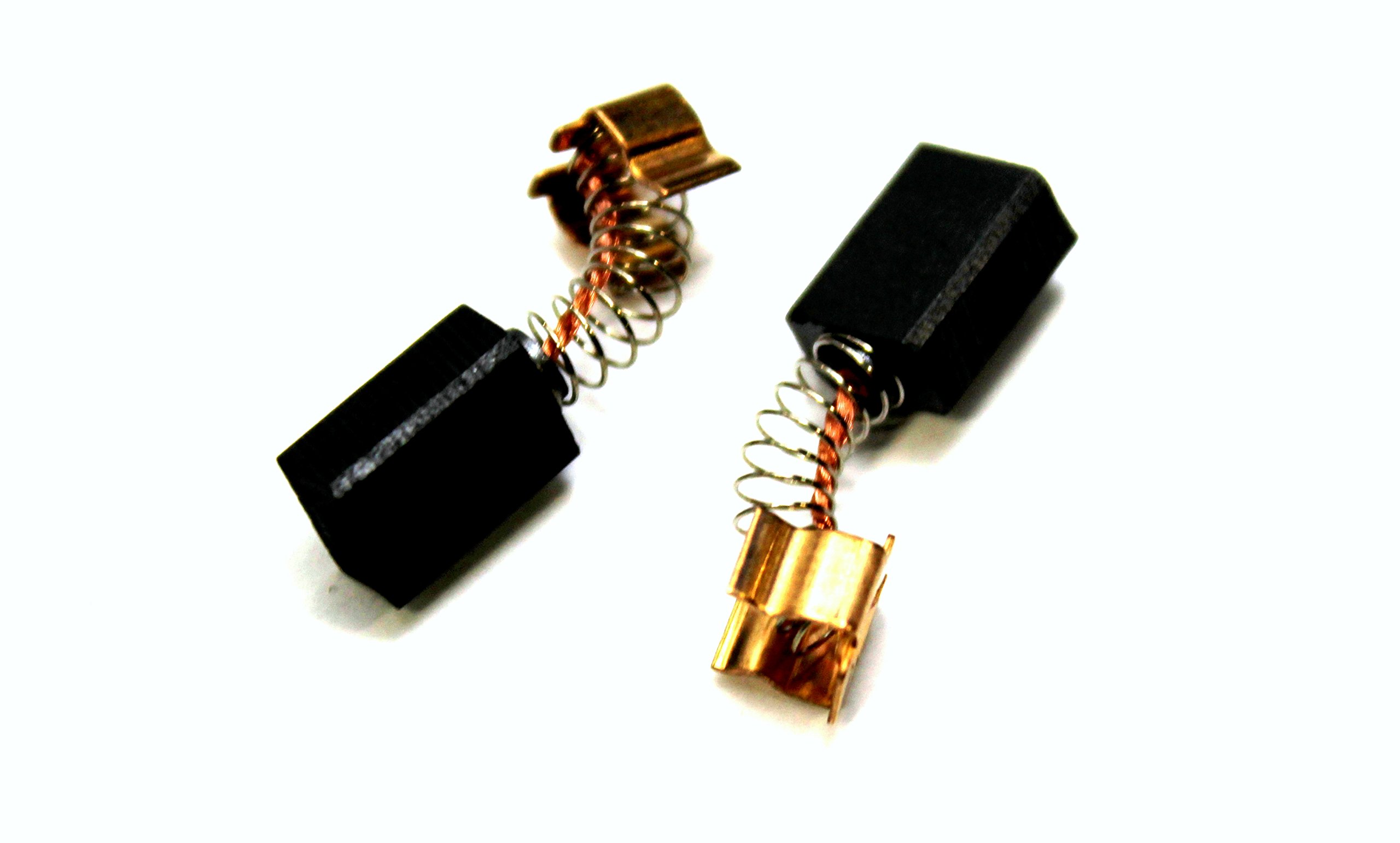
The image displays two individual Makita CB70 carbon brushes. Each brush consists of a rectangular black carbon block, a coiled metal spring, and a copper terminal. These components are crucial for conducting electricity to the motor's commutator, allowing the tool to operate. The springs ensure constant contact between the carbon brush and the commutator as the brush wears down.
Key Features:
- O.E.M. authorized replacement part, ensuring compatibility and quality.
- Designed to fit various Makita power tool models.
- Essential component for electrical conductivity in power tool motors.
- Part Number: CB70.
3. Specifications
| Manufacturer | Makita |
| Part Number | CB70 |
| Item Weight | 0.16 ounces |
| Product Dimensions | 2.5 x 1 x 0.1 inches |
| Material | Other (Carbon) |
| Item Package Quantity | 1 (typically sold as a pair for replacement) |
| Batteries Required? | No |
4. Installation Instructions
Replacing carbon brushes is a common maintenance task for power tools. Always refer to your specific tool's service manual for detailed, model-specific instructions. The following are general guidelines:
- Safety First: Disconnect the power tool from its power source (unplug it or remove the battery pack) before beginning any maintenance.
- Locate Brush Caps: Identify the brush caps on your power tool. These are usually small, slotted or Phillips-head caps on the side of the motor housing.
- Remove Old Brushes: Unscrew the brush caps and carefully pull out the old carbon brushes. Note their orientation.
- Inspect Commutator: While the brushes are out, inspect the commutator (the copper segments on the motor's armature). It should be clean and free of excessive scoring or carbon buildup.
- Insert New Brushes: Insert the new Makita CB70 carbon brushes into the brush holders, ensuring they are oriented correctly. The carbon block should slide smoothly into the holder, and the spring should apply pressure to the brush.
- Secure Brush Caps: Screw the brush caps back into place, tightening them securely but not overtightening.
- Test Tool: Reconnect the power tool to its power source and test its operation. It may take a few seconds for the new brushes to seat properly, which might result in some initial sparking. This is normal.
If you are unsure about any step, consult a qualified technician or the tool's official service manual.
5. Operating Considerations After Brush Replacement
After installing new carbon brushes, it is important to allow them to "seat" properly against the commutator. This process ensures optimal contact and performance.
- Initial Run-in: Run the tool at a moderate speed without load for a few minutes. This helps the brushes conform to the shape of the commutator.
- Observe for Sparking: Some minor sparking at the commutator is normal, especially with new brushes. Excessive sparking, smoke, or unusual smells indicate a problem and the tool should be immediately shut off and inspected.
- Regular Use: Continue to use the tool as intended. The brushes will continue to wear and conform over time.
6. Maintenance and Care
Proper maintenance of your power tool, including its carbon brushes, extends its lifespan and ensures safe operation.
- Regular Inspection: Periodically inspect the carbon brushes for wear. They should be replaced when they are worn down to approximately 1/4 inch (6mm) or less, or if they appear chipped or damaged.
- Keep Clean: Ensure the brush holders and commutator area are kept clean and free of dust and debris. Use compressed air to blow out carbon dust if necessary.
- Use Genuine Parts: Always use genuine Makita replacement parts, such as the CB70, to ensure compatibility and maintain the tool's performance and warranty.
7. Troubleshooting Common Issues
If your tool experiences issues after brush replacement, consider the following:
- Tool Not Starting:
- Ensure brushes are fully seated and brush caps are tightened.
- Check power supply.
- Verify brushes are installed with correct orientation.
- Excessive Sparking or Smoke:
- Immediately stop the tool.
- Inspect brushes for damage or improper seating.
- Check commutator for damage, excessive wear, or carbon buildup.
- This could indicate a deeper motor issue requiring professional service.
- Reduced Power or Intermittent Operation:
- Brushes may not be fully seated or could be defective.
- Commutator may be dirty or worn.
For persistent issues, it is recommended to seek assistance from a certified Makita service center.
8. Warranty and Support
As an O.E.M. authorized replacement part, the Makita CB70 Carbon Brush Set is manufactured to Makita's high standards. For specific warranty information regarding replacement parts, please refer to Makita's official warranty policy available on their website or contact Makita customer service directly.
For technical support, service, or to locate an authorized service center, please visit the official Makita website or contact their customer support line. Using genuine Makita parts helps maintain the validity of your tool's warranty.
Makita Official Website: www.makitatools.com