
Introduction
This instruction manual provides essential information for the proper handling, installation, and maintenance of the Makita CB401 Carbon Brush Set. The CB401 is an original equipment manufacturer (OEM) authorized replacement part designed for various Makita power tool models. Carbon brushes are critical components in many electric motors, facilitating the transfer of electrical current to the motor's commutator. Regular inspection and timely replacement of worn carbon brushes are vital for maintaining tool performance and extending motor life.
Please read this manual thoroughly before attempting any installation or maintenance procedures to ensure safe and effective use of your Makita power tool.
Safety Information
Always observe the following safety precautions when working with power tools and electrical components:
- Disconnect Power: Before performing any maintenance, inspection, or installation, always unplug the power tool from its power source to prevent accidental startup and electrical shock.
- Wear Personal Protective Equipment (PPE): Use safety glasses and gloves to protect against potential hazards.
- Use Correct Parts: Only use genuine Makita replacement parts, such as the CB401 carbon brush set, to ensure compatibility and maintain tool integrity.
- Work in a Well-Lit Area: Ensure adequate lighting to clearly see components and connections.
- Keep Children Away: Do not allow children or untrained personnel to handle power tools or replacement parts.
- Consult Tool Manual: Refer to your specific Makita power tool's instruction manual for detailed disassembly and reassembly procedures, as these can vary by model.
Product Overview
The Makita CB401 Carbon Brush Set is a direct replacement for worn carbon brushes in compatible Makita power tools. Each set typically contains two carbon brushes, which are consumable components designed to wear down over time. Replacing them ensures consistent electrical contact with the motor's commutator, which is essential for the motor's efficient operation.
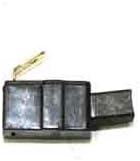
Image: Makita CB401 Carbon Brush Set. This image displays the typical appearance of the CB401 carbon brush set, featuring two rectangular carbon blocks with attached copper wires and terminal connectors.
The CB401 brushes are manufactured to Makita's specifications, ensuring proper fit and electrical characteristics for optimal tool performance and longevity.
Installation (Setup)
The following steps outline a general procedure for replacing carbon brushes. Specific steps may vary depending on your Makita power tool model. Always consult your tool's specific instruction manual for detailed guidance.
- Prepare the Tool: Ensure the power tool is unplugged from the electrical outlet. Place the tool on a stable, clean surface.
- Locate Brush Caps: Identify the brush caps on the motor housing. These are typically small, slotted or Phillips-head caps, often located on opposite sides of the motor.
- Remove Old Brushes:
- Using a screwdriver, carefully unscrew and remove the brush caps.
- Gently pull out the old carbon brushes. Note their orientation and how they were seated.
- Inspect the commutator for any damage or excessive wear. Clean any carbon dust from the brush holders.
- Install New Brushes:
- Insert the new Makita CB401 carbon brushes into the brush holders, ensuring they slide in smoothly and are oriented correctly. The carbon block should make proper contact with the commutator.
- Ensure the wire lead from the brush is properly positioned and not pinched.
- Carefully screw the brush caps back into place. Do not overtighten, as this can damage the caps or housing.
- Reassemble and Test: Reassemble any other parts of the tool that were removed. Plug the tool into the power source and perform a brief test run to ensure proper operation.
Operating Considerations
After installing new carbon brushes, it is recommended to allow a brief "break-in" period. During this time, run the tool at a light load for a few minutes. This allows the new brushes to properly seat and conform to the shape of the commutator, optimizing electrical contact and reducing initial sparking. Excessive sparking during initial operation is normal but should subside after the break-in period.
Maintenance
Regular inspection of carbon brushes is crucial for maintaining the performance and longevity of your Makita power tool. Follow these guidelines:
- Periodic Inspection: Depending on tool usage, inspect the carbon brushes every 50-100 hours of operation, or if you notice a decrease in power, excessive sparking, or intermittent operation.
- Check Brush Length: Replace brushes when they are worn down to approximately 1/4 inch (6mm) or to the wear limit line marked on the brush, if present. Severely worn brushes can damage the commutator.
- Clean Brush Holders: When replacing brushes, clean any accumulated carbon dust from the brush holders to ensure the new brushes can move freely.
- Commutator Condition: While inspecting brushes, also check the commutator for excessive wear, pitting, or discoloration. If the commutator is severely damaged, professional service may be required.
Troubleshooting
If your power tool exhibits issues after carbon brush replacement, consider the following:
- Excessive Sparking: A small amount of sparking is normal, especially with new brushes during break-in. Persistent heavy sparking may indicate improperly seated brushes, a dirty or damaged commutator, or incorrect brush type. Ensure brushes are fully seated and caps are tightened.
- Reduced Power or Intermittent Operation: This often points to worn brushes, but if new brushes are installed, check for proper electrical connections, ensure the brushes are making full contact with the commutator, and verify that the brush caps are securely fastened.
- Tool Not Starting: Double-check that the tool is plugged in and the power switch is functional. If brushes were just replaced, ensure they are correctly installed and making contact. A severely worn commutator or other internal motor issues could also be a cause.
If troubleshooting steps do not resolve the issue, it is recommended to consult a qualified service technician or contact Makita customer support.
Specifications
| Part Number | CB401 |
| Manufacturer | Makita |
| Item Weight | 0.16 ounces |
| Product Dimensions | 2 x 1.25 x 0.75 inches |
| Item Package Quantity | 1 (set of brushes) |
| Batteries Required | No |
Warranty and Support
For information regarding warranty coverage for Makita replacement parts, please refer to the official Makita warranty policy available on their website or contact Makita customer service directly. As an OEM part, the CB401 is designed to meet Makita's quality standards.
For technical assistance, service, or to locate an authorized service center, please visit the official Makita website or contact their customer support line. When contacting support, please have your tool's model number and the CB401 part number available.


