
1. Product Overview
The Valcom VC-V-1014B is a robust 5-watt, one-way track-style speaker designed for various indoor and covered outdoor environments. Its high-efficiency design and durable metal, weather-resistant enclosure make it suitable for retail spaces, restaurants, offices, hallways, and covered patios. This speaker is engineered for clear audio output and flexible installation.
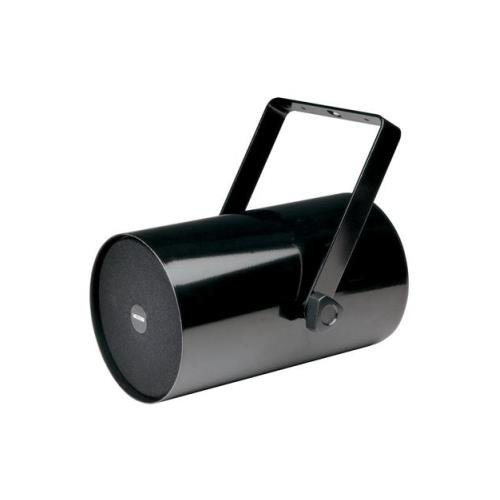
Figure 1: Valcom VC-V-1014B 5-Watt 1-Way Track Speaker. This image shows the Valcom VC-V-1014B 5-Watt 1-Way Track Speaker. It is a black, cylindrical speaker unit with a sturdy black metal U-shaped mounting bracket attached to its sides, allowing for track or wall installation. The speaker grille is visible on one end.
2. Safety Information
Please read all safety instructions carefully before installation and operation. Failure to follow these guidelines may result in property damage, injury, or electric shock.
- Electrical Safety: This product operates on a corded electric power source. Ensure all wiring is performed by a qualified individual and complies with local electrical codes. Disconnect power before making any connections or performing maintenance.
- Mounting: The speaker must be securely attached to a stable wall or exposed beam using the provided track bracket. Ensure the mounting surface can support the weight of the speaker (approximately 5.7 pounds). Improper mounting can lead to the speaker falling, causing injury or damage.
- Environmental Conditions: While the enclosure is weather-resistant, this speaker is not fully waterproof. Do not expose it to direct heavy rain, submersion in water, or extreme temperatures. It is designed for covered outdoor areas only.
- Ventilation: Ensure adequate airflow around the speaker to prevent overheating. Do not block the speaker grille or any ventilation openings.
- Cleaning: Use a soft, dry cloth for cleaning. Do not use liquid cleaners or aerosols directly on the speaker.
3. Package Contents
Verify that all items are present in the package before proceeding with installation:
- Valcom VC-V-1014B 5-Watt 1-Way Track Speaker Unit
- Mounting Track Bracket
- Installation Hardware (screws, nuts, washers - may vary)
4. Setup and Installation
Follow these steps for proper installation of your Valcom VC-V-1014B speaker:
- Choose Location: Select a suitable location on a wall or exposed beam that can safely support the speaker's weight and provides optimal sound dispersion. Ensure the location is within reach of the necessary power and audio cabling.
- Mount Bracket: Securely attach the track bracket to the chosen surface using appropriate screws and anchors (not always included, depending on surface type). Ensure the bracket is level and firmly fixed.
- Attach Speaker: Align the speaker unit with the mounted track bracket. Use the provided hardware to firmly attach the speaker to the bracket. Ensure all connections are tight to prevent vibration or accidental detachment.
- Wiring: Connect the speaker to your audio amplifier or system. This speaker is a one-way speaker, typically requiring two wires for audio signal. Refer to your audio system's manual for specific wiring diagrams. Ensure power is off before making any electrical connections.
- Power Connection: Connect the speaker to its corded electric power source. Verify that the power supply meets the speaker's requirements.
5. Operating Instructions
Once installed and wired, operating the Valcom VC-V-1014B speaker is straightforward:
- Power On: Turn on the power to your audio amplifier or system to which the speaker is connected.
- Audio Source: Select your desired audio source on your amplifier (e.g., microphone, music player).
- Volume Control: Adjust the volume level using your amplifier's controls. For more precise local volume control, consider integrating a Valcom VC-V-1092 Speaker Volume Control (sold separately).
- Sound Check: Play a test audio to ensure sound is clear and at an appropriate level.
6. Maintenance
Regular maintenance helps ensure the longevity and optimal performance of your speaker:
- Cleaning: Periodically wipe the exterior of the speaker with a soft, dry, lint-free cloth to remove dust and dirt. Do not use abrasive cleaners, solvents, or excessive moisture.
- Inspection: Regularly inspect the mounting bracket and all connections for tightness and signs of wear or corrosion. Re-tighten any loose screws.
- Environmental Check: Ensure the speaker remains protected from direct water exposure and extreme weather conditions, even though it is weather-resistant.
7. Troubleshooting
If you encounter issues with your Valcom VC-V-1014B speaker, refer to the following common problems and solutions:
| Problem | Possible Cause | Solution |
|---|---|---|
| No Sound |
|
|
| Distorted Sound |
|
|
| Intermittent Sound |
|
|
If the problem persists after trying these solutions, contact Valcom customer support or a qualified technician.
8. Specifications
| Feature | Detail |
|---|---|
| Model Number | VC-V-1014B |
| Brand | Valcom |
| Speaker Type | Track-Style, 1-Way |
| Power Rating | 5 Watt |
| Enclosure Material | Metal |
| Weather Resistance | Weather Resistant (Not fully waterproof) |
| Color | Black |
| Power Source | Corded Electric |
| Mounting Type | Wall Mount (via track bracket) |
| Item Weight | 5.7 pounds (2.59 kg) |
| Product Dimensions (L x W x H) | 10.5 x 8.5 x 12 inches (26.67 x 21.59 x 30.48 cm) |
| UPC | 806296612916, 807035654754, 809390044430 |
| Manufacturer | VALCOM |
9. Warranty and Support
For information regarding product warranty, please refer to the documentation provided with your purchase or visit the official Valcom website. Warranty terms and conditions may vary.
For technical support, troubleshooting assistance beyond this manual, or inquiries about replacement parts, please contact Valcom customer service directly. You can typically find contact information on the manufacturer's website or on your purchase receipt.
Related Products:
- Valcom VC-V-1092: Speaker Volume Control (for additional volume management)
- Valcom VC-V-1013B: 1 Watt Track-Style Speaker (a lower wattage alternative)


