
Moffat E33T5/P10M
Moffat E33T5/P10M Turbofan Bake Center Convection Oven User Manual
Model: E33T5/P10M
Introduction
This manual provides detailed instructions for the safe and efficient operation of your Moffat E33T5/P10M Turbofan Bake Center Convection Oven. This electric half-size unit combines a convection oven with a proofer/holding cabinet, designed for commercial food service applications. Please read this manual thoroughly before installation, operation, or maintenance to ensure proper use and to prevent damage or injury.
Setup
1. Unpacking
Carefully remove the oven and proofer unit from its packaging. Inspect for any shipping damage. Report any damage to the carrier immediately. Retain all packaging materials until the unit is confirmed to be in working order.
2. Placement
Position the unit on a stable, level surface capable of supporting its weight (approximately 225 pounds). Ensure adequate clearance around the unit for ventilation and maintenance. Avoid placing near heat sources or in areas with excessive moisture.
3. Electrical Connection
The Moffat E33T5/P10M operates on 208V/60Hz/1-ph power. Connection must be performed by a qualified electrician in accordance with all local and national electrical codes. Ensure the power supply matches the unit's requirements.
4. Initial Cleaning
Before first use, clean the interior and exterior surfaces of both the oven and proofer sections with a mild detergent and warm water. Rinse thoroughly and dry. The porcelain enameled oven chamber should be wiped clean.
Operating Instructions
The unit features a touch screen control panel for intuitive operation.
1. Control Panel Overview
The touch screen interface allows for precise control over temperature, time, fan speed, and cooking stages. A USB port is available for recipe management and software updates.
2. Basic Oven Operation
- Power On: Press the power button on the control panel.
- Set Temperature: Use the touch screen to set the desired temperature between 140°F and 500°F.
- Set Time: Input the desired cooking time.
- Fan Speed: Select between the two available fan speeds for optimal cooking results.
- Start Cooking: Press the start button to begin the cooking cycle.
3. Cooking Stages
The oven supports up to 5 cooking stages, allowing for complex recipes with varying temperature and time settings. Program each stage sequentially via the touch screen.
4. Special Functions
- Rethermalization: Use this function to safely reheat pre-cooked food items.
- Roast: Optimized settings for roasting various food products.
5. Proofer/Holding Cabinet Operation
The lower section functions as a proofer or holding cabinet. Controls for this section are separate and allow for temperature and humidity management suitable for proofing dough or holding cooked foods at serving temperature.
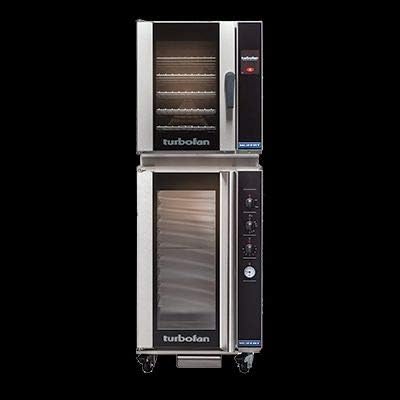
Figure 1: Front view of the Moffat E33T5/P10M Turbofan Bake Center Convection Oven. The unit features a stainless steel exterior, with the convection oven on top and the proofer/holding cabinet below. Both sections have glass doors to view contents, and the top oven has a prominent handle. The control panel is located on the right side of the upper oven, and the lower proofer has its own set of controls.
Maintenance
1. Daily Cleaning
- After each use, allow the oven to cool. Wipe down the interior, including the porcelain enameled oven chamber, with a damp cloth and mild, non-abrasive cleaner.
- Clean the exterior stainless steel surfaces with a stainless steel cleaner to maintain appearance.
- Empty and clean the proofer's water pan (if applicable) daily to prevent mineral buildup.
2. Regular Maintenance
- Periodically inspect the door seals for wear and tear. Replace if damaged to maintain heat efficiency.
- Ensure the dual halogen oven lamps are functioning. Replace as needed.
- For optimal performance and longevity, professional servicing by a qualified technician is recommended annually.
Troubleshooting
| Problem | Possible Cause | Solution |
|---|---|---|
| Oven not heating | No power supply; circuit breaker tripped; heating element failure. | Check power connection and circuit breaker. If problem persists, contact service. |
| Uneven cooking | Fan malfunction; improper loading; dirty oven interior. | Ensure fan is operating. Do not overload. Clean oven interior. |
| Touch screen unresponsive | Temporary software glitch; power issue. | Restart the unit. If issue continues, contact service. |
| Proofer not maintaining temperature | Door seal issue; heating element problem; water pan empty. | Check door seal. Ensure water pan has water. Contact service if heating element suspected. |
For issues not listed or if troubleshooting steps do not resolve the problem, contact a qualified service technician.
Specifications
- Brand: Moffat
- Model Number: E33T5/P10M
- Type: Turbofan Bake Center Convection Oven, Electric Half Size, 1 Deck
- Capacity: (5) half-size sheet pan capacity (oven)
- Tray Spacing: 3-1/3" (oven)
- Temperature Range: 140°F - 500°F (oven)
- Control Type: Touch Screen Control
- Fan: 2 speed fan
- Oven Chamber: Porcelain Enameled
- Lighting: Dual Halogen Oven Lamps
- Connectivity: USB port
- Functions: Rethermalization, Roast functions
- Exterior Material: Stainless Steel
- Door Style: Dropdown Door
- Product Dimensions: 26.75 x 24 x 65.5 inches
- Item Weight: 225 pounds
- Certifications: cETLus, NSF
Warranty and Support
For warranty information and technical support, please refer to the documentation provided with your purchase or contact Moffat customer service directly. Keep your purchase receipt and model number readily available when seeking support.
For further assistance, visit the official Moffat website or contact their authorized service centers. Visit Moffat Official Website
Ask a question about this manual
Ask about setup, troubleshooting, compatibility, parts, safety, or missing instructions. Manuals+ will review the question and use this page’s manual context to help answer it.