
Introduction
Thank you for purchasing the Klip Xtreme KWS-605 Portable Bluetooth Speaker. This manual provides detailed instructions for setting up, operating, and maintaining your speaker. Please read this manual thoroughly before use to ensure proper functionality and to maximize your listening experience.
Package Contents
- Klip Xtreme KWS-605 Portable Bluetooth Speaker
- USB Charging Cable
- User Guide
Product Overview
Familiarize yourself with the speaker's controls and ports.
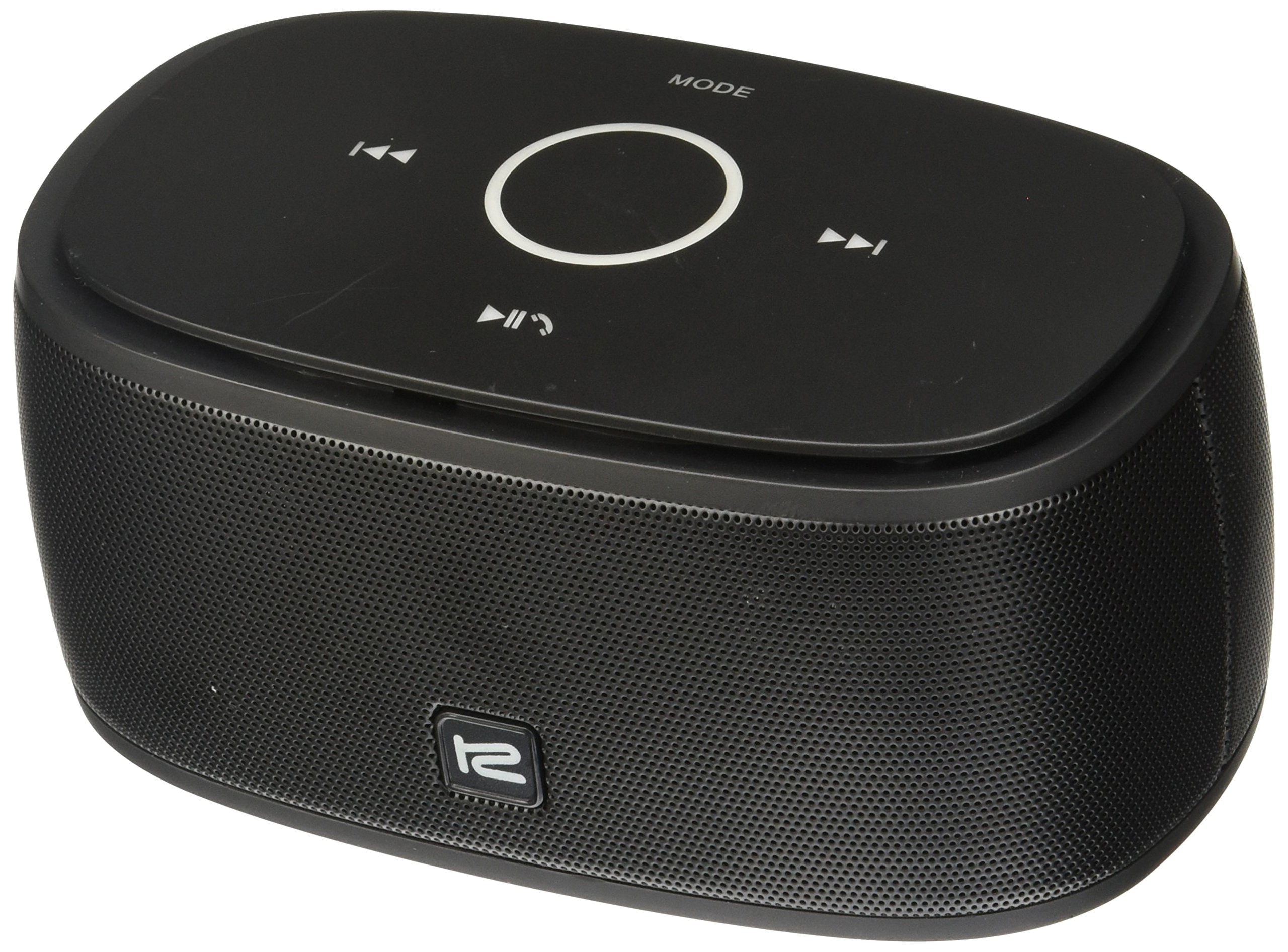
Image: Rear view of the Klip Xtreme KWS-605 speaker, highlighting the power button, line-in port, and DC IN (micro USB) charging port. The top panel shows playback controls (previous, play/pause, next) and a mode button.
Controls and Ports:
- Power Button: Located on the rear panel, used to turn the speaker on or off.
- LINE IN Port: 3.5mm auxiliary input for connecting non-Bluetooth devices.
- DC IN Port: Micro USB port for charging the speaker.
- Play/Pause Button: On the top panel, controls media playback.
- Previous/Next Track Buttons: On the top panel, used to skip tracks.
- MODE Button: On the top panel, switches between input modes (e.g., Bluetooth, Auxiliary).
Setup
1. Charging the Speaker
- Connect the supplied USB charging cable to the DC IN port on the back of the speaker.
- Connect the other end of the USB cable to a USB power adapter (not included) or a computer's USB port.
- The charging indicator light will illuminate. Once fully charged, the light will change or turn off (refer to LED indicator behavior in specifications for details).
- A full charge typically takes approximately 2-3 hours.
2. Powering On/Off
- To power on, press and hold the Power Button on the rear panel until the indicator light illuminates.
- To power off, press and hold the Power Button again until the indicator light turns off.
Operating Instructions
1. Bluetooth Pairing
- Ensure the speaker is powered on and in Bluetooth mode. If not, press the MODE button to switch to Bluetooth. The Bluetooth indicator light will flash, indicating it's in pairing mode.
- On your mobile device (smartphone, tablet, laptop), enable Bluetooth and search for available devices.
- Select "Klip Xtreme KWS-605" from the list of found devices.
- Once paired, the Bluetooth indicator light will stop flashing and remain solid. You can now play audio through the speaker.
2. NFC One-Touch Pairing (if supported by your device)
- Ensure NFC is enabled on your mobile device.
- Gently tap your NFC-enabled device against the NFC area on the speaker (usually indicated by an NFC logo).
- Confirm the pairing request on your device. The speaker will connect automatically.
3. Using the Auxiliary Input (LINE IN)
- Connect one end of a 3.5mm audio cable (not included) to the LINE IN port on the speaker.
- Connect the other end of the audio cable to the headphone jack or audio output of your non-Bluetooth device.
- Press the MODE button on the speaker to switch to Auxiliary mode.
- Play audio from your connected device.
4. Hands-Free Calling
- When connected via Bluetooth, the speaker's built-in microphone allows for hands-free calls.
- To answer an incoming call, press the Play/Pause Button.
- To end a call, press the Play/Pause Button again.
- To reject an incoming call, press and hold the Play/Pause Button.
5. Media Playback Controls
- Play/Pause: Press the Play/Pause Button to play or pause audio.
- Next Track: Press the Next Track Button to skip to the next song.
- Previous Track: Press the Previous Track Button to go to the beginning of the current song or the previous song.
- Note: Volume control is typically managed via your connected device.
Maintenance
- Keep the speaker away from water, moisture, and extreme temperatures.
- Clean the speaker with a soft, dry cloth. Do not use abrasive cleaners or solvents.
- Avoid dropping or subjecting the speaker to strong impacts.
- When not in use for extended periods, store the speaker in a cool, dry place.
Troubleshooting
| Problem | Solution |
|---|---|
| Speaker does not turn on. | Ensure the speaker is charged. Connect it to a power source using the USB cable. |
| Cannot pair with Bluetooth device. |
|
| No sound from the speaker. |
|
| Poor audio quality. |
|
Specifications
| Feature | Detail |
|---|---|
| Model | KWS-605 |
| Connectivity Technology | Bluetooth, NFC, Auxiliary (3.5mm) |
| Special Features | Bluetooth, Hands-free calling |
| Speaker Type | Subwoofer (as per product data, typically refers to full-range for portable speakers) |
| Material | Plastic |
| Dimensions (L x W x H) | 16.5 x 4.6 x 6.6 cm (6.5 x 1.8 x 2.6 inches) |
| Weight | 367 grams (0.81 lbs) |
| Battery Type | 1 Lithium Ion (Rechargeable) |
| Power Input | DC IN (Micro USB) |
| Supported Media Types | MP3 |
Warranty and Support
Klip Xtreme products are designed for reliability and performance. For warranty information, please refer to the warranty card included with your purchase or visit the official Klip Xtreme website. For technical support or customer service, please contact your local distributor or refer to the contact information provided on the Klip Xtreme website.
Please retain your proof of purchase for warranty claims.