
1. Introduction
This manual provides essential information for the safe and efficient use of your Beiter DC Power 12V 5Ah Sealed Lead Acid (SLA) Battery. This battery is designed as a direct replacement for various applications, including the Craftsman HPS Battery Backup models 54918, 132B2511, and DJW12-4.5.
Please read this manual thoroughly before installation and operation to ensure proper handling and to maximize the battery's lifespan.
2. Product Features
- Genuine Beiter DC Power Battery: A reliable sealed lead acid battery.
- Battery Type: 20-hour rated Sealed Lead Acid (SLA) battery.
- Maintenance-Free Operation: All Beiter DC Power batteries are maintenance-free and valve-regulated, eliminating the need for water additions.
- Rugged Construction: The high-impact resistant battery case is constructed from non-conductive ABS plastic, offering strong resistance to shock, vibration, chemicals, and heat.
- Spill-Proof Design: Features a valve-regulated, spill-proof design, allowing for trouble-free, safe operation in any orientation.

Figure 1: Front view of the Beiter DC Power 12V 5Ah Sealed Lead Acid Battery.
3. Specifications
| Feature | Detail |
|---|---|
| Brand | Beiter DC Power |
| Item Weight | 4 pounds |
| Model Numbers | 54918, 132B2511, DJW12-4.5 |
| Battery Type | 12V Sealed Lead Acid (SLA) |
| Battery Capacity | 5 Amp Hours (Ah) |
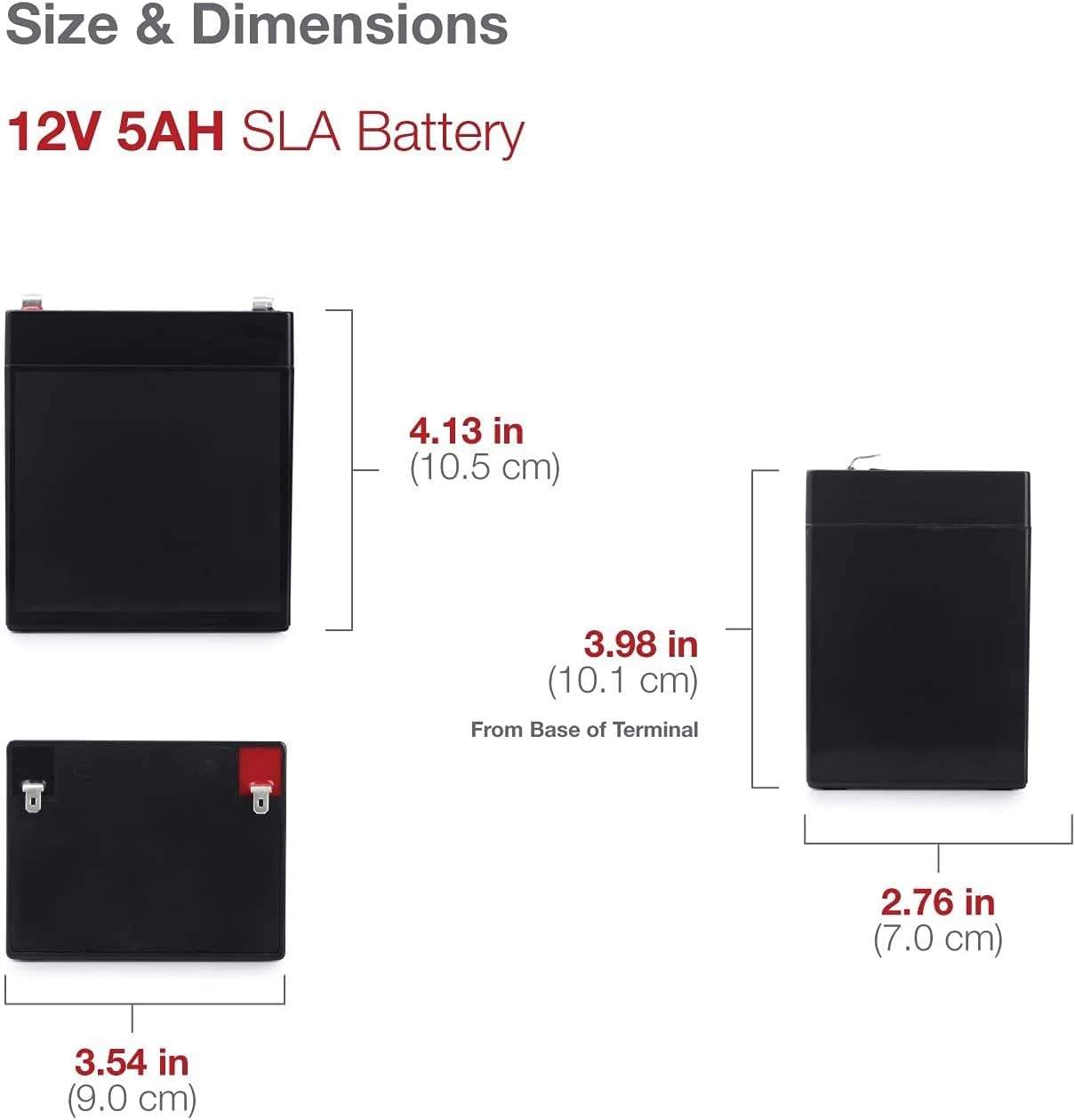
Figure 2: Physical dimensions of the 12V 5Ah SLA Battery. Height: 4.13 in (10.5 cm), Width: 3.54 in (9.0 cm), Depth: 2.76 in (7.0 cm).
4. Compatibility
This Beiter DC Power 12V 5Ah battery is a direct replacement for the following models:
- Craftsman HPS Battery Backup Model #54918
- Craftsman HPS Battery Backup Model #132B2511
- Craftsman HPS Battery Backup Model #DJW12-4.5
- Other compatible models include: 804302, 23-289, 23-289B, 23-289A, 23289, BP4-12, BP4.5-12, BP5-12, CA1240, CFM12V4.6M, DG12-5, ES4-12, GP1245, GP1250, HR5.5-12, HR1221WF2, JC1240, LC-R125P, LC-RB124P, LC-R125P, LCR-12V4BP, LCR-12V5P, NP4-12, NP4-12P, NPH5-12, NPX-25, PC1250, PE4-12R, PE4.5-12R, PE12V4.5F1, PE12V4.0, PS-1242, PS-1250, PS1250, PS-1252, PXL12050, RBC45, SLA-12V4-5, UB1245, UB1250, UB1250A, WP4-12, WP4.5-12, WP5-12.
5. Safety Information
WARNING: Improper handling of batteries can lead to serious injury or damage.
- Always wear appropriate personal protective equipment (PPE), such as safety glasses and gloves, when handling batteries.
- Do not short-circuit the battery terminals. This can cause sparks, heat, and potential fire or explosion.
- Do not charge in a sealed container. Ensure adequate ventilation during charging.
- Avoid total discharging (damage is done to battery below 10.5V).
- Keep batteries away from open flames, sparks, and heat sources.
- Do not disassemble, crush, puncture, or modify the battery.
- Dispose of batteries according to local regulations. Do not dispose of in household waste.
- This product contains chemicals known to the State of California to cause cancer and birth defects or other reproductive harm.
6. Installation
Before beginning installation, ensure the device requiring the battery is powered off and disconnected from any power source.
- Identify Terminals: Locate the positive (+) and negative (-) terminals on both the new battery and the device. The positive terminal is typically marked with a red indicator or a plus sign, and the negative with a black indicator or a minus sign.
- Remove Old Battery: Carefully disconnect the negative terminal first, then the positive terminal, from the old battery. Remove the old battery from its compartment.
- Insert New Battery: Place the new Beiter DC Power battery into the battery compartment. Ensure it fits securely.
- Connect New Battery: Connect the positive terminal of the new battery first, then the negative terminal. Ensure all connections are tight and secure.
- Secure Compartment: Close and secure the battery compartment cover.

Figure 3: Example of battery installation in a compatible device, such as a garage door opener.
7. Charging
The Beiter DC Power 12V 5Ah SLA battery is designed to be recharged. Use a charger compatible with 12V Sealed Lead Acid batteries.
- Constant Voltage Charge:
- Standby Use: 13.6 - 13.8V
- Cyclic Use: 14.5 - 14.9V
- Initial Current:
- Standby Use: 0.75A
- Cyclic Use: 1.5A
- Ensure the charger's voltage and current settings match the battery's requirements to prevent damage.
- Do not overcharge or undercharge the battery. Follow the charger manufacturer's instructions.
8. Operation
Once properly installed and charged, the battery will provide power to your device. As a sealed lead acid battery, it can be discharged in any position due to its valve-regulated design.
Regularly check your device's indicators for battery status. If the device shows signs of low power, recharge the battery promptly to avoid deep discharge, which can shorten battery life.
9. Maintenance
Beiter DC Power SLA batteries are maintenance-free, but following these guidelines can help prolong their life:
- Regular Charging: Keep the battery charged, especially if stored for extended periods. A fully charged battery will last longer.
- Clean Terminals: Periodically inspect and clean battery terminals to ensure good contact and prevent corrosion. Use a wire brush and a mixture of baking soda and water if corrosion is present.
- Storage: Store the battery in a cool, dry place away from direct sunlight and extreme temperatures. Ensure it is fully charged before storage.
- Replacement: It is recommended to replace the battery every 3-5 years for optimal performance, depending on usage and environmental conditions.

Figure 4: Emphasizing the quality of the battery for long-term performance.
10. Troubleshooting
If you encounter issues with your battery, consider the following common problems and solutions:
- Battery Not Holding Charge:
- Ensure the charger is functioning correctly and is compatible with SLA batteries.
- Check for loose or corroded connections at the terminals.
- The battery may have reached the end of its service life and requires replacement.
- Device Not Powering On:
- Verify the battery is fully charged.
- Check all connections to ensure they are secure and correctly polarized (positive to positive, negative to negative).
- Confirm the battery's voltage is within the operational range (above 10.5V).
- Swollen Battery Case:
- A swollen case indicates internal damage, often due to overcharging or excessive heat. Discontinue use immediately and replace the battery.
11. Disposal
Batteries contain materials that can be harmful to the environment if not disposed of properly. Please recycle your old battery responsibly.
- Do not dispose of batteries in regular household trash.
- Contact your local waste management facility or battery recycling center for proper disposal instructions.
- Many retailers that sell batteries also offer recycling services.

Figure 5: Always recycle batteries responsibly.
12. Warranty and Support
A limited warranty applies to this product. For specific details regarding warranty coverage, terms, and conditions, please refer to the documentation included with your purchase or contact Beiter DC Power customer support.
For technical assistance or further inquiries, please visit the Beiter DC Power Store on Amazon or contact their official support channels.
13. Product Videos
Beiter DC Power - Trusted Batteries
This video provides an overview of Beiter DC Power batteries, highlighting their quality, reliability, and various applications. It demonstrates key features such as their valve-regulated, spill-proof design and ease of installation.