
1. Introduction
This manual provides comprehensive instructions for the safe and efficient operation, installation, and maintenance of your Hatco TK-100 Toast King Vertical Conveyor Toaster. The TK-100 is a high-capacity commercial toaster designed for vertical conveying of bread and buns, capable of toasting approximately 960 units per hour. It features durable stainless steel construction and is ideal for commercial kitchen environments.
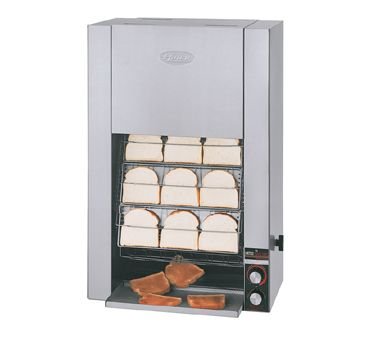
Image: The Hatco TK-100 Toast King Vertical Conveyor Toaster, showing its stainless steel exterior and vertical conveyor system with bread slices loaded for toasting.
2. Important Safety Information
Please read all safety warnings and instructions carefully before operating this appliance to prevent injury or damage.
- Electrical Safety: Ensure the toaster is connected to a properly grounded electrical outlet with the correct voltage as specified on the product label. Do not operate with a damaged cord or plug.
- Hot Surfaces: The exterior surfaces of the toaster, especially the toasting chamber and surrounding areas, become extremely hot during operation. Use caution and avoid direct contact.
- Fire Hazard: Never leave the toaster unattended while in operation. Do not place flammable materials near or on the toaster. Clear crumb tray regularly to prevent grease buildup and potential fires.
- Ventilation: Ensure adequate ventilation around the toaster to prevent overheating. Do not block air vents.
- Cleaning: Always unplug the toaster and allow it to cool completely before cleaning. Do not immerse the toaster in water or spray directly with liquids.
- Maintenance: Refer all servicing to qualified service personnel. Do not attempt to repair the unit yourself.
3. Setup
3.1 Unpacking
Carefully remove the toaster from its packaging. Inspect the unit for any shipping damage. Report any damage immediately to the carrier and your dealer. Retain all packing materials for future shipping or if return is necessary.
3.2 Placement
Place the toaster on a stable, level, non-combustible surface. Ensure there is sufficient clearance around the unit for proper ventilation and heat dissipation. Maintain a minimum of 6 inches (15 cm) clearance from walls and other equipment.
3.3 Electrical Connection
Verify that the electrical supply matches the voltage and amperage requirements specified on the toaster's data plate. Plug the toaster into a dedicated, grounded electrical outlet. Do not use extension cords or multi-outlet adapters.
4. Operating Instructions
4.1 Initial Startup
- Ensure the toaster is properly plugged in.
- Turn the main power switch to the 'ON' position.
- Allow the toaster to preheat for approximately 15-20 minutes until the heating elements reach operating temperature.
4.2 Adjusting Toasting Settings
The TK-100 features controls for adjusting the toast shade and conveyor speed:
- Toast Shade Control: Use the rotary knob on the control panel to adjust the desired toast shade. Turning the knob clockwise typically results in darker toast, while counter-clockwise results in lighter toast.
- Conveyor Speed Control: The conveyor speed can be adjusted to optimize throughput and toast quality. A slower speed allows for more contact time with the heating elements, resulting in darker toast. A faster speed results in lighter toast. Adjust as needed based on product type (bread, buns) and desired browning.
4.3 Loading Product
Carefully place bread slices or bun halves onto the loading rack. The vertical conveyor system will automatically pull the product into the toasting chamber. Ensure product is placed evenly to prevent jamming.
4.4 Unloading Toasted Product
Toasted product will exit the bottom of the toaster onto the discharge tray. Remove toasted items promptly to prevent them from cooling or becoming over-toasted.
5. Maintenance
5.1 Daily Cleaning
- Turn off the toaster and unplug it from the power outlet. Allow the unit to cool completely.
- Remove the crumb tray located at the bottom of the toaster. Empty crumbs and wipe the tray clean with a damp cloth and mild detergent. Rinse and dry thoroughly.
- Wipe down the exterior stainless steel surfaces with a damp cloth and a non-abrasive cleaner. Do not use steel wool or abrasive pads, as they can scratch the finish.
- Clean the loading and discharge areas, removing any food debris.
5.2 Periodic Maintenance
- Heating Elements: Periodically inspect the heating elements for any signs of damage or excessive buildup. Do not attempt to clean heating elements directly.
- Conveyor System: Check the conveyor chain and guides for smooth operation. Ensure no debris is obstructing the movement.
- Ventilation Openings: Ensure all ventilation openings are clear of dust and debris to maintain proper airflow.
Note: For any internal cleaning or maintenance beyond routine crumb tray emptying and exterior wiping, contact a qualified service technician.
6. Troubleshooting
This section provides solutions to common operational issues. For problems not listed here, contact customer support.
| Problem | Possible Cause | Solution |
|---|---|---|
| Toaster does not turn on. | No power supply; Power switch off; Circuit breaker tripped. | Check power cord connection; Ensure power switch is ON; Reset circuit breaker. |
| Product not toasting evenly or sufficiently. | Incorrect toast shade setting; Conveyor speed too fast; Heating elements dirty or faulty. | Adjust toast shade control; Decrease conveyor speed; Contact service for element inspection. |
| Conveyor jams or stops. | Product improperly loaded; Debris in conveyor path. | Turn off and unplug unit. Carefully remove jammed product; Clean conveyor path. |
| Excessive smoke or burning smell. | Crumb tray full; Food debris inside unit; Product stuck. | Immediately turn off and unplug unit. Allow to cool. Clean crumb tray; Remove any stuck food. |
7. Specifications
Key technical specifications for the Hatco TK-100 Toast King Vertical Conveyor Toaster:
| Feature | Detail |
|---|---|
| Brand | Hatco |
| Model Number | TK-100 |
| Type | Vertical Conveyor Toaster (Bread and Bun) |
| Capacity | Approximately 960 units/hour (16 slices) |
| Material | Stainless Steel |
| Color | Silver |
| Special Feature | Conveyor Toasting, High-Capacity Commercial Design |
| Display Type | Analog |
| Number of Settings | 2 |
| Date First Available | August 4, 2013 |
8. Warranty and Support
8.1 Warranty Information
Hatco products are manufactured to the highest quality standards. For specific warranty terms and conditions, please refer to the warranty card included with your product or visit the official Hatco website. Keep your purchase receipt as proof of purchase for warranty claims.
8.2 Customer Support
If you have any questions, require technical assistance, or need to schedule service, please contact Hatco customer support or your authorized Hatco dealer. Provide your product model number (TK-100) and serial number when contacting support to expedite assistance.


