
Introduction
Thank you for choosing the BESTSUN Tactical LED Flashlight. This manual provides essential information for the safe and effective use of your new flashlight. Please read it thoroughly before operation and retain it for future reference.
This flashlight is designed for various activities including camping, hiking, fishing, running, dog walking, power outages, and general household use. It features a durable aluminum alloy construction, a powerful LED chip, and multiple lighting modes.
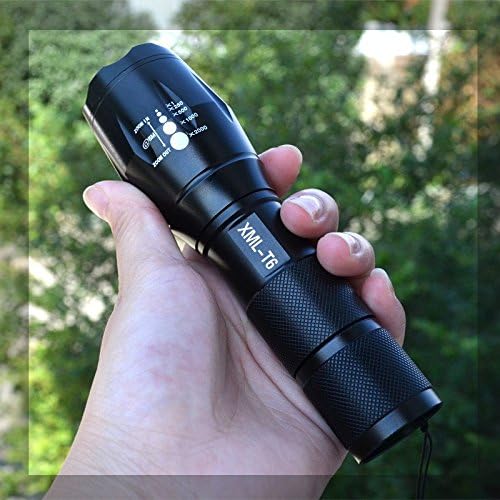
Image: A hand holding the BESTSUN Tactical LED Flashlight, illustrating its compact and portable design.
Setup and Battery Installation
Your BESTSUN Tactical LED Flashlight can be powered by either one 18650 rechargeable battery or three AAA batteries. Batteries are not included with the flashlight and must be purchased separately.
Installing AAA Batteries:
- Unscrew the tailcap of the flashlight by turning it counter-clockwise.
- Locate the AAA battery holder inside the flashlight body.
- Insert three AAA batteries into the holder, ensuring the positive (+) end of each battery aligns with the positive (+) marking on the holder, and the flat negative (-) side is against the spring.
- Place the loaded battery holder into the flashlight body with the pointed end facing towards the flashlight head (bulb).
- Screw the tailcap back on clockwise until secure.
Installing 18650 Battery:
- Unscrew the tailcap of the flashlight by turning it counter-clockwise.
- If a plastic tube (adapter for 18650 battery) is provided, insert one 18650 battery into this tube. Ensure the positive (+) end of the battery faces towards the flashlight head.
- Insert the 18650 battery (with or without adapter tube, depending on fit) into the flashlight body, with the positive (+) end facing towards the flashlight head (bulb).
- Screw the tailcap back on clockwise until secure.
Important: Ensure correct battery polarity. Incorrect installation can damage the flashlight.

Image: Overview of the BESTSUN Tactical LED Flashlight, showing the head, body, and tailcap. The zoom and mode indicators are visible on the flashlight head.
Operating Instructions
Power On/Off:
To turn the flashlight ON or OFF, firmly press the orange button located on the tailcap until you hear a click.

Image: Detailed view of the flashlight's LED emitter and the orange tailcap button for power and mode selection.
Switching Modes:
The flashlight features 5 lighting modes: High, Medium, Low, Strobe, and SOS/Emergency.
To cycle through the modes while the flashlight is ON, lightly press the tailcap button without clicking it completely. Each light press will advance to the next mode.
Adjusting Focus (Zoom Function):
The flashlight features an adjustable focus to switch between a wide floodlight and a concentrated spotlight.
To adjust the focus, gently pull the head of the flashlight outwards for a wider beam (floodlight) or push it inwards for a more focused, narrower beam (spotlight).

Image: Diagram illustrating the adjustable head of the flashlight for zoom functionality, along with product dimensions.
Maintenance
- Cleaning: Wipe the flashlight body with a soft, damp cloth. Do not use abrasive cleaners or solvents.
- Battery Care: Remove batteries if the flashlight will not be used for an extended period to prevent leakage and corrosion.
- Water Resistance: The flashlight is designed to be waterproof for general outdoor use and light rain. Do not immerse the flashlight in water. Ensure all parts are securely tightened to maintain water resistance.
- Storage: Store the flashlight in a cool, dry place away from direct sunlight and extreme temperatures.
Troubleshooting
| Problem | Possible Cause | Solution |
|---|---|---|
| Flashlight does not turn on. |
|
|
| Light is dim or flickers. |
|
|
| Cannot switch modes. |
|
|
Product Specifications
- Model: BS_LEF_A100_2500
- Light Source: LED
- Brightness: Up to 3000 Lumens
- Light Distance: 100-300 meters (328-984 feet)
- LED Lifespan: 100,000 hours
- Modes: High, Medium, Low, Strobe, SOS/Emergency
- Power Source: 1 x 18650 battery OR 3 x AAA batteries (not included)
- Material: Aluminum Alloy, Rubber
- Color: Black
- Dimensions (approx.): 135mm (Length) x 41mm (Head Diameter) x 27mm (Body Diameter)
- Weight (approx.): 150 grams (without batteries)
- Water Resistance: Waterproof (IPX4 rated, resistant to splashing water, not for immersion)
- Special Features: Adjustable Focus (Zoom), Tailcap Switch
Warranty Information
BESTSUN products are manufactured to high-quality standards. This product may be covered by a limited warranty against defects in materials and workmanship. Please refer to the retailer's return policy or contact the manufacturer directly for specific warranty terms and conditions. Proof of purchase may be required.
Customer Support
If you encounter any issues or have questions regarding your BESTSUN Tactical LED Flashlight that are not addressed in this manual, please contact your retailer or visit the official BESTSUN website for further assistance.
For online purchases, you may also refer to the seller's contact information provided on the product page.