
Introduction
Welcome to the user manual for the TROTEC HyStream 2000 Heat Gun. This document provides essential information for the safe and effective operation, maintenance, and troubleshooting of your heat gun. Please read these instructions carefully before initial use and keep them for future reference. The HyStream 2000 is a versatile tool designed for a wide range of applications, from paint removal to plastic welding and heat shrinking.
Safety Instructions
Always observe all safety warnings and instructions provided in this manual to prevent electric shock, fire, and serious injury.
General Safety Warnings
- Read all instructions: Familiarize yourself with the controls and proper use of the heat gun.
- Wear appropriate personal protective equipment (PPE): This includes safety glasses, gloves, and a respirator if working with materials that produce fumes.
- Keep the work area clean and well-lit: Cluttered or dark areas invite accidents.
- Do not operate power tools in explosive atmospheres: Do not use the heat gun near flammable liquids, gases, or dust.
- Ensure adequate ventilation: Hot air guns produce high temperatures and can generate fumes. Work in a well-ventilated area.
- Do not touch the nozzle or accessories during or immediately after use: These parts become extremely hot and can cause severe burns. Allow the tool to cool down completely.
- Unplug the heat gun when not in use, before changing accessories, or before performing any maintenance.
- Store idle tools out of reach of children and other untrained persons.
- Do not abuse the cord: Never carry the tool by the cord or yank it to disconnect from an outlet.
- Do not use the heat gun as a hair dryer or for heating food.
- Be aware of hidden hazards: Heat can ignite flammable materials behind walls or surfaces.
Product Overview
The TROTEC HyStream 2000 Heat Gun is designed for ease of use and versatility. Below are the main components and controls.
Main Components
- Main Unit: The body of the heat gun housing the motor and heating element.
- Handle: Ergonomically designed for comfortable grip and extended use.
- Air Outlet Nozzle: Where the hot air is expelled.
- LCD Display: Shows current temperature and airflow settings.
- Control Buttons: Used to adjust temperature and airflow.
- Power Switch: For turning the device on and off, and selecting initial settings.
- Power Cord: Connects the tool to the electrical supply.
- Nozzle Attachments: Various shapes for different applications.
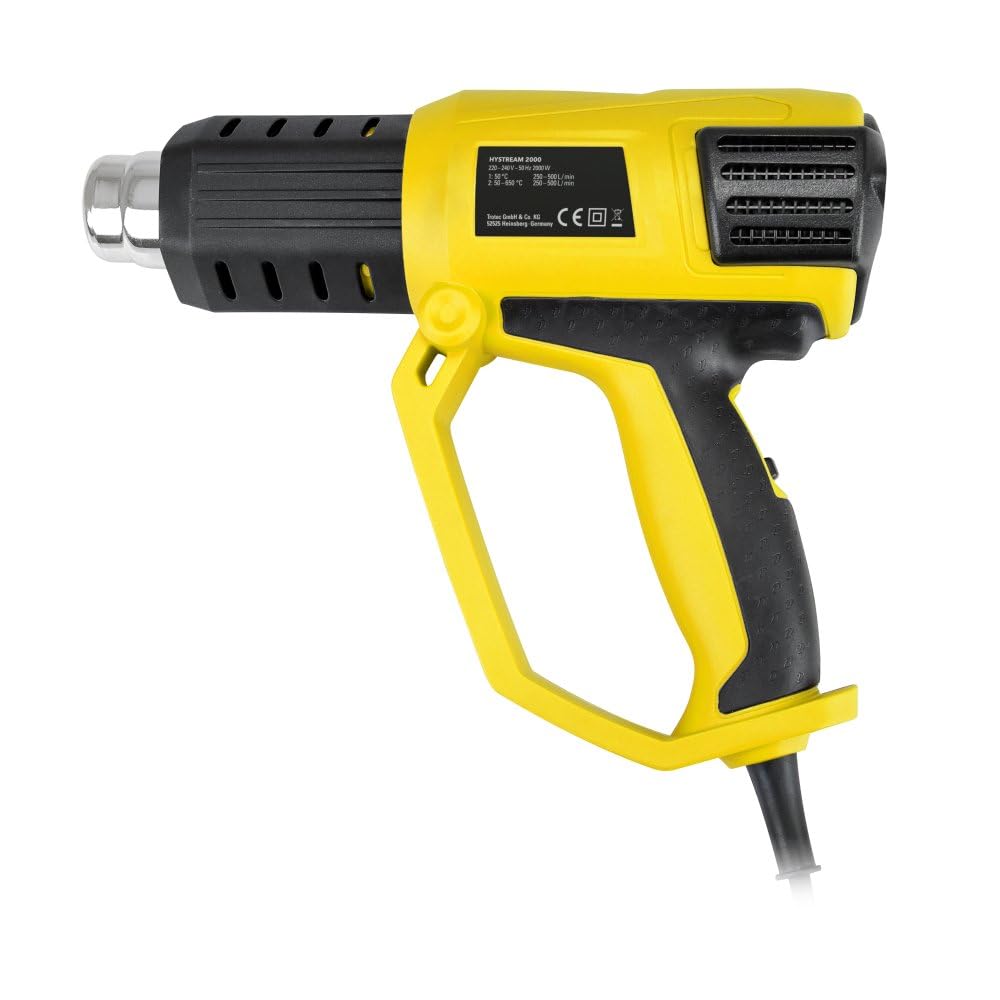
Figure 1: The TROTEC HyStream 2000 Heat Gun, showing its ergonomic design and main body.

Figure 2: Close-up of the LCD display and control buttons for temperature and airflow adjustment.

Figure 3: Various nozzle attachments included with the heat gun for specialized tasks.
Setup
Unpacking
Carefully remove the heat gun and all accessories from the packaging. Inspect the device for any signs of damage. Do not use a damaged device.
Attaching Nozzles
Select the appropriate nozzle for your task. Ensure the heat gun is unplugged and cool before attaching or removing any nozzle. Slide the desired nozzle onto the air outlet until it is securely in place. Do not force the nozzle.
Power Connection
Connect the power cord to a suitable electrical outlet. Ensure the voltage matches the specifications of the heat gun.
Operating Instructions
The HyStream 2000 offers precise control over temperature and airflow for optimal results.
Powering On/Off
Locate the main power switch, typically on the handle. This switch may have multiple positions (e.g., 0 for off, 1 for low heat/airflow, 2 for high heat/airflow). Select the desired initial setting. The LCD display will illuminate.
Adjusting Temperature
Once powered on, use the temperature control buttons (usually marked '+' and '-') near the LCD display to set the desired temperature. The HyStream 2000 allows for 60 adjustable temperature levels within a range of 50°C to 650°C. The selected temperature will be shown on the LCD.
Adjusting Airflow
Use the airflow control buttons (also typically '+' and '-') to select one of the five available airflow levels. The current airflow level will be indicated on the LCD display.
Hands-Free Operation
The heat gun features a specially balanced weight distribution, allowing it to be placed in a stable, stationary position for hands-free operation. Ensure the surface is stable and non-flammable when operating in this mode.
Applications
The TROTEC HyStream 2000 is a versatile tool suitable for numerous tasks:
- Paint and Varnish Removal: Soften old paint or varnish for easy scraping.
- Plastic Welding and Forming: Heat and shape plastic materials or weld plastic components.
- Heat Shrinking Cables: Apply heat to shrink tubing around electrical connections for insulation and protection.
- Removing Adhesives and Residues: Soften stubborn adhesives, stickers, or residues for easier removal.
- Drying Processes: Accelerate the drying of glues, paints, or other materials.
- Defrosting: Thaw frozen pipes (use caution to avoid damage).
Maintenance and Cleaning
Regular maintenance ensures the longevity and safe operation of your heat gun.
General Cleaning
- Always unplug the device before cleaning.
- Allow the heat gun to cool down completely.
- Wipe the exterior of the tool with a soft, damp cloth. Do not use harsh chemicals or abrasive cleaners.
- Ensure the air intake and outlet vents are free from dust and debris to maintain proper airflow and prevent overheating. Use a soft brush or compressed air if necessary.
Storage
Store the heat gun in a dry, secure place, out of reach of children. Protect it from moisture and direct sunlight. Ensure the power cord is neatly coiled and not kinked.
Troubleshooting
If you encounter issues with your HyStream 2000, refer to the table below for common problems and solutions.
| Problem | Possible Cause | Solution |
|---|---|---|
| Heat gun does not turn on. | No power supply; Faulty power cord/plug; Main switch in 'Off' position. | Check power outlet and connection; Inspect cord for damage; Ensure main switch is in 'On' position. |
| No hot air, only cold air. | Heating element failure; Incorrect temperature setting. | Contact customer support; Increase temperature setting via LCD controls. |
| Overheating protection activated. | Blocked air vents; Prolonged use at high temperature. | Unplug and allow to cool; Clean air vents; Reduce operating time or temperature. |
| Temperature/airflow not adjusting. | Control buttons malfunction; Internal electronic issue. | Ensure buttons are pressed correctly; Contact customer support if issue persists. |
Technical Specifications
Key technical data for the TROTEC HyStream 2000 Heat Gun.
| Feature | Specification |
|---|---|
| Brand | TROTEC |
| Model Name | HyStream 2000 |
| Model Number | 6100000057 |
| Power | 2000 W |
| Temperature Range | 50 °C to 650 °C (60 adjustable levels) |
| Airflow Control | 5-step regulation |
| Display | LCD |
| Overheat Protection | Yes |
| Product Dimensions | 25.5 x 3 x 13 cm |
| Weight | 1.31 kg |
| ASIN | B00YXHX440 |
Warranty and Support
Warranty Information
This product is covered by a manufacturer's warranty. Please refer to the warranty card included with your purchase or visit the official TROTEC website for detailed terms and conditions. Keep your proof of purchase for warranty claims.
Customer Support
For technical assistance, spare parts, or any questions regarding your TROTEC HyStream 2000 Heat Gun, please contact TROTEC customer support. Contact details can typically be found on the official TROTEC website or in your product packaging.

