
Introduction
This manual provides essential information for the proper installation, operation, and maintenance of the Elkron FAP541 Digital Control Unit. The FAP541 is a 1-loop digital control unit designed for various system applications, offering reliable performance and user-friendly interaction.
Product Overview
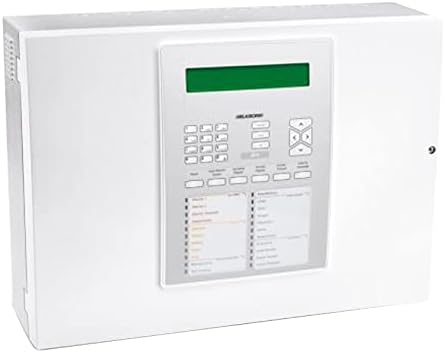
Figure 1: Front view of the Elkron FAP541 Digital Control Unit, showcasing its display, keypad, and various indicator lights for system status.
Setup
Follow these steps for the initial setup and installation of your Elkron FAP541 Digital Control Unit.
Unpacking and Inspection
- Carefully remove the control unit from its packaging.
- Inspect the unit thoroughly for any signs of physical damage that may have occurred during shipping. If damage is observed, do not proceed with installation and contact your supplier immediately.
- Verify that all components listed in the product's packing list are present before beginning installation.
Mounting the Unit
The FAP541 unit should be mounted in a secure, dry, and easily accessible location. Avoid areas exposed to direct sunlight, extreme temperatures, or high humidity.
- Select a suitable wall or sturdy surface capable of supporting the unit's weight.
- Use appropriate mounting hardware (screws, anchors) to securely fasten the unit to the chosen surface.
- Ensure there is adequate space around the unit for ventilation and future access for maintenance.
Power Connection
Connect the unit to a stable and appropriate power source in accordance with all local electrical codes and regulations.
- Ensure that the main power supply is disconnected or switched off before making any electrical connections.
- Connect the power cable to the designated terminal block on the unit, ensuring correct polarity.
- Once all connections are secure and verified, restore power to the unit.
Operating Instructions
This section outlines the basic operational procedures for the Elkron FAP541 Digital Control Unit.
Initial Power-Up
Upon the first application of power, the unit will initiate a self-test sequence. The integrated display will then show the current system status or a welcome message.
Keypad Navigation
The front panel keypad is used for navigating menus, entering data, and controlling system functions.
- Use the ▲ (Up), ▼ (Down), ◀ (Left), and ▶ (Right) arrow keys to move through menu options.
- Press the ENTER key to confirm a selection or to proceed.
- Press the ESC (Escape) key to return to the previous menu or to cancel an ongoing operation.
System Status Indicators
The unit is equipped with various LED indicators to provide a quick visual reference of the system's operational status:
- GREEN LED: Indicates normal operation, system armed, or power on.
- RED LED: Indicates an active alarm condition or a critical system fault.
- YELLOW LED: Indicates a trouble condition, warning, or a non-critical fault requiring attention.
Maintenance
Regular maintenance is crucial for ensuring the long-term reliability and optimal performance of your Elkron FAP541 Digital Control Unit.
Cleaning
- Wipe the exterior surfaces of the unit with a soft, dry, and lint-free cloth.
- Do not use liquid cleaners, abrasive materials, or chemical solvents, as these can damage the unit's finish or internal components.
System Checks
- Perform a comprehensive system test at least once a month to confirm that all connected devices and functions are operating correctly.
- Periodically inspect all power and communication cable connections for any signs of looseness, wear, or corrosion.
Troubleshooting
This section provides guidance for resolving common issues that may arise with your Elkron FAP541 Digital Control Unit. For problems not listed here, please contact technical support.
| Problem | Possible Cause | Solution |
|---|---|---|
| Unit does not power on | No power supply; Loose power connection; Blown fuse | Check power outlet and circuit breaker; Secure power cable; Replace fuse if necessary (consult qualified technician) |
| Alarm LED is red | System in alarm state; Sensor fault; Tamper detection | Check the system log for the specific alarm source; Inspect relevant sensors and wiring; Reset the system after resolving the cause |
| Display is blank or unreadable | Power issue; Display malfunction; Extreme temperature | Verify stable power supply; Ensure unit is within operating temperature range; If issue persists, contact technical support |
| Keypad unresponsive | Temporary software glitch; Hardware fault | Perform a soft reset (power cycle the unit if safe to do so); If problem continues, contact technical support |
Specifications
Detailed technical specifications for the Elkron FAP541 Digital Control Unit.
- Model: Elkron FAP541 (80SC6100121)
- Type: Digital Control Unit, 1-Loop
- Manufacturer: Elkron
- Package Dimensions: Approximately 20 x 20 x 15 cm
- Package Weight: Approximately 1 kg
- Items in Package: 1
- Batteries: Not included
- Connectivity Technology: RCA
- ASIN: B00YXAZ5US
- GTIN: 08033959745823
- First Available Date: February 21, 2020
- Software Updates: Guaranteed until unknown date
Warranty and Support
For detailed warranty information, terms, and conditions, please refer to the official Elkron website or contact your authorized Elkron dealer. Warranty coverage may vary based on region and purchase date.
For technical assistance, troubleshooting beyond this manual, or service requests, please reach out to Elkron customer support or your certified installer. Please note that guaranteed software updates are specified as 'unknown' in the product's technical data.

